QnE Companion is a Windows productivity suite developed by TeraByte Unlimited. Instead of focusing on a single function, it combines several everyday utilities into one lightweight application, including a clipboard manager, password manager, screen capture tool, application launcher, and desktop icon manager. The goal is to give users quick access to common productivity tools without installing multiple standalone applications.
Many Windows users rely on separate programs for clipboard history, screenshots, password storage, and application launching. QnE Companion brings these functions together in a single package that can be accessed from the taskbar, a floating desktop companion, or keyboard shortcuts. A free version is available, with additional features unlocked through a paid license.
The application is designed for users who want convenient desktop utilities that remain easily accessible without consuming significant system resources.
Key Features of QnE Companion
Clipboard Manager
QnE Clipboard Companion extends the standard Windows clipboard by storing clipboard history, allowing users to search, organize, categorize, and permanently save frequently used clips. This is especially useful for developers, writers, and office workers who regularly copy and paste content.
Password Manager
The integrated password manager securely stores login credentials, supports importing passwords from popular browsers, and offers autofill capabilities using customizable templates. Security features include encryption and automatic database locking after inactivity.
Screen Capture Utility
The built-in screenshot tool can capture the entire display or selected regions, with support for multiple monitors. It provides a quick way to save images for documentation, tutorials, or technical support.
Application Launcher
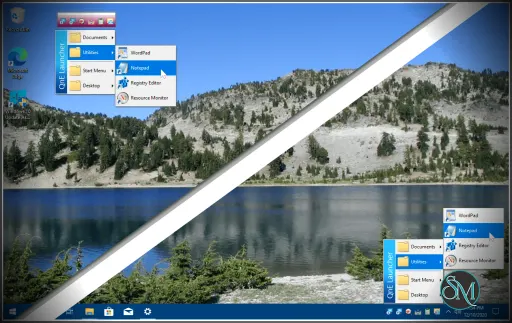
QnE Launcher lets users build custom menus containing frequently used applications, folders, and documents. Cascading submenus make it easier to organize large collections of shortcuts.
Desktop Icon Manager
One of the more unique features is QnE Icon Companion, which can save and restore desktop icon layouts, search for icons, highlight recently created items, minimize desktop windows, and refresh the desktop. This is particularly useful for users who frequently connect to different displays or experience icon rearrangement after changing screen resolution.
Buy Products from TeraByte Unlimited with Discount Coupon | |
|---|---|
Performance and User Experience
QnE Companion is lightweight and runs quietly in the background. The floating companion window and taskbar integration provide quick access to its utilities without interrupting normal workflows.
The interface favors functionality over modern aesthetics. While it looks more traditional than newer productivity applications, navigation is straightforward, and each utility is easy to access. Users who regularly perform repetitive desktop tasks can benefit from having multiple tools consolidated into a single application.
Pros
Combines multiple productivity utilities into one application.
Useful clipboard history and organization tools.
Integrated password manager with browser import support.
Convenient screen capture utility.
Desktop icon backup and restoration.
Lightweight and easy to access from the taskbar.
Free version available.
Cons
Windows only.
Interface feels somewhat dated.
Some advanced features require a paid license.
Password management is less comprehensive than dedicated password managers.
Who Should Use QnE Companion?
QnE Companion is well suited for Windows users who frequently work with copied text, screenshots, multiple applications, and desktop organization. Developers, technical support staff, writers, office professionals, and power users will likely benefit the most from its collection of integrated utilities.
Users who only need one specific feature, such as password management or screen capture, may prefer specialized applications with more advanced capabilities.
Final Verdict
QnE Companion offers a practical collection of desktop productivity tools in a single lightweight package. Its clipboard manager, password manager, screen capture utility, launcher, and desktop icon management features work together to simplify everyday Windows tasks.
Although the interface could use a modern refresh, the software remains a reliable and efficient productivity companion for users who appreciate having multiple utilities available from one application.
Developer:
TeraByte Unlimited
Operating System:
Windows
Date Added:
2026-07-05T13:16:04.000Z
Categories:
Post a Comment/Report Broken Link: