BootIt Bare Metal (BIBM) is a disk partition manager, boot manager, and system maintenance utility developed by TeraByte Unlimited. Designed for advanced users, IT professionals, and system administrators, it combines partition management, multi-boot configuration, and disk imaging support into a single lightweight application that runs outside the operating system.
Despite newer products in the TeraByte lineup, BootIt Bare Metal remains a dependable solution for managing BIOS-based systems and legacy environments where stability and flexibility are essential.
Overview
BootIt Bare Metal allows users to create, resize, move, copy, delete, and manage disk partitions without relying on the installed operating system. It also includes a sophisticated boot manager that makes it easy to install and switch between multiple operating systems on the same computer.
The software can be installed directly on a hard drive or launched from bootable media, making it useful for system maintenance, operating system installation, and disaster recovery.
Key Features of BootIt Bare Metal (BIBM)
Advanced Partition Management
BootIt Bare Metal provides a comprehensive set of partitioning tools for creating, resizing, moving, copying, deleting, and formatting partitions. It supports both MBR and GPT partition tables, allowing it to work with a wide variety of storage devices.
Multi-Boot Manager
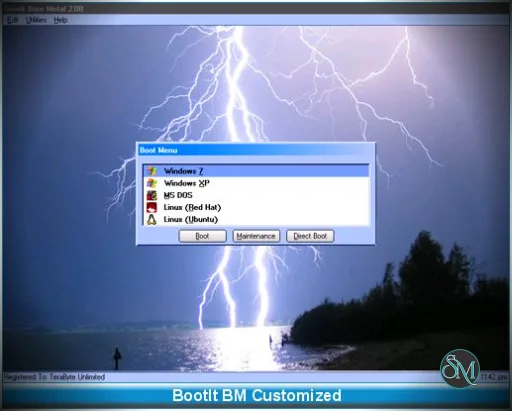
One of the software's standout features is its flexible boot manager. Users can configure multiple operating systems on a single computer, customize boot menus, and isolate operating systems from one another for improved stability and security.
Disk Imaging Integration
BootIt Bare Metal works seamlessly with TeraByte's Image for Windows, Image for Linux, and Image for DOS products, allowing users to back up and restore entire disk images as part of their system maintenance workflow.
Bootable Maintenance Environment
Because BootIt Bare Metal operates outside the installed operating system, users can modify system partitions, repair boot problems, and perform maintenance tasks even when Windows or Linux fails to start.
Partition Work Support
The software includes tools for converting partition types, aligning partitions for SSD performance, editing partition properties, and performing other advanced storage management tasks.
Buy Products from TeraByte Unlimited with Discount Coupon | |
|---|---|
Performance and User Experience
BootIt Bare Metal is known for its reliability rather than its appearance. The interface is functional and menu-driven, reflecting its long history in professional system administration.
Partition operations are generally fast and dependable, and the software has earned a strong reputation for safely handling complex disk management tasks. However, the number of available options may feel overwhelming to users unfamiliar with partitioning concepts.
Documentation is comprehensive, helping experienced users take full advantage of the software's capabilities.
Pros
Powerful partition management features.
Flexible multi-boot configuration.
Works independently of installed operating systems.
Excellent reliability for disk operations.
Supports both MBR and GPT disks.
Integrates with TeraByte imaging software.
Lightweight and efficient.
Cons
User interface feels dated.
Steeper learning curve than consumer-focused partition tools.
Primarily intended for advanced users and administrators.
Newer UEFI-focused environments may benefit more from BootIt UEFI.
Who Should Use BootIt Bare Metal?
BootIt Bare Metal is best suited for IT professionals, system administrators, computer technicians, enthusiasts, and advanced users who regularly manage partitions, maintain multi-boot systems, or perform operating system recovery.
For users working exclusively with modern UEFI systems, TeraByte's newer BootIt UEFI product may be a better fit. However, BootIt Bare Metal remains an excellent option for BIOS systems and mixed hardware environments.
Final Verdict
BootIt Bare Metal continues to be one of the most capable partition management and multi-boot utilities available. Its combination of reliable disk management, flexible boot configuration, and compatibility with TeraByte's imaging tools makes it a valuable utility for anyone responsible for maintaining computers.
Although its interface is less polished than newer competitors, its stability, powerful feature set, and long-standing reputation make it a trusted solution for advanced system management.
Developer:
TeraByte Unlimited
Operating System:
Booting Tools
Date Added:
2026-07-05T13:06:35.000Z
Categories:
Post a Comment/Report Broken Link: