Next.js is a React-based framework that enables developers to build fast, SEO-friendly web applications. It extends React by adding powerful features like server-side rendering, static site generation, API routes, and optimized performance.

It is widely used for:

  • Marketing websites

  • SaaS applications

  • E-commerce platforms

  • Full-stack web apps

Next.js 16.3.5 Release Notes

The following bug fixes have been backported. It does not include all pending features/changes on canary.
  • next/image: Skip 0-byte entries when initializing disk LRU cache (#98185)
  • next/image: Reject empty images when reading/writing to the disk cache (#98186)
  • Emit whole-app server NFTs when output: 'standalone' is used with an adapter (#98167)
  • Add CSP nonce to script tags of loading and template files (#98403)
  • Fix use cache prerender signal retention (#98448)

Key Features of Next.js

1. Server-Side Rendering and Static Generation

Next.js allows pages to be rendered on the server or generated at build time. This improves performance and search engine visibility compared to traditional client-side apps.

2. App Router and File-Based Routing

Routing is handled automatically based on the file structure. The newer App Router introduces layouts, nested routes, and better data handling.

3. Built-In API Routes

You can create backend endpoints directly inside your project, turning Next.js into a full-stack framework without needing a separate server.

4. Image Optimization

Next.js includes automatic image optimization, resizing, and lazy loading, which significantly improves page speed.

5. Performance Optimization

Features like code splitting, prefetching, and edge rendering help deliver fast loading times and smooth user experiences.

6. Edge and Serverless Support

Next.js works seamlessly with serverless platforms and edge functions, making it ideal for scalable deployments.

Quick start

  1. Create a new Next.js app named my-app

  2. cd my-app and start the dev server.

  3. Visit http://localhost:3000.

#pnpm
pnpm create next-app@latest my-app --yes
cd my-app
pnpm dev

 #npm
npx create-next-app@latest my-app --yes
cd my-app
npm run dev

 #yarn
yarn create next-app@latest my-app --yes
cd my-app
yarn dev

 #bun
bun create next-app@latest my-app --yes
cd my-app
bun dev
  • --yes skips prompts using saved preferences or defaults. The default setup enables TypeScript, Tailwind CSS, ESLint, App Router, and Turbopack, with import alias @/*, and includes AGENTS.md (with a CLAUDE.md that references it) to guide coding agents to write up-to-date Next.js code.

System requirements

Before you begin, make sure your development environment meets the following requirements:

  • Minimum Node.js version: 20.9

  • Operating systems: macOS, Windows (including WSL), and Linux.

Supported browsers

Next.js supports modern browsers with zero configuration.

  • Chrome 111+

  • Edge 111+

  • Firefox 111+

  • Safari 16.4+

Learn more about browser support, including how to configure polyfills and target specific browsers.


Performance and Scalability

Next.js is designed with performance in mind. By combining server-side rendering, static generation, and smart caching, it delivers fast load times even for complex applications.

When deployed on platforms like Vercel, it can scale automatically and leverage global edge networks.


Developer Experience

One of Next.js’s biggest strengths is its developer experience. It offers:

  • Fast refresh during development

  • Clear project structure

  • Strong documentation

  • Large community support

However, beginners may find concepts like server components, routing layers, and rendering strategies slightly challenging at first.


Pros and Cons

Pros

  • Excellent performance and SEO capabilities

  • Full-stack features in a single framework

  • Strong ecosystem and community

  • Flexible rendering options

  • Easy deployment and scalability

Cons

  • Learning curve for beginners

  • Frequent updates can introduce breaking changes

  • Some advanced features require deeper understanding of React


Who Should Use Next.js

Next.js is ideal for:

  • Developers building modern web applications

  • Teams focused on performance and SEO

  • Startups and businesses needing scalable solutions

  • Developers already familiar with React

It may not be necessary for very small projects where a simple static site generator is enough.


Next.js vs Traditional React Apps

While React focuses on building UI components, Next.js provides a complete framework with routing, rendering strategies, and backend capabilities built in.

This reduces the need for additional libraries and simplifies project architecture.


Final Verdict

Next.js is one of the most powerful and versatile frameworks in the modern web development ecosystem. It combines performance, scalability, and developer-friendly features into a single solution.

Next.js is an excellent choice for developers who want to build fast, scalable, and production-ready applications with minimal setup.

If you are building modern web applications and want performance, flexibility, and scalability, Next.js is one of the most popular frameworks available today. Developed by Vercel, Next.js simplifies complex development tasks while delivering production-ready performance out of the box.

Next.js 16.3.5
Free
Software Informations:
Developer:

Operating System:
Framework
Date Added:
2026-09-12T07:01:23.008Z

At its core, Brave Browser is built on the open-source Chromium engine, ensuring compatibility with most websites and extensions from the Chrome Web Store. However, what sets it apart is its aggressive stance on privacy. Out of the box, Brave blocks third-party ads, trackers, cookies, and fingerprinting techniques that websites use to profile users.

  • Shields Protection: Brave's signature feature is "Shields," a customizable panel that lets users adjust blocking levels per site. It categorizes threats into ads, trackers, upgrades to HTTPS, and even script blocking. According to Brave's own transparency reports, the browser blocks billions of tracking attempts daily across its user base.

  • Tor Integration: For ultimate anonymity, Brave includes a private window with Tor, routing traffic through the Tor network to mask IP addresses. This is particularly useful for journalists, activists, or anyone in restrictive regimes.

Download Brave Browser Release v1.95.101 (Chromium 153.0.8010.37) Offline Installer

Windows

macOS

Installer - 64bit (157.18 MB)

Installer - 32bit (144.63 MB)

Installer - ARM64 (162.34 MB)

Silent Installer - 64bit (157.16 MB)

Silent Installer - 32bit (144.63 MB)

Silent Installer - ARM64 (162.34 MB)

Installer - 64bit (135.97 MB)

Installer - 32bit (124.24 MB)

Installer - ARM64 (142.31 MB)

Silent Installer - 64bit (135.96 MB)

Silent Installer - 32bit (124.24 MB)

Silent Installer - ARM64 (142.31 MB)

DMG - ARM64 (213.07 MB)

PKG - ARM64 (204.9 MB)

DMG - Universal (315.38 MB)

PKG - Universal (304.11 MB)

DMG - AMD64 (231.92 MB)

PKG - AMD64 (222.31 MB)

DMG - ARM64 (158.22 MB)

PKG - ARM64 (147.57 MB)

DMG - Universal (254.84 MB)

PKG - Universal (239.84 MB)

DMG - AMD64 (174.75 MB)

PKG - AMD64 (164.84 MB)

Linux

Android / IOS

RPM - ARM64 (135.08 MB)

RPM - AMD64 (143.22 MB)

ZIP - AMD64 (196.69 MB)

ZIP - ARM64 (196.46 MB)

DEB - AMD64 (141.73 MB)

DEB - ARM64 (133.74 MB)

RPM - ARM64 (120.17 MB)

RPM - AMD64 (127.66 MB)

ZIP - AMD64 (177.1 MB)

ZIP - ARM64 (177.61 MB)

DEB - AMD64 (126.03 MB)

DEB - ARM64 (118.76 MB)

Bravearm64Universal.apk (197.36 MB)

BraveMonoarm.apk (215.96 MB)

BraveMonoarm64.apk (340.36 MB)

BraveMonox64.apk (375.62 MB)

BraveMonox86.apk (288.89 MB)

Brave Browser Release v1.95.101 (Chromium 153.0.8010.37) Offline Installer Release Notes:

Release v1.95.101 (Chromium 153.0.8010.37)

Android

Pick the APK suitable for your device's architecture.

iOS

brave-core-ios-1.95.101.* contains Brave for iOS.

Linux

DEB and RPM packages attached below, details at https://brave.com/linux

macOS

Brave--.dmg or Brave--.pkg will install this version. macOS 12 and above are supported as per https://support.brave.app/hc/en-us/articles/360021357112-What-are-the-system-requirements-to-install-Brave

Windows

Brave*Setup.exe will fetch and install the latest available version for your CPU architecture from our update servers. Windows 10 and above are supported as per https://support.brave.app/hc/en-us/articles/360021357112-What-are-the-system-requirements-to-install-Brave

Release Notes

Web3

  • Added Zcash Ironwood migration banner. (#58493)
  • Fixed visibility of "Skip" button on the "Backup Wallet" screen when using dark theme. (#58241)
  • Fixed spacing for asset loading skeleton on the "Accounts" page. (#57871)

Leo

  • Added the ability to share a Leo conversation. (#56444)
  • Added a light box preview of attached images and files. (#45678)
  • Improved contrast on certain dialogs when using dark theme. (#58353)
  • Increased Bring Your Own Model (BYOM) input limits. (#49577)
  • Updated UI on the "Add model" and "Edit model" screens for BYOM. (#57721)
  • Updated Leo to transition from full page to side panel views when clicking a conversation link. (#57047)
  • Fixed full page screenshot not displaying accurate file size. (#57676)

General

  • Added calculator results to the address bar dropdown when typing basic math expressions. (#52260)
  • Added "Always use mini icon for containers" setting under brave://settings/braveContent when "Containers" are enabled. (#56954)
  • Added container name to tab hover card. (#56175)
  • Added support for temporary containers via command-line switch. (#57993 & #58019)
  • Added a keyboard shortcut for "Close all duplicate tabs". (#45199)
  • Re-added keyboard shortcut for toggling between vertical and horizontal tabs. (#52874)
  • Updated "navigator.userAgentData" to hide Brave UA for certain sites. (#47826)
  • Updated the "Customize" modal on the New Tab Page. (#57685)
  • Updated .dmg installer backgrounds on macOS. (#58236)
  • Disabled platform authentication (Cloud AP) SSO in container tabs. (#57741)
  • Fixed padding and widths of tab groups when using vertical tabs. (#58010)
  • Fixed improper display of container icons when scrolling the horizontal tab bar. (#57255)
  • Fixed "Auto expand vertical tabs independently per window" setting not working on Linux. (#56842)
  • Fixed "Edit Password" showing "chrome://" scheme instead of "brave://" for internal page bookmarks. (#40787)

Origin Release Notes

  • Added calculator results to the address bar dropdown when typing basic math expressions. (#52260)
  • Added "Always use mini icon for containers" setting under brave://settings/braveContent when "Containers" are enabled. (#56954)
  • Added container name to tab hover card. (#56175)
  • Added support for temporary containers via command-line switch. (#57993 & #58019)
  • Added the ability to import passwords from Brave release channel build on macOS and Linux. (#55631)
  • Added a keyboard shortcut for "Close all duplicate tabs". (#45199)
  • Re-added keyboard shortcut for toggling between vertical and horizontal tabs. (#52874)
  • Updated "navigator.userAgentData" to hide Brave UA for certain sites. (#47826)
  • Updated the "Customize" modal on the New Tab Page. (#57685)
  • Updated .dmg installer backgrounds on macOS. (#58236)
  • Disabled platform authentication (Cloud AP) SSO in container tabs. (#57741)
  • Fixed padding and widths of tab groups when using vertical tabs. (#58010)
  • Fixed improper display of container icons when scrolling the horizontal tab bar. (#57255)
  • Fixed "Auto expand vertical tabs independently per window" setting not working on Linux. (#56842)
  • Fixed "Edit Password" showing "chrome://" scheme instead of "brave://" for internal page bookmarks. (#40787)

Unlike incognito modes in other browsers, which merely hide history from your device, Brave prevents data from leaving your machine in the first place.

Privacy doesn't come at the cost of speed. Brave claims to load pages up to 3-6 times faster than competitors by stripping out ad-laden content. Tests conducted by outlets like PCMag and Tom's Hardware in 2024 confirm this: Brave consistently outperforms Chrome in resource usage and load times, especially on ad-heavy sites like news portals.

The browser achieves this through:

  • Ad and Tracker Blocking: Removing bloatware elements reduces data transfer and rendering time.

  • Optimized Resource Management: Lower CPU and RAM usage means smoother multitasking, ideal for low-end devices.

Brave Browser is available on Windows, macOS, Linux, Android, and iOS. Syncing across devices is seamless via end-to-end encryption, without requiring an account.

Key features include:

Brave Search: An independent, ad-free search engine launched in 2021, now powering default searches. It doesn't track queries and offers "Goggles" for custom result filtering.

Brave Wallet: A built-in crypto wallet supporting Ethereum, Solana, and more, with NFT viewing and DeFi integration.

IPFS Support: Peer-to-peer file sharing for decentralized web access.

AI Integration: Brave introduced "Leo," an on-device AI assistant for summarizing pages, translating, or answering queries without cloud tracking.

Brave Browser has emerged as a formidable alternative to mainstream browsers like Chrome, Firefox, and Safari. Launched in 2016 by Brave Software, Inc., co-founded by Brendan Eich the creator of JavaScript and former Mozilla CEO Brave prioritizes user privacy, speed, and a unique ad-reward system. with over 60 million monthly active users, Brave is not just a browser, it's a statement against the pervasive data-tracking economy dominated by tech giants.

Brave Browser Release v1.95.101 (Chromium 153.0.8010.37) Offline Installer
Free
Software Informations:
Developer:

Operating System:
Windows / Mac / Linux
Date Added:
2026-09-12T06:01:19.798Z

Cursor has quickly become one of the most popular AI-powered coding editors, designed as a VS Code–compatible environment with deep AI integration for code generation, refactoring, debugging, and project-wide reasoning. Cursor blends a full modern IDE with ChatGPT-like reasoning and VSCode-like familiarity.

Cursor is an AI-first code editor built on top of the VS Code ecosystem. It includes:

  • A modern editor with familiar VS Code UI

  • Support for VS Code extensions, themes, shortcuts, and tools

  • Deep AI integration that can analyze your entire codebase

  • Project-level understanding instead of just single-file suggestions

  • Chat-style reasoning infused directly into your project workspace

Cursor combines the speed of a traditional editor with the intelligence of a developer assistant that can read, write, and help you refactor code.

Benefits of Using Cursor

  • Faster Development
    AI-driven suggestions dramatically cut boilerplate time and help produce features faster.

  • Better Code Quality
    Refactoring and rewrite tools help improve structure, consistency, and clarity.

  • Enhanced Understanding
    Developers can ask Cursor to explain complex workflows, making onboarding easier.

  • Easier Debugging
    The AI can analyze errors, suggest fixes, or point to related logic across files.

  • Improved Architectures
    Cursor can propose reorganized structures or modern patterns for cleaner design.

Cursor represents the next evolution of programming tools: an editor where AI is not an add-on, but a core part of the development experience. By blending VS Code familiarity with powerful project-aware AI assistance, Cursor helps developers write better code, learn faster, and build software more efficiently.

Changelog: https://cursor.com/changelog

Cursor 3.20.14
Free
Software Informations:
Developer:

Operating System:
Windows / Mac / Linux
Date Added:
2026-09-12T05:01:30.052Z

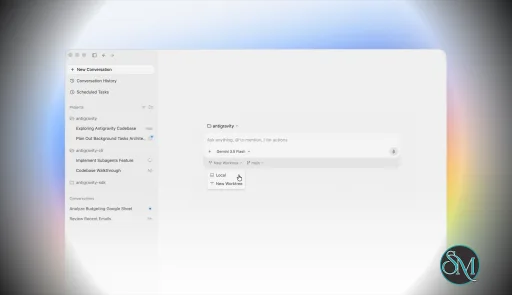
Antigravity 2.0 is a standalone desktop application designed to coordinate AI agents that can perform complex development tasks independently.

The platform expands beyond a traditional IDE by introducing:

  • Multi-agent orchestration

  • Background task execution

  • Agent workflows

  • Native voice interaction

  • CLI integration

  • SDK support

  • Enterprise deployment options

  • Automated software delivery workflows

Rather than focusing on code completion, Antigravity 2.0 emphasizes supervising AI workers that execute development tasks on behalf of the user.

Antigravity 2.0 is one of the most ambitious AI development platforms released in recent years. Introduced during Google I/O 2026, the platform moves beyond traditional AI-assisted coding and embraces a fully agent-driven workflow where autonomous AI agents can plan, build, test, and iterate on software projects with minimal manual intervention.

Unlike the original Antigravity IDE, which blended AI assistance with a familiar coding environment, Antigravity 2.0 reimagines development around agent orchestration, positioning itself as a competitor to tools such as Claude Code, Codex, and Cursor.

Download Antigravity 2.0 (2.13.0) - Software Mirrors

Antigravity 2.0 (2.13.0) for Windows

Download for x64

Download for ARM64

Antigravity 2.0 (2.13.0) for macOS

Download for Apple Silicon

Download for Intel

Antigravity 2.0 (2.13.0) for Linux

Download for x64

Download for ARM64

Download Antigravity IDE

Key Features of Antigravity 2.0

Multi-Agent Orchestration

The headline feature is the ability to run multiple AI agents simultaneously.

Developers can delegate different portions of a project to separate agents, allowing parallel execution of research, implementation, testing, and validation tasks.

Standalone Agent Workspace

Unlike the original IDE-centric approach, Antigravity 2.0 operates as its own desktop environment focused entirely on managing agents and reviewing their outputs.

CLI and SDK Support

Google introduced both a command-line interface and a software development kit, allowing developers to build custom workflows and automate agent interactions beyond the desktop application.

Voice Commands

Native voice interaction allows developers to communicate with agents through speech, including live transcription capabilities integrated directly into the application.

Background Task Scheduling

Users can assign long-running jobs that continue executing asynchronously while they work on other activities.

Gemini 3.5 Flash Integration

Antigravity 2.0 is heavily powered by Google's Gemini 3.5 Flash model, which focuses on faster agent execution and improved responsiveness for complex workflows.

User Experience

Using Antigravity 2.0 feels very different from using a conventional code editor.

Developers spend less time manually writing code and more time managing AI-generated work. The experience resembles directing a team of junior developers rather than interacting with a traditional coding assistant.

For users already comfortable with AI-assisted development, this workflow can be extremely productive.

For developers who prefer direct control over every file and implementation detail, the transition may feel uncomfortable at first. Some community members have criticized the removal of familiar IDE elements and traditional project navigation.

Performance

Performance is one of the platform's strongest areas.

The new architecture delivers significantly faster agent execution than earlier versions, particularly when multiple agents work simultaneously. Users report that many tasks complete far more quickly than in the original Antigravity environment.

The ability to run agents asynchronously can dramatically improve productivity during:

  • Large refactoring projects

  • Research-heavy tasks

  • Full-stack application development

  • Testing and verification workflows

  • Documentation generation

However, the platform can still be resource-intensive, particularly when managing numerous active agents. Community feedback also mentions occasional quota limitations and usage restrictions during heavy workloads.

Real-World Development Workflow

Antigravity 2.0 is particularly effective for:

  • Rapid prototyping

  • Feature implementation

  • Automated testing

  • Codebase analysis

  • Large-scale refactoring

  • Documentation generation

  • Multi-service applications

The platform's biggest strength is reducing the amount of repetitive work developers must perform manually.

Instead of requesting code snippets, users can assign high-level objectives and allow agents to execute most of the implementation process.

Community Reception

Developer reactions have been mixed.

Many users praise:

  • Faster workflows

  • Better AI performance

  • Multi-agent execution

  • Powerful automation capabilities

At the same time, some longtime Antigravity users dislike the shift away from a traditional IDE experience. Several community discussions highlight migration issues, interface changes, and workflow disruptions during the transition from the original platform.

The most common criticism is that Antigravity 2.0 feels less like an IDE and more like an agent management console. Whether this is viewed positively or negatively depends largely on the developer's preferred workflow.

Security Considerations

Because agents can execute tasks autonomously, developers should still carefully review generated outputs and permissions.

While the platform includes safeguards and review mechanisms, relying entirely on autonomous execution without oversight can introduce risks in production environments.

As with any advanced AI coding platform, human review remains essential.

Pros

  • Innovative multi-agent architecture

  • Significantly faster development workflows

  • Native voice interaction

  • Background task execution

  • CLI and SDK support

  • Strong integration with Gemini models

  • Excellent for large projects and automation

  • Cross-platform desktop application

Cons

  • Steeper learning curve than traditional IDEs

  • Less direct control over implementation details

  • Migration frustrations for existing users

  • Resource intensive during large workloads

  • Usage quotas may affect heavy users

  • Traditional developers may miss familiar IDE workflows

Who Should Use Antigravity 2.0?

Antigravity 2.0 is best suited for:

  • Professional software developers

  • AI-focused engineering teams

  • Technical founders

  • Automation enthusiasts

  • Developers managing large codebases

  • Users comfortable supervising AI agents

It is particularly valuable for those who want to maximize productivity through autonomous AI workflows rather than traditional coding methods.

Antigravity 2.0 represents one of the most significant shifts in software development tooling since the rise of AI coding assistants. Its agent-first architecture, multi-agent orchestration, and autonomous workflow capabilities make it one of the most advanced development platforms currently available. While the departure from traditional IDE workflows will not appeal to everyone, Antigravity 2.0 offers a compelling vision of how software development may evolve over the coming years.

Antigravity 2.0 (2.13.0)
Free
Software Informations:
Developer:

Operating System:
Windows / macOS / Linux
Date Added:
2026-09-12T03:34:41.632Z

Kdenlive, short for KDE Non Linear Video Editor, is a free and open source video editing application. It supports multi track editing, a wide range of formats, and a customizable workflow, making it a strong alternative to commercial editors.

It is especially popular among Linux users, but it is also available on Windows and macOS, making it accessible across platforms.

Kdenlive is a well-established video editor that has gained popularity among creators who want advanced editing features without paying for expensive software. Developed by the KDE Community, it delivers a flexible and capable editing environment suitable for both beginners and experienced users.

Key Features of Kdenlive

  • Multi Track Timeline
    Kdenlive allows you to work with multiple video and audio tracks. This gives you full control over complex edits, layering, and transitions.

  • Wide Format Support
    Thanks to FFmpeg integration, Kdenlive supports nearly all video and audio formats. You can import and export projects without worrying about compatibility.

  • Effects and Transitions
    The software includes a large library of built in effects and transitions. Users can adjust color, apply filters, and enhance footage directly within the editor.

  • Proxy Editing
    For smoother performance on lower end systems, Kdenlive offers proxy editing. This feature uses lower resolution versions of your clips during editing, then renders the final output in full quality.

  • Keyframe Animation
    You can animate effects and transitions using keyframes. This adds flexibility for advanced editing and motion control.

  • Customizable Interface
    Kdenlive allows users to rearrange panels and tools based on their workflow, which helps improve productivity.

User Experience

Kdenlive provides a professional level interface, but it can feel overwhelming at first. Once you understand the layout, the workflow becomes efficient and flexible.

Frequent updates from the KDE community continue to improve stability and usability, though occasional bugs may still appear depending on the version.

Performance and Compatibility

Kdenlive performs well on most systems, especially when proxy editing is enabled. It handles large projects reasonably well, though performance can vary depending on hardware.

It supports Linux, Windows, and macOS, making it one of the most versatile open source video editors available.

Pros

  • Free and open source

  • Supports a wide range of formats

  • Multi track editing for complex projects

  • Strong set of effects and transitions

  • Cross platform availability

Cons

  • Interface can be complex for beginners

  • Occasional stability issues

  • Rendering speed may vary depending on system

Kdenlive is ideal for content creators, YouTubers, and editors who want a powerful tool without spending money. It is especially suitable for users who prefer open source software and need flexibility in their editing workflow.

Kdenlive offers impressive capabilities for a free video editor. With its rich feature set and active development, it stands as one of the best open source choices for video editing today.

Kdenlive 26.08.1
Free
Software Informations:
Developer:

Operating System:
Windows / macOS / Linux
Date Added:
2026-09-12T01:00:31.480Z

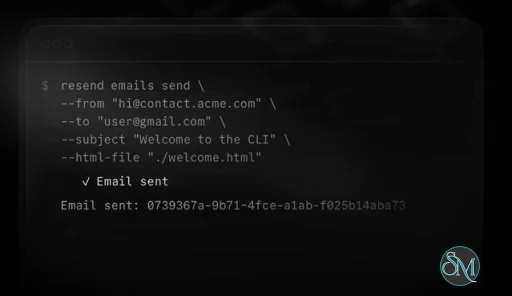
Resend CLI is a developer focused command line interface provided by Resend. It allows developers to interact with the Resend email API directly from the terminal.

The tool is designed to:

  • Send test emails

  • Manage domains and API keys

  • Debug email delivery issues

  • Integrate email workflows into development pipelines

It is especially useful for developers building applications that rely on transactional emails.

Download Resend CLI v2.20.1 - Software Mirrors

Download resend-windows-x64.zip

Download resend-linux-x64.tar.gz

Download resend-linux-arm64.tar.gz

Download resend-darwin-x64.tar.gz

Download resend-darwin-arm64.tar.gz

Download checksums.txt

Resend CLI v2.20.1 Release Notes:

Install

cURL
curl -fsSL https://resend.com/install.sh | bash
Node.js
npm install -g resend-cli
Homebrew (macOS / Linux)
brew install resend/cli/resend
PowerShell (Windows)
irm https://resend.com/install.ps1 | iex

What's Changed

  • fix(webhooks): say that get returns the signing secret by @gabrielmfern in #389
Full Changelog: v2.20.0...v2.20.1

Key Features of Resend CLI

Command Line Email Sending

Resend CLI allows developers to send emails directly from the terminal.

Users can:

  • Send test messages

  • Validate email templates

  • Trigger transactional email flows

This eliminates the need for manual testing through application interfaces.


Domain and API Management

The CLI provides tools to manage email infrastructure:

  • Add and verify domains

  • Manage API keys

  • Configure sending settings

This helps developers maintain control over their email environment without leaving the terminal.


Email Testing and Debugging

Resend CLI simplifies debugging by allowing developers to test email delivery quickly.

Features include:

  • Checking delivery status

  • Identifying errors in email configuration

  • Validating sender domains

This reduces time spent troubleshooting email issues.


Integration with Development Workflows

Because it is CLI based, Resend CLI integrates easily into:

  • CI and CD pipelines

  • Deployment scripts

  • Automation workflows

This makes it suitable for modern DevOps environments.


Template Support

Developers can test and manage email templates directly.

This allows:

  • Previewing email content

  • Testing dynamic variables

  • Ensuring formatting consistency


Lightweight and Fast

The CLI tool is lightweight and designed for quick execution.

Benefits include:

  • Minimal system resource usage

  • Fast command execution

  • Easy installation and setup


Performance and Usability

Resend CLI is optimized for developers who prefer terminal based tools.

Performance highlights:

  • Fast response times for API calls

  • Reliable command execution

  • Smooth integration with scripts

Usability considerations:

  • Requires familiarity with command line interfaces

  • Setup may involve API configuration

  • Not intended for non technical users


Pros and Cons

Advantages

  • Simple and efficient CLI workflow

  • Fast email testing and debugging

  • Integrates with CI and CD pipelines

  • Lightweight and easy to install

  • Developer friendly design


Limitations

  • Requires Resend platform usage

  • Not suitable for non technical users

  • Limited functionality outside email workflows

  • Dependent on API connectivity


Who Should Use Resend CLI

Resend CLI is ideal for:

  • Developers building email enabled applications

  • DevOps engineers automating workflows

  • Teams testing transactional email systems

  • Users working in terminal based environments

It is particularly useful for projects that rely heavily on email APIs.


Final Verdict

Resend CLI is a powerful and efficient tool for managing email workflows directly from the command line. With features for sending, testing, and debugging emails, it simplifies development processes and improves productivity.

For developers using the Resend platform, Resend CLI is a practical addition that enhances control and streamlines email integration.

Email remains a critical part of modern applications, and developers often need reliable tools to test, send, and manage transactional emails efficiently. Resend CLI is a command line tool designed to simplify email workflows for developers using the Resend platform.

Resend CLI v2.20.1
Free
Software Informations:
Developer:

Operating System:
Windows / macOS / Linux
Date Added:
2026-09-12T01:00:31.132Z

Vivaldi is a Chromium based web browser available on Windows, macOS, Linux, Android, and iOS. Since it uses Chromium, it supports most Chrome extensions while adding a large collection of built in tools and interface customization features.

Unlike many browsers that prioritize simplicity, Vivaldi embraces complexity and flexibility. Nearly every toolbar, menu, shortcut, and panel can be customized.

Vivaldi has built a loyal following among users who want more control over their browsing experience. Created by former Opera developers, Vivaldi focuses heavily on customization, productivity, and privacy rather than minimalism. It is one of the few browsers designed specifically for power users who manage dozens of tabs, multitask heavily, and want every part of the interface tailored to their workflow.

Key Features of Vivaldi

  • Advanced Tab Management
    Vivaldi offers some of the best tab management tools available in any browser. Features like Tab Stacking, Tab Tiling, Workspaces, and Tab Hibernation help organize large numbers of tabs efficiently.

  • Extreme Customization
    Almost every part of the browser interface can be changed, including toolbar placement, themes, keyboard shortcuts, and mouse gestures. Many users consider it the most customizable mainstream browser available.

  • Built In Productivity Tools
    Vivaldi includes integrated Notes, Mail, Calendar, Feed Reader, screen capture tools, and Quick Commands without requiring extensions.

  • Privacy Focused Features
    The browser includes built in ad blocking, tracker blocking, private windows, and encrypted sync. Vivaldi also states that it does not profile users or sell browsing data.

  • Chrome Extension Support
    Because it is Chromium based, users can install most extensions from the Chrome Web Store while still benefiting from Vivaldi’s custom interface and tools.

User Experience

Vivaldi feels very different from mainstream browsers. New users may initially find the interface crowded due to the sheer number of options and built in tools.

For experienced users, however, the browser becomes extremely efficient once customized properly. Features like Quick Commands, side panels, and keyboard driven workflows significantly improve multitasking.

Community discussions often praise the workflow flexibility and customization, though some users report occasional interface inconsistencies or performance quirks.

Performance and Privacy

Vivaldi performs well overall, but its feature heavy interface can consume more memory compared to lighter browsers. Some Reddit users report higher RAM usage than Chrome or Edge, especially with many tabs open.

Privacy is stronger than many mainstream browsers, though privacy focused communities often note that browsers like Brave or hardened Firefox still offer more aggressive anti fingerprinting protections.

Pros

  • Exceptional customization options

  • Advanced tab and workspace management

  • Built in productivity tools

  • Chromium compatibility with Chrome extensions

  • Strong privacy oriented approach

Cons

  • Can feel overwhelming for beginners

  • Higher resource usage than some competitors

  • Occasional UI bugs and inconsistencies

  • Privacy protections not as aggressive as specialized privacy browsers

Vivaldi is ideal for power users, multitaskers, researchers, developers, and anyone who spends long hours in the browser. Users who value customization and productivity will benefit the most from its feature rich design.

Casual users who prefer a minimal interface may find simpler browsers easier to manage.

Vivaldi stands out as one of the most feature packed and customizable browsers available today. Its combination of productivity tools, privacy focused features, and deep personalization makes it an excellent choice for users who want complete control over their browsing experience.

Vivaldi 8.2.4133.52
Free
Software Informations:
Developer:

Operating System:
Windows / macOS / Linux / Android
Date Added:
2026-09-11T23:00:34.409Z

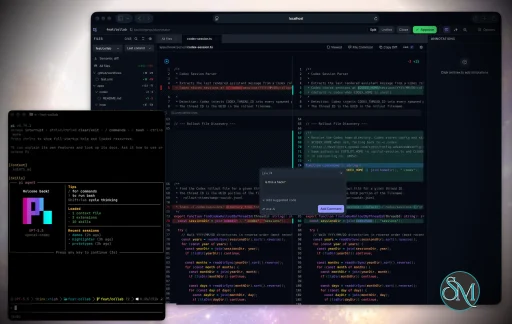
Plannotator is an open-source platform designed to review and validate plans and code generated by AI coding agents.

The platform provides a centralized interface where developers can:

  • Review AI-generated plans

  • Annotate proposed actions

  • Approve or reject tasks

  • Inspect code changes

  • Provide structured feedback

  • Improve agent outputs

  • Maintain human oversight

Rather than replacing developers, Plannotator aims to keep humans involved in critical decision-making during AI-assisted development.

As AI coding agents become increasingly capable, developers face a growing challenge: ensuring that AI-generated plans and code changes align with project requirements before they are executed. Plannotator addresses this problem by acting as a review layer between developers and AI coding agents.

Instead of generating code itself, Plannotator focuses on making AI-driven development more transparent and controllable. It allows teams to review, annotate, approve, reject, and refine agent-generated plans and code changes before they affect a project.

Download Plannotator v0.27.14 - Software Mirrors

Plannotator v0.27.14 for Windows

plannotator-paste-win32-arm64.exe | 90.2 MB

plannotator-paste-win32-x64.exe | 93.92 MB

plannotator-win32-arm64.exe | 146.4 MB

plannotator-win32-x64.exe | 150.12 MB

Plannotator v0.27.14 for macOS

plannotator-darwin-arm64 | 117.15 MB

plannotator-darwin-x64 | 122.17 MB

plannotator-paste-darwin-arm64 | 60.51 MB

plannotator-paste-darwin-x64 | 65.97 MB

Plannotator v0.27.14 for Linux

plannotator-linux-arm64 | 145.54 MB

plannotator-linux-x64 | 146.41 MB

plannotator-paste-linux-arm64 | 89.35 MB

plannotator-paste-linux-x64 | 90.21 MB

Plannotator v0.27.14 for Other

plannotator-0.27.14-release-sbom.cdx.json | 1.38 MB

Plannotator v0.27.14 Release Notes:

Follow @plannotator on X for updates
Missed recent releases?
  • v0.27.13: Open a review on a specific base (--base, --diff-type), symlink containment on /api/doc, CI flake fix, Amp decision relay
  • v0.27.12: Unified decision control, token hover cards, local-vs-remote diff, approval notes
  • v0.27.11: OpenCode server leak fix, durable local feedback archive, unknown-subcommand fix
  • v0.27.10: Auto-viewed files on scroll, annotation undo/redo, OpenCode 2 slash commands restored, npm 12 agent terminal fix
  • v0.27.9: WebMCP browser-agent tools, HTML refresh from disk, host seams, lazy renderers, Windows uninstall fix
  • v0.27.8: Pi keeps its prompt cache across plan transitions, thumbs-up returns to HTML annotation, embed picker seam
  • v0.27.7: Pi host crash fix on Windows, Call Flow tree cap, jj fork-point base, plannotator knowledge skill + llms.txt
  • v0.27.6: Live app annotation lands on Pi, one interaction model for HTML pages
  • v0.27.5: Annotate your running app, Agent TUI placement, collapsed lockfiles, VS Code theme fix
  • v0.27.4: Portable Guided Review exports, guides.show share links, guide CLI, jj Call Flow
  • v0.27.3: Folder watcher freeze fix on large repos, first SBOM-attested release pipeline
  • v0.27.2: Mobile plan and code review, Codex CLI 0.147 fix, configurable markdown extensions

What's New in v0.27.14

A community release. Eleven pull requests, nine of them from contributors, and one first-time contributor who arrived with two Pi fixes. Six of the changes close issues people filed. The theme is the long tail: Pi plans that lose their progress, Codex threads split across files, a browser setting that silently did nothing under WSL, a toolbar that grew off the bottom of the screen. Each one was reported by someone who hit it, and each one is fixed.

Pi: plan progress survives compaction and session forks

On Pi, the approved plan's progress widget tracked [DONE:n] markers in memory only. After a context compaction, a session fork, or a restart, the counter reset to 0/N and the checkboxes in the plan file were never written back, so a half-finished plan looked untouched. Completion state is now persisted into the approved plan's markdown itself. A new plannotator_mark_done tool lets the agent mark each step as it finishes, the checkbox flips in the file immediately, and a restored session reads its progress back from the plan instead of starting over. Older in-progress executions are recovered on restore by writing their markers back into the plan. The tool is scoped to the executing phase and refuses to run outside it, and the tool set changes only at phase entry, so Pi's prompt cache is untouched. #1496 by @a4180p, closing #1376 reported by @huangxinsteam-oss, with @michaelmior confirming the same failure.

Pi: Ask AI renders completed messages and reports errors

Ask AI on Pi built its response from streamed text_delta events. A Pi provider that did not emit usable deltas produced an empty answer, and a failed request, such as an upstream 429, ended as a successful empty response with no indication anything went wrong. The provider now maps text blocks from Pi's message_end event, which Pi documents as the authoritative completed message, and forwards a failed request's error message to the UI. Normal delta streaming still takes precedence, so nothing is rendered twice. #1495 by @a4180p.

Codex: annotate-last works when a thread spans several rollout files

One Codex thread can be written across several rollout JSONL files. plannotator last picked the first file whose name matched the thread id, from an unsorted directory listing, which could be an empty or aborted segment. The command then failed with "No rendered assistant message found" while the message sat in a sibling file. Every rollout for the thread is now considered, newest first, and annotate-last uses the first one that actually contains a rendered assistant message. The Stop hook's plan detection takes the newest existing rollout for the current session and deliberately does not fall back across segments, so an older segment can never resurrect a stale plan. Single-file threads behave exactly as before. The fix was verified against the Codex CLI with a synthetic multi-segment session home. #1493 by @FNDEVVE, closing #1367 reported by @arklanq-patronus.

PLANNOTATOR_BROWSER works under WSL, and says so when it fails

Under WSL, PLANNOTATOR_BROWSER was always routed through cmd.exe /c start, so a Linux path or script could never launch. The failure was swallowed, and a headless session reported success while the reviewer never saw a window. Both runtimes now classify the configured value first. Windows targets (chrome.exe, C:\..., /mnt/c/...) keep the cmd.exe route; POSIX paths and bare names that resolve on the Linux PATH are executed directly. When an explicitly configured browser fails to launch, one line on stderr names the executable and the error before the usual fallback prints the URL. The Pi runtime now reports opened: false on spawn errors instead of claiming success. macOS and non-WSL Linux behavior is unchanged. #1494 by @FNDEVVE, closing #1472 reported by @Pallieter.

Code review: the annotation toolbar stays on screen when suggested code expands

Selecting lines near the bottom of a diff and expanding Add suggested code pushed the submit row past the bottom edge. The toolbar's vertical clamp reserved a fixed 200 pixels while its maximum height was the whole viewport, so internal scrolling never engaged and the toolbar simply grew off screen. Ask AI mode had the same problem. The toolbar now measures its real height after every change and keeps the whole box inside the visible area: an anchored toolbar flips above its anchor when it would not fit below, a toolbar taller than the viewport pins to the top with a bounded height so it scrolls internally, and a dragged toolbar keeps its position but clamps into bounds. #1491 by @FNDEVVE, closing #1424 reported by @tekumara.

Mod+E enters and leaves Edit Mode in place

Plan review and annotate had an Edit button but no keyboard route into markdown Edit Mode. Mod+E now toggles it: entering keeps your scroll position and drafts, and pressing it again commits your edits and returns you to the same place in the rendered document. The chord is ignored while you are typing in an input, a text area, or a comment composer, so it cannot steal a keystroke. It is listed in the in-app shortcut help and on the docs page. #1492 by @FNDEVVE, closing #1479 requested by @ogizanagi.

JJ: line-of-work bases stay put

On Jujutsu repos, the automatic "line of work" base could move under a review. A moving remote bookmark or an ambiguous fork-point revset could pull unrelated changes into the diff, or label a current-change diff as line of work. The base is now resolved once to an immutable commit id, ambiguous or unavailable fork points are reported instead of guessed, and the fallback to the current change keeps your line-of-work preference for the next switch. Detected fork points are exposed for explicit selection, the base label shows a short commit id instead of a 40-character hash, and the Bun and Pi servers stay aligned. #1497 by @graemefolk.

Additional Changes

  • Skill autocomplete menu no longer clips: typing / or $ in the annotate comment composer opened the skill menu inside the composer card, whose scroll container clipped every row past the card edge. The composer now allows visible overflow only while the menu is open and restores its scrolling when it closes. #1488 by @leoreisdias
  • Data directory resolved per call: four modules captured PLANNOTATOR_DATA_DIR at import time and froze every derived path, so a data directory set after import was ignored, and the Codex, Tour, and Guide review schemas could stay stale across versions. All of them now resolve on each call, and the schema files are rewritten once per process so a version upgrade never reads an older schema. #1490 by @FNDEVVE, closing #1477 filed by @bendrucker
  • Dependency refresh: 33 minor and patch updates across the workspace, including @pierre/diffs 1.3.6. Three packages are held back on purpose and now excluded from Dependabot. The Bun runtime stays pinned at 1.3.14. #1501
  • Commit-rail switches keep the base picker: a regression introduced on main after v0.27.13 and caught by the pre-release QA gate before it shipped. #1508

Install / Update

macOS / Linux:
bash
curl -fsSL https://plannotator.ai/install.sh | bash
Windows:
powershell
irm https://plannotator.ai/install.ps1 | iex
Claude Code Plugin: Run /plugin in Claude Code, find plannotator, and click "Update now". Pi: Update @plannotator/pi-extension to 0.27.14 and restart Pi. OpenCode: Clear cache and restart:
bash
rm -rf ~/.bun/install/cache/@plannotator

What's Changed

  • fix(pi): persist approved plan checklist progress by @a4180p in #1496
  • fix(pi): render completed messages and errors by @a4180p in #1495
  • fix(codex): fall back across rollout files for annotate-last and the Stop hook by @FNDEVVE in #1493
  • fix(browser): honor POSIX PLANNOTATOR_BROWSER under WSL and warn on launch failure by @FNDEVVE in #1494
  • fix(review): keep the annotation toolbar inside the viewport when suggested code expands by @FNDEVVE in #1491
  • feat(editor): Mod+E shortcut to enter and leave Edit mode in place by @FNDEVVE in #1492
  • fix(shared): resolve data-dir paths per call instead of capturing at import by @FNDEVVE in #1490
  • fix(review): stabilize JJ line-of-work bases by @graemefolk in #1497
  • fix(ui): prevent skill autocomplete menu clipping by @leoreisdias in #1488
  • chore(deps): bun minor+patch group in #1501
  • fix(review): stop echoing the launch-frozen git context on commit switches in #1508

New Contributors

  • @a4180p made their first contribution in #1495

Contributors

@FNDEVVE carried this release: five merged pull requests in a week, three of them closing issues other people filed, each with a stash-the-fix control proving the new tests fail on the old code. @a4180p arrived with two Pi fixes at once, and the checklist persistence one closes a bug that had cost people real plan progress. @graemefolk kept pushing on Jujutsu support and made the line-of-work base honest about what it can and cannot resolve. @leoreisdias fixed the skill menu clipping with a DOM regression test that names the clipping ancestor, so the failure cannot come back quietly. The reports made the fixes possible:
  • @huangxinsteam-oss reported the Pi progress reset (#1376), and @michaelmior confirmed it
  • @arklanq-patronus reported the multi-file Codex thread failure (#1367)
  • @Pallieter reported the silent PLANNOTATOR_BROWSER failure (#1472)
  • @tekumara reported the toolbar running off the bottom of the diff (#1424)
  • @ogizanagi requested the Edit Mode shortcut (#1479)
  • @bendrucker filed the import-time data directory capture (#1477) after root-causing the CI flake in the last release
Thank you. Plannotator gets better because you tell us where it falls short. Full Changelog: v0.27.13...v0.27.14

Key Features of Plannotator

Plan Review System

One of Plannotator's core capabilities is reviewing plans generated by AI agents before execution.

Developers can examine:

  • Proposed tasks

  • Implementation strategies

  • Agent reasoning

  • Planned file modifications

  • Workflow sequences

This visibility helps reduce unintended changes and costly mistakes.

Annotation Tools

The platform allows users to add comments, notes, and guidance directly to AI-generated plans.

These annotations can be used to:

  • Clarify requirements

  • Correct misunderstandings

  • Provide context

  • Guide future agent actions

AI Code Review

Plannotator extends the review process beyond planning by supporting inspection of generated code.

Developers can:

  • Review modifications

  • Analyze diffs

  • Leave comments

  • Request revisions

  • Validate implementation details

This workflow resembles modern pull-request review systems.

Human-in-the-Loop Workflows

A major design goal is ensuring that AI actions remain subject to human approval.

Organizations can establish review processes where important actions require validation before execution.

Open Source Foundation

Plannotator is open source, allowing teams to inspect, modify, and self-host the platform according to their needs.

This transparency is particularly valuable for organizations adopting AI-assisted software development.

User Experience

The interface is designed around review workflows rather than direct code generation.

Instead of interacting with a chatbot, users primarily:

  1. Receive agent-generated plans

  2. Review proposed actions

  3. Add feedback

  4. Approve or reject changes

  5. Monitor execution results

The workflow feels familiar to developers accustomed to pull requests, code reviews, and project planning tools.

Productivity Benefits

As AI coding tools become more autonomous, review processes become increasingly important.

Plannotator helps organizations:

  • Reduce risky AI actions

  • Improve code quality

  • Increase accountability

  • Preserve architectural consistency

  • Encourage collaboration between developers and AI agents

For teams adopting AI-driven development, these safeguards can be as valuable as the coding agents themselves.

Collaboration Features

The platform supports collaborative review workflows where multiple team members can participate in evaluating AI-generated outputs.

This allows:

  • Peer review

  • Team approval processes

  • Shared annotations

  • Collective decision-making

Such features are especially useful for larger engineering teams.

Performance

Because Plannotator focuses on workflow management and review rather than model inference, performance largely depends on the connected AI agents and integrations.

The platform itself is lightweight and primarily serves as an orchestration and review layer.

Open Source Advantages

Being open source provides several benefits:

  • Transparent development

  • Self-hosting capabilities

  • Custom integrations

  • Community contributions

  • Vendor independence

Organizations concerned about compliance, security, or proprietary workflows may find these advantages particularly appealing.

Limitations

Plannotator is designed as a companion tool rather than a complete AI development platform.

Common limitations include:

  • Requires external AI coding agents

  • Best suited for teams already using AI-assisted development

  • Smaller ecosystem than mature developer platforms

  • Additional review steps may slow rapid prototyping

  • Some users may prefer fully autonomous workflows

The software delivers the most value in environments where oversight and quality control are priorities.

Pros

  • Improves transparency of AI-generated plans

  • Supports structured review workflows

  • Human-in-the-loop design

  • Useful annotation system

  • Open source

  • Self-hosting support

  • Familiar review experience for developers

  • Helps reduce AI-generated mistakes

Cons

  • Not a standalone coding agent

  • Requires integration with AI development tools

  • Smaller community than established developer platforms

  • Adds review overhead to workflows

  • Best suited for teams rather than casual users

Who Should Use Plannotator?

Plannotator is ideal for:

  • Software development teams

  • Engineering managers

  • AI-assisted development workflows

  • Organizations adopting coding agents

  • Open-source projects

  • Teams prioritizing code quality and governance

It is particularly valuable for environments where AI-generated code requires oversight before reaching production systems.

Plannotator fills an increasingly important role in the AI development ecosystem by providing visibility and control over AI-generated plans and code changes. Its focus on human oversight, structured reviews, and collaborative workflows makes it a useful companion for modern coding agents. While it is not a replacement for AI coding tools themselves, it offers a practical solution for teams seeking greater confidence and accountability in AI-assisted software development.

Plannotator v0.27.14
Free
Software Informations:
Developer:

Operating System:
Windows / macOS / Linux
Date Added:
2026-09-11T23:00:34.355Z