TeraByte Drive Image Backup and Restore Suite is a professional-grade disk imaging and backup solution developed by TeraByte Unlimited. Designed for Windows, Linux, and UEFI environments, it provides everything needed to create complete system images, clone drives, restore entire operating systems, and recover from hardware failures or data loss. Its emphasis on reliability and flexibility has made it a trusted choice among IT professionals, system administrators, and power users.
Unlike traditional file backup software, TeraByte Drive Image Backup and Restore Suite creates sector-level images of entire disks or individual partitions. This allows users to restore a computer to exactly the same state it was in when the backup was created, including the operating system, applications, settings, and personal files.
The suite combines several utilities into one package, including Image for Windows, Image for Linux, Image for DOS, Image for UEFI, and the OSD Tool Suite, providing a complete backup and recovery solution across multiple environments.
Key Features of TeraByte Drive Image Backup and Restore Suite
Complete Disk Imaging
The software creates full images of entire drives or selected partitions, making it suitable for disaster recovery, hardware upgrades, and operating system migration. Images can be restored to the original drive or deployed to replacement hardware.
Incremental and Differential Backups
To reduce backup time and storage usage, the suite supports incremental and differential backups in addition to full backups. This allows users to maintain up-to-date backups without repeatedly copying unchanged data.
Cross-Platform Recovery
One of the suite's biggest strengths is its ability to operate across multiple boot environments. Whether using Windows, Linux, DOS, or UEFI recovery media, users can access and restore their backup images even if the installed operating system no longer boots.
Flexible Backup Destinations
Backup images can be stored on internal drives, external USB storage, network shares, optical media, and other supported devices. This flexibility allows organizations to implement a wide variety of backup strategies.
Drive Cloning
The suite includes reliable disk cloning capabilities for migrating operating systems to new SSDs or larger hard drives while preserving all existing data and boot configurations.
Image Validation
Built-in validation tools verify backup integrity before restoration, helping ensure that backup images remain usable when disaster recovery becomes necessary.
Deployment Tools
The included OSD Tool Suite provides automation, scripting, and deployment utilities for administrators managing multiple computers across an organization.
Download TeraByte Drive Image Backup and Restore Suite for DOS/Linux - Software Mirrors | |
|---|---|
Buy Products from TeraByte Unlimited with Discount Coupon | |
|---|---|
Performance and User Experience
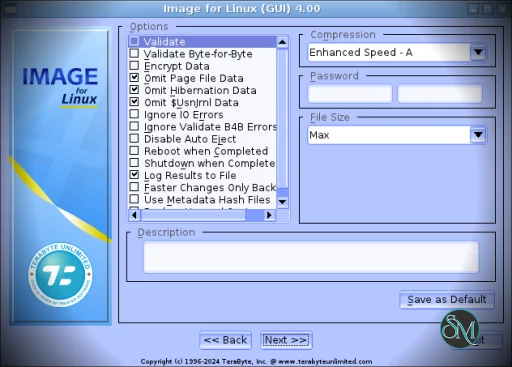
TeraByte Drive Image Backup and Restore Suite prioritizes reliability over visual design. The interface is functional and efficient, although it appears more traditional than many consumer-oriented backup applications.
Backup and restore operations are consistently dependable, and image creation is generally fast when using modern storage devices. Advanced users will appreciate the extensive configuration options, while beginners may need some time to become familiar with the available settings.
The software also includes tools for creating bootable recovery media, allowing systems to be restored even after complete drive failure.
Pros
Comprehensive disk imaging and recovery solution.
Supports Windows, Linux, DOS, and UEFI environments.
Reliable drive cloning capabilities.
Incremental and differential backups.
Image validation for backup integrity.
Flexible recovery media creation.
Powerful deployment and automation tools.
One-time purchase without subscription fees.
Cons
User interface feels dated compared to newer backup software.
Learning curve is higher than beginner-focused backup applications.
Advanced options may overwhelm casual users.
Cloud backup integration is limited compared to cloud-first services.
Who Should Use TeraByte Drive Image Backup and Restore Suite?
This suite is ideal for IT professionals, computer technicians, system administrators, developers, and advanced home users who require dependable full-system backups and disaster recovery. It is especially valuable for users managing multiple computers or regularly performing hardware upgrades, operating system migrations, or recovery operations.
Home users looking for simple file synchronization or cloud backup may prefer more consumer-focused solutions, but those who want complete control over system imaging will find this suite exceptionally capable.
Final Verdict
TeraByte Drive Image Backup and Restore Suite remains one of the most reliable disk imaging solutions available. Its combination of full-system imaging, flexible recovery options, cross-platform support, and professional deployment tools makes it an excellent investment for anyone who takes backup and disaster recovery seriously.
Although its interface prioritizes functionality over appearance, the software delivers outstanding reliability and extensive capabilities that continue to earn the trust of professionals worldwide.
Developer:
TeraByte Unlimited
Operating System:
Linux
Date Added:
2026-07-05T16:29:47.000Z
Categories:
Post a Comment/Report Broken Link: