DeepSeek TUI v0.8.66

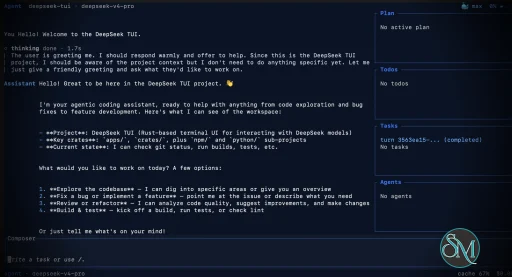
DeepSeek TUI is an open source terminal based coding agent designed for DeepSeek AI models. Unlike a simple chatbot, it can interact with your local workspace, execute shell commands, manage git operations, and assist with software development tasks directly from the command line.

The project is written in Rust and focuses on speed, low resource usage, and keyboard driven workflows. It is especially appealing for developers who spend most of their time in the terminal.

DeepSeek TUI is gaining attention among developers who prefer terminal based workflows and want direct access to AI powered coding tools without relying on heavy IDE integrations. Built around DeepSeek models, it transforms the terminal into an interactive coding assistant capable of editing files, running commands, and managing development workflows.

Download DeepSeek TUI v0.8.66 - Software Mirrors

Download DeepSeek TUI v0.8.66 Windows 64bit
codew-windows-x64.exe | 227.5 kB

Download DeepSeek TUI v0.8.66 Windows 64bit
codewhale-tui-windows-x64.exe | 50.77 MB

Download DeepSeek TUI v0.8.66 Windows 64bit
codewhale-windows-x64-portable.zip | 22.84 MB

Download DeepSeek TUI v0.8.66 Windows 64bit
codewhale-windows-x64.exe | 14.06 MB

Download DeepSeek TUI v0.8.66 Windows 64bit
codewhale-windows-x64.zip | 22.84 MB

Download DeepSeek TUI v0.8.66 macOS arm64
codew-macos-arm64 | 462.77 kB

Download DeepSeek TUI v0.8.66 macOS arm64
codewhale-macos-arm64 | 13.91 MB

Download DeepSeek TUI v0.8.66 macOS arm64
codewhale-macos-arm64.tar.gz | 24.23 MB

Download DeepSeek TUI v0.8.66 macOS arm64
codewhale-tui-macos-arm64 | 46.93 MB

Download DeepSeek TUI v0.8.66 macOS x64
codew-macos-x64 | 454.73 kB

Download DeepSeek TUI v0.8.66 macOS x64
codewhale-macos-x64 | 14.53 MB

Download DeepSeek TUI v0.8.66 macOS x64
codewhale-macos-x64.tar.gz | 25.28 MB

Download DeepSeek TUI v0.8.66 macOS x64
codewhale-tui-macos-x64 | 49.36 MB

Download DeepSeek TUI v0.8.66 macOS arm64
codew-macos-arm64 | 462.77 kB

Download DeepSeek TUI v0.8.66 macOS arm64
codewhale-macos-arm64 | 13.91 MB

Download DeepSeek TUI v0.8.66 macOS arm64
codewhale-macos-arm64.tar.gz | 24.23 MB

Download DeepSeek TUI v0.8.66 macOS arm64
codewhale-tui-macos-arm64 | 46.93 MB

Download DeepSeek TUI v0.8.66 Linux x64
codew-linux-x64 | 609.27 kB

Download DeepSeek TUI v0.8.66 Linux x64
codewhale-linux-x64 | 16.35 MB

Download DeepSeek TUI v0.8.66 Linux x64
codewhale-linux-x64.tar.gz | 27.1 MB

Download DeepSeek TUI v0.8.66 Linux x64
codewhale-tui-linux-x64 | 55.76 MB

Download DeepSeek TUI v0.8.66 Linux arm64
codew-linux-arm64 | 534.42 kB

Download DeepSeek TUI v0.8.66 Linux arm64
codewhale-linux-arm64 | 17.06 MB

Download DeepSeek TUI v0.8.66 Linux arm64
codewhale-linux-arm64.tar.gz | 26.59 MB

Download DeepSeek TUI v0.8.66 Linux arm64
codewhale-tui-linux-arm64 | 54.94 MB

DeepSeek TUI v0.8.66 Release Notes:

CodeWhale is the canonical project, command, npm package, and
release-asset name. The legacy npm package deepseek-tui is
deprecated and receives no further releases. Users coming from
v0.8.x legacy deepseek / deepseek-tui names should migrate
with docs/REBRAND.md.

Install

Recommended — npm (one command, both binaries)

bash
npm install -g codewhale
The wrapper downloads the matched runtime binaries from this Release and places them in the same directory.

Docker / GHCR

bash
docker run --rm -it \
  -e DEEPSEEK_API_KEY="$DEEPSEEK_API_KEY" \
  -v ~/.deepseek:/home/codewhale/.deepseek \
  ghcr.io/hmbown/codewhale:v0.8.66
The image ships the codewhale dispatcher, codew shim, and codewhale-tui runtime. The latest tag is also updated on release.

Cargo (Linux / macOS)

bash
cargo install codewhale-cli codewhale-tui --locked
Both crates are required — codewhale-cli produces the codewhale dispatcher and codew shim, while codewhale-tui produces the interactive runtime that the dispatcher delegates to. Installing only one crate will fail at runtime with a MISSING_COMPANION_BINARY error.

Manual download — platform archives (recommended)

Each archive below contains the codewhale dispatcher, codew shim, and codewhale-tui runtime, plus an install script:
  • Linux x64: codewhale-linux-x64.tar.gz | install.sh
  • Linux ARM64: codewhale-linux-arm64.tar.gz | install.sh
  • Linux RISC-V: codewhale-linux-riscv64.tar.gz | install.sh
  • macOS x64: codewhale-macos-x64.tar.gz | install.sh
  • macOS ARM: codewhale-macos-arm64.tar.gz | install.sh
  • Windows x64 (installer): CodeWhaleSetup.exe | NSIS setup
  • Windows x64: codewhale-windows-x64.zip | install.bat
  • Windows x64 (portable): codewhale-windows-x64-portable.zip | —
Unix (Linux / macOS):
bash
tar xzf codewhale-.tar.gz
cd codewhale-
./install.sh
Windows:
  • For the installer path, run CodeWhaleSetup.exe; it installs codewhale.exe, codew.exe, and codewhale-tui.exe under %LOCALAPPDATA%\Programs\CodeWhale\bin and adds that directory to the current-user PATH.
  • Extract codewhale-windows-x64.zip
  • Run install.bat (copies to %USERPROFILE%\bin)
  • Add %USERPROFILE%\bin to your PATH
The portable Windows archive skips the install script — extract and run from any directory. The NSIS installer is currently unsigned and may trigger Windows SmartScreen until a signing certificate is wired into the release pipeline. Each platform also has bare, unarchived binaries attached below (codewhale-, codew-, and codewhale-tui-) — the npm wrapper and the in-app codewhale update download the matched runtime binaries, whereas the .tar.gz / .zip archives above are the recommended manual download and additionally bundle an install script. The legacy npm package deepseek-tui is deprecated and is not republished. For migration from v0.8.x legacy binary names, see docs/REBRAND.md.

Verify (recommended)

Download the checksum manifests from this Release and verify:
bash

Linux — archive bundles

sha256sum -c codewhale-bundles-sha256.txt

Linux — individual binaries

sha256sum -c codewhale-artifacts-sha256.txt

macOS

shasum -a 256 -c codewhale-bundles-sha256.txt shasum -a 256 -c codewhale-artifacts-sha256.txt

What's in v0.8.66

Added

  • Added codewhale doctor / codewhale doctor --json legacy-state
diagnostics that compare known ~/.deepseek state paths with their ~/.codewhale counterparts and flag unmigrated or dual-root data (#3727).
  • Added Sakana AI Fugu as a first-class OpenAI-compatible provider with
sakana/fugu aliases, FUGU_API_KEY / SAKANA_API_KEY discovery, provider-picker wiring, model completions, and provider docs. Harvested from #3748 by @lerugray.
  • Added WhaleFlow-to-Fleet launch-shape validation: the default Fleet workflow
contract allows up to 100 total agents and 5 recursive rings, requires bounded loops/expands before launch, and preserves per-slot model selection.
  • Added a read-only /config ask-rules view for the resolved
permissions.toml path, file status, rule count, and configured tool/command/path ask rules. Merged from #3569 by @greyfreedom.
  • Added provider-level context_window overrides so OpenAI-compatible
gateways and self-hosted providers can budget against their real model context window (#3545).
  • Added the native codew shim to release archives, Windows installer inputs,
local release-asset preparation, and checksum verification so manual installs receive the same short command that Cargo installs build.
  • Added OpenModel as a first-class Anthropic Messages provider, with config,
CLI, provider picker, docs, and registry coverage. Harvested from #3585 by @noaft.
  • Added WeCom Bridge deployment and security documentation, with shipped
runtime/bridge commands and approval-timeout environment guidance. Harvested from #3640 by @pkeging.
  • Added a token/cache/cost scorecard command for offline release gating,
baseline regression checks, and per-turn cost visibility (#3388). Stream-JSON exec metadata now also reports conservative input_analysis and visible_final_answer_chars, so benchmark harnesses can measure transcript growth and final-answer bloat without guessing (#2956, #2957).
  • Added a release evidence ledger for v0.8.66 and opened the external ACP
registry submission for CodeWhale after validating the published codewhale@0.8.65 ACP auth handshake against the upstream registry checker (#3192).
  • Added a typed [verifier] config table for the verifier-preview lane, with
enabled and the shipped verdict_policy = "hunt" mapping documented and validated (#2093).
  • Added Hotbar Alt+1Alt+8 quick-slot switching with decision-card key
disambiguation, plus an introductory card that explains and can dismiss the Hotbar (#3796, #3788).
  • Release/docs hygiene: guarded public install/version snippets and the npm
codewhaleBinaryVersion pointer against drift, made check-docs/check-facts fail on stale snippets or unmapped providers, and stopped sync-changelog from dropping a release when only [Unreleased] exists (#3767, #3768, #3769, #3770, #3771, #3772).

Changed

  • Deferred Auto mode from the user-facing mode picker, cycle, hotbar, /mode
command, and runtime-thread mode overrides until it has a distinct prompt and auto-review behavior; existing auto mode text now folds back to Agent instead of selecting a hollow mode, and approval modal copy no longer implies the current mode is YOLO (#3730, #3733).
  • Clarified the Fleet setup surface and docs so Fleet is treated as the durable
sub-agent configuration layer while WhaleFlow is the agent-authored orchestration plan that selects and monitors Fleet slots.
  • Slimmed the default Constitution prompt while keeping its required structural
anchors under regression coverage, reducing the static prompt footprint for cache-sensitive turns (#2953).
  • Made the approval prompt inline and bottom-anchored instead of a full-screen
takeover, so context and controls stay visible while a tool awaits a decision (#3799).
  • The Hotbar is now hidden by default until explicit setup opt-in (#3807); the
interactive Agent shell also defaults to approval-gated on with a shared baseline (#3756).
  • Mode authority now resolves approval prompts through a single authority
source instead of per-surface checks (#3795).

Fixed

  • Surfaced legacy state relocation with a user-visible migration notice whenever
~/.deepseek/ is moved or copied into ~/.codewhale/, so upgraded users know their data was preserved and where the canonical state now lives (#3726).
  • Restored legacy .deepseek/sessions visibility for upgraded installs where
an empty ~/.codewhale/sessions directory already existed, by copying missing legacy session entries into the primary CodeWhale session store without overwriting newer data (#3724).
  • Calmed approval risk classification for read-only shell commands such as
codewhale --version, codewhale --help, and git status --porcelain so the modal no longer labels proven read-only shell as destructive (#3730).
  • Added provider/model route columns to /cache turn telemetry so DeepSeek
cache-hit regressions can be correlated with Auto route changes (#3738).
  • Fixed runtime API approval handling so workspace trust no longer auto-resolves
ordinary tool approvals; trust now only participates in full-access retry decisions while YOLO/auto-approve remains the approval bypass (#3736).
  • Fixed modal surfaces so the shared view stack paints an opaque backdrop before
any overlay, while Plan/request-input popup interiors stay opaque and the Plan confirmation footer keeps action choices visible on narrow terminals (#3732).
  • Added a turn-loop Plan-mode guard for file-writing tools and write-capable MCP
tools so Plan's "no writes" promise is enforced before approval or execution, not only by the sandbox/catalog layer (#3734).
  • Preserved the durable review safety floor for publish-like shell actions in
YOLO mode, so cargo publish, npm publish, and tag/release pushes force approval instead of silently auto-approving (#3735).
  • Fixed Ctrl+O external-editor freezes where CodeWhale's terminal input pump
could keep reading keys while Vim/editor owned the terminal, especially in Windows mintty/cygwin shells. Thanks @buko for the precise repro (#3657).
  • Hardened the OHOS dependency drift check against transient Cargo registry EOFs
by retrying the dependency graph probe before failing CI.
  • Updated the /links provider fallback to the current CodeWhale docs URL and
added a Baidu Qianfan docs link. Harvested from #3621 by @noaft.
  • Hardened CODEWHALE_TOOL_SURFACE=shell-only for benchmark/exec runs: the
shell-only surface hides native tools from the model-visible catalog, and unknown CODEWHALE_TOOL_SURFACE values now warn instead of silently falling back to the full tool surface (#2954).
  • Sub-agent fanout and lock hot paths: preserved event-channel headroom for
progress events (#3783, thanks @cyq1017), let independent sub-agent starts join a single parallel dispatch batch instead of serializing (#3801), rendered the sub-agent sidebar/ListSubAgents from a read-only snapshot with bounded cleanup (#3803), used nonblocking best-effort sends for ListSubAgents refresh while still awaiting critical events (#3802), moved sub-agent state persistence disk I/O off the manager write lock (#3805), and used try_lock for shell-manager refresh in async UI paths (#3804).
  • Provenance: runtime continuations and SubAgentHandoff now inherit standing
YOLO authority, while MemoryRecall, ImportedTranscript, and AssistantGenerated inputs remain guarded (#3817).
  • Approval honesty: labeled session-scoped approvals accurately instead of
"always", and surfaced approval decisions in tool results (#3766). Contributor credits for this release live in the changelog entry above — thank you to everyone whose reports, PRs, reviews, and reproductions shaped it. See CHANGELOG.md for full notes and docs/CHANGELOG_ARCHIVE.md for older releases.

Key Features of DeepSeek TUI

  • Terminal Native Workflow
    DeepSeek TUI operates entirely within the terminal, allowing developers to work without switching between browser windows or external interfaces.

  • AI Assisted Coding
    The assistant can read and edit files, generate code, explain logic, and help automate development tasks.

  • Shell Command Execution
    It supports running terminal commands directly through the interface, streamlining development workflows.

  • Git Integration
    Developers can manage repositories, review changes, and handle version control related tasks from inside the tool.

  • Multiple Work Modes
    DeepSeek TUI includes modes like Plan, Agent, and YOLO, offering different levels of automation and approval control.

  • Large Context Handling
    The tool is built around DeepSeek V4 capabilities, including support for extremely large context windows that help with understanding bigger codebases.

User Experience

DeepSeek TUI is designed for developers comfortable with terminal environments. The interface is keyboard focused and efficient, though beginners may need time to adapt.

The workflow feels closer to tools like Claude Code or Codex style assistants rather than traditional chat applications. Community feedback on Reddit and GitHub discussions highlights its speed and practical coding workflow.

Performance and Compatibility

Because it is written in Rust, DeepSeek TUI is lightweight and responsive. It supports Linux, macOS, and Windows, with installation available through npm, Cargo, or direct binaries.

Performance depends heavily on the connected DeepSeek models and API configuration, but the local interface itself remains fast and efficient.

Pros

  • Fast terminal native workflow

  • AI powered coding and automation

  • Lightweight Rust based architecture

  • Supports file editing and shell execution

  • Open source and actively developed

Cons

  • Requires familiarity with terminal workflows

  • Depends on external AI APIs

  • Advanced automation modes may feel risky for inexperienced users

DeepSeek TUI is ideal for developers, DevOps engineers, and terminal focused power users who want AI assistance integrated directly into their command line workflow. It is especially attractive for users seeking a lightweight alternative to browser based AI coding tools.

DeepSeek TUI combines AI coding assistance with the efficiency of terminal workflows. Its fast performance, flexible automation, and developer focused design make it one of the most interesting open source AI terminal tools currently gaining traction.
DeepSeek TUI v0.8.66
Free
Software Informations:
Developer:

Operating System:
Windows / macOS / Linux
Date Added:
2026-07-01T16:01:36.887Z
Categories:

Post a Comment/Report Broken Link: