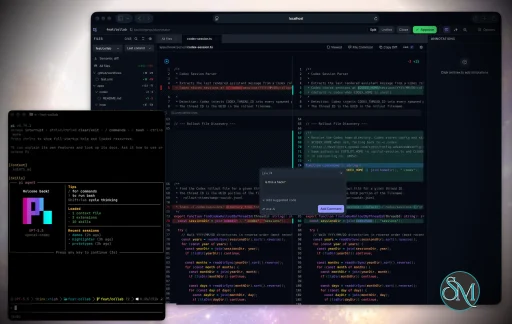
Plannotator is an open-source platform designed to review and validate plans and code generated by AI coding agents.
The platform provides a centralized interface where developers can:
Review AI-generated plans
Annotate proposed actions
Approve or reject tasks
Inspect code changes
Provide structured feedback
Improve agent outputs
Maintain human oversight
Rather than replacing developers, Plannotator aims to keep humans involved in critical decision-making during AI-assisted development.
As AI coding agents become increasingly capable, developers face a growing challenge: ensuring that AI-generated plans and code changes align with project requirements before they are executed. Plannotator addresses this problem by acting as a review layer between developers and AI coding agents.
Instead of generating code itself, Plannotator focuses on making AI-driven development more transparent and controllable. It allows teams to review, annotate, approve, reject, and refine agent-generated plans and code changes before they affect a project.
Download Plannotator v0.25.0 - Software Mirrors |
|---|
Plannotator v0.25.0 for Windowsplannotator-paste-win32-arm64.exe | 106.86 MB plannotator-paste-win32-x64.exe | 110.08 MB |
Plannotator v0.25.0 for macOSplannotator-darwin-arm64 | 112.47 MB plannotator-darwin-x64 | 116.88 MB |
Plannotator v0.25.0 for Linuxplannotator-linux-arm64 | 147.98 MB plannotator-linux-x64 | 148.52 MB |
Plannotator v0.25.0 Release Notes:Follow @plannotator on X for updatesMissed recent releases?
What's New in v0.25.0This is the largest community release Plannotator has had. Eighteen pull requests landed since v0.24.2, thirteen of them from community members, and eight authors made their first contribution. The release adds an optional Vim keyboard layer, lets approvals carry your notes to the agent, makes gated annotate sessions scriptable, persists Guided Reviews across sessions, and hardens memory use, file watching, and multi-extension behavior across the board.Vim keyboard controls for plan review and annotatePlan review and annotate mode now have an optional Vim-style keyboard layer. Turn it on in Settings, then move through the document withj/k by block, refine into inline targets and exact text with l/h and the text motions, select with v/V, and create comments, redlines, and quick labels without touching the mouse. An optional HUD shows a target reticle, live keypress feedback, and a complete ? key map while you learn. It works in raw HTML annotate sessions too.
Everything is off by default. If keyboard-driven review is not how you work, close the one-time announcement and nothing changes.
Approve with NotesApproving a gated annotate session used to throw away any annotations you had made along the way. Approval was a bare "approved" and your notes vanished. Now approval can carry them: the agent receives your annotations together with the approval across Claude Code, OpenCode, and Pi, with a customizableapprovedWithNotes prompt template for tuning the wording. The approve flow also validates stale saved edits instead of silently proceeding, and approve-with-notes anchors to the correct message in multi-message annotate-last sessions.
Strict automation mode for gated annotateplannotator annotate --gate --json always exited 0 no matter what the reviewer decided, so scripts could not use it as a real approval gate. A new strict mode fixes that: --require-approval exits nonzero unless the reviewer approves (configuration errors exit with a distinct code so automation never mistakes a typo for a rejection), and --result-file publishes the decision atomically with a write-temp plus no-clobber rename, so readers never see a partial record. The decision always reaches stdout before file publication, so a failed publish cannot destroy a completed review. Existing non-strict behavior is byte-identical.
Annotate watches your file, not your whole folderKeeping an open source document synchronized with disk used to subscribe to the file's entire parent directory, so unrelated sibling files, nested changes, and git metadata churn all triggered pointless reconciliation. The watcher now tracks exactly the open files, in both the Bun and Pi servers, and survives atomic editor saves and platform quirks that previously could crash the watch on Linux.Guided Reviews persist across sessionsA successful Guided Review is now saved automatically under your data directory, keyed to the repository. The guide screen shows your previous guides with their reviewed-progress, lets you reopen them read-through with per-section reviewed state intact, and flags a guide whose commit no longer matches the head under review. Disable persistence withPLANNOTATOR_GUIDE_HISTORY=0 or "guideHistory": false in config.json.
Folder annotate sessions get per-file version diffsSingle-file annotate has shown a "since last review" diff badge for a while. Folder sessions now get the same treatment per file: open a folder, pick a file you have annotated before, and a +N/-M badge shows what changed since your last visit, with rendered and raw diff views. Each file keeps its own version history, shared with single-file sessions of the same file, and the diff view dismisses itself when you switch to a file with no baseline.Bounded memory for large untracked filesAn unignored build artifact or large binary in git status could drive the review server to gigabytes of memory, and the freshness poll re-read the file every few seconds. Untracked files over 5 MiB now render as binary additions without loading their contents, freshness checks use size and mtime metadata instead of reading files, untracked diff generation is capped at four concurrent git processes, and oversized content is refused by the file-content endpoint in both runtimes.Disable AI features for managed deploymentsPLANNOTATOR_AI=disabled turns off Ask AI, Review Agents, and Guided Review launches across every server. The AI runtime is never constructed, so no agent processes are spawned or left idle, which matters on shared multi-user machines. Review and annotate flows work normally, saved guides remain readable, and capability probes degrade gracefully for older clients.
OpenCode feedback goes to your agent, not a hardcoded oneReview feedback in OpenCode was hardwired to hand off to an agent namedbuild. If you had disabled or renamed it, every feedback send failed silently. Feedback now defaults to whatever agent you were already talking to, and a configured agent name is validated against your live agent list before sending, with a warning toast and graceful fallback when it is missing. Plan approval keeps its automatic build handoff, so the plan-to-build workflow is unchanged.
Pi extension plays well with other extensionsPlannotator's Pi extension used to restore a snapshot of the global tool list when switching phases, wiping out tools other Pi extensions had activated or deactivated in the meantime. It now tracks exactly the tools it added for a phase and releases only those, leaving everyone else's selections alone. The planning phase always includesplannotator_submit_plan, even with a custom planning.activeTools configuration.
External plan execution handoff for PiAn opt-inexecutionMode: "external" setting lets a companion extension own execution. On approval, instead of entering the executing phase, Plannotator restores the pre-planning state and emits a plannotator:plan-approved event carrying the plan path, content, working directory, and any approval feedback. Automatic execution remains the default and is unchanged.
Faster Pi extension loadingThe Pi extension's imports now use exact.ts relative specifiers instead of extension probing, which cuts the module resolution work Pi's loader does on every session start.
Additional Changes
Install / UpdatemacOS / Linux:/plugin in Claude Code, find plannotator, and click "Update now".
OpenCode: Clear cache and restart:
opencode.json:
What's Changed
New Contributors
Contributors@rNoz shipped a three-PR stack built from daily use: exact file watching, the strict automation gate, and Approve with Notes, stress-tested on a personal integration branch before ever reaching review. @BenNewman100 fixed Windows cross-drive paths and extended the version diff to folder sessions, keeping the branch current across three weeks of upstream churn. @kcosr contributed the memory bounds and the AI kill switch, both born from running Plannotator on shared agent infrastructure. @cb-bradbeebe diagnosed the hardcoded agent bug, proposed the fix on the issue, and delivered it with validation and tests. @CodeByPeete made the Pi extension a good citizen among other extensions, and @cgngtr built the external execution handoff on top of that model days after it landed. @ruaridhw fixed frontmatter block-scalar parsing, @dca123 made the Pi extension load faster, and @balasivagn improved comment-popover keyboard accessibility. Community reports and requests shaped the release throughout:
|
Key Features of Plannotator
Plan Review System
One of Plannotator's core capabilities is reviewing plans generated by AI agents before execution.
Developers can examine:
Proposed tasks
Implementation strategies
Agent reasoning
Planned file modifications
Workflow sequences
This visibility helps reduce unintended changes and costly mistakes.
Annotation Tools
The platform allows users to add comments, notes, and guidance directly to AI-generated plans.
These annotations can be used to:
Clarify requirements
Correct misunderstandings
Provide context
Guide future agent actions
AI Code Review
Plannotator extends the review process beyond planning by supporting inspection of generated code.
Developers can:
Review modifications
Analyze diffs
Leave comments
Request revisions
Validate implementation details
This workflow resembles modern pull-request review systems.
Human-in-the-Loop Workflows
A major design goal is ensuring that AI actions remain subject to human approval.
Organizations can establish review processes where important actions require validation before execution.
Open Source Foundation
Plannotator is open source, allowing teams to inspect, modify, and self-host the platform according to their needs.
This transparency is particularly valuable for organizations adopting AI-assisted software development.
User Experience
The interface is designed around review workflows rather than direct code generation.
Instead of interacting with a chatbot, users primarily:
Receive agent-generated plans
Review proposed actions
Add feedback
Approve or reject changes
Monitor execution results
The workflow feels familiar to developers accustomed to pull requests, code reviews, and project planning tools.
Productivity Benefits
As AI coding tools become more autonomous, review processes become increasingly important.
Plannotator helps organizations:
Reduce risky AI actions
Improve code quality
Increase accountability
Preserve architectural consistency
Encourage collaboration between developers and AI agents
For teams adopting AI-driven development, these safeguards can be as valuable as the coding agents themselves.
Collaboration Features
The platform supports collaborative review workflows where multiple team members can participate in evaluating AI-generated outputs.
This allows:
Peer review
Team approval processes
Shared annotations
Collective decision-making
Such features are especially useful for larger engineering teams.
Performance
Because Plannotator focuses on workflow management and review rather than model inference, performance largely depends on the connected AI agents and integrations.
The platform itself is lightweight and primarily serves as an orchestration and review layer.
Open Source Advantages
Being open source provides several benefits:
Transparent development
Self-hosting capabilities
Custom integrations
Community contributions
Vendor independence
Organizations concerned about compliance, security, or proprietary workflows may find these advantages particularly appealing.
Limitations
Plannotator is designed as a companion tool rather than a complete AI development platform.
Common limitations include:
Requires external AI coding agents
Best suited for teams already using AI-assisted development
Smaller ecosystem than mature developer platforms
Additional review steps may slow rapid prototyping
Some users may prefer fully autonomous workflows
The software delivers the most value in environments where oversight and quality control are priorities.
Pros
Improves transparency of AI-generated plans
Supports structured review workflows
Human-in-the-loop design
Useful annotation system
Open source
Self-hosting support
Familiar review experience for developers
Helps reduce AI-generated mistakes
Cons
Not a standalone coding agent
Requires integration with AI development tools
Smaller community than established developer platforms
Adds review overhead to workflows
Best suited for teams rather than casual users
Who Should Use Plannotator?
Plannotator is ideal for:
Software development teams
Engineering managers
AI-assisted development workflows
Organizations adopting coding agents
Open-source projects
Teams prioritizing code quality and governance
It is particularly valuable for environments where AI-generated code requires oversight before reaching production systems.
Plannotator fills an increasingly important role in the AI development ecosystem by providing visibility and control over AI-generated plans and code changes. Its focus on human oversight, structured reviews, and collaborative workflows makes it a useful companion for modern coding agents. While it is not a replacement for AI coding tools themselves, it offers a practical solution for teams seeking greater confidence and accountability in AI-assisted software development.
Developer:
backnotprop
Operating System:
Windows / macOS / Linux
Date Added:
2026-07-27T23:02:24.777Z
Categories:
Post a Comment/Report Broken Link: