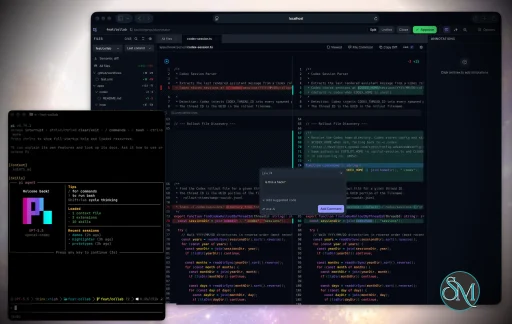
Plannotator is an open-source platform designed to review and validate plans and code generated by AI coding agents.
The platform provides a centralized interface where developers can:
Review AI-generated plans
Annotate proposed actions
Approve or reject tasks
Inspect code changes
Provide structured feedback
Improve agent outputs
Maintain human oversight
Rather than replacing developers, Plannotator aims to keep humans involved in critical decision-making during AI-assisted development.
As AI coding agents become increasingly capable, developers face a growing challenge: ensuring that AI-generated plans and code changes align with project requirements before they are executed. Plannotator addresses this problem by acting as a review layer between developers and AI coding agents.
Instead of generating code itself, Plannotator focuses on making AI-driven development more transparent and controllable. It allows teams to review, annotate, approve, reject, and refine agent-generated plans and code changes before they affect a project.
Download Plannotator v0.24.1 - Software Mirrors |
|---|
Plannotator v0.24.1 for Windowsplannotator-paste-win32-arm64.exe | 106.86 MB plannotator-paste-win32-x64.exe | 110.08 MB |
Plannotator v0.24.1 for macOSplannotator-darwin-arm64 | 112.19 MB plannotator-darwin-x64 | 116.6 MB |
Plannotator v0.24.1 for Linuxplannotator-linux-arm64 | 147.7 MB plannotator-linux-x64 | 148.23 MB |
Plannotator v0.24.1 Release Notes:Follow @plannotator on X for updatesMissed recent releases?
What's New in v0.24.1A one-fix patch.plannotator annotate now opens a file you point to with a ../ path.
v0.24.1 follows v0.24.0 by a few hours, so the full v0.24.0 notes are included below — most users updating now are getting both. Annotate accepts parent-relative file pathsRunningplannotator annotate ../docs/plan.md failed with File type not supported: .md, even though .md is supported. The path resolver rejected any relative path that pointed outside the current directory, so a ../ path never resolved. The command then found the file on disk and reported the resolver miss as a type error, which is why the message named a supported extension.
An explicit path you type is now honored when the file exists, including a ../ path that points to a parent directory. This matches how absolute paths already work. Bare filenames still resolve only within the current project, so typing notes.md cannot reach a same-named file in a parent directory.
Closing #1085, reported by @shulcsm.
What's New in v0.24.0This release adds two review surfaces: a gallery for the images, videos, and documents inside PR conversations, and native GitButler workspace support. 25 pull requests landed since v0.23.1. Six came from community members, four of them first-time contributors. The release also brings port ranges, an expanded comment editor, and fixes across the OpenCode and Pi integrations.PR and MR artifact galleryPull request conversations hold more than text: screenshots of the bug, GIFs of the fix, demo videos, HTML reports, attached markdown. The review UI ignored all of it. When you review a GitHub pull request or GitLab merge request, Plannotator now collects images, GIFs, videos, HTML, and markdown files from the description and conversation into a gallery. Selecting a tile opens a focused viewer. Markdown and sandboxed HTML render inline, and everything is annotatable: select text in a document, drop a point note on an image, pin a note to a video timestamp, or comment on the artifact as a whole. These notes join your normal review feedback with their source attached, whether the feedback posts to GitHub/GitLab or returns to your local agent. Conversation artifacts sort newest-first, and you can hide tiles you don't want to see again. The gallery appears only for hosted reviews, since local diffs have no conversation to collect from.
GitButler review supportGitButler users work in a virtual-branch workspace that ordinary Git tooling misreads: HEAD sits on a synthetic workspace commit, and several branches are applied at once. Running a code review there produced confusing diffs against internals GitButler manages for you. Plannotator now detects an active GitButler workspace and reviews it natively. The default Workspace view shows everything applied, committed changes plus assigned and unassigned working-tree changes, against GitButler's reported merge base. You can also review a single stack or one branch within a stack as committed-only diffs. Detection requires both the workspace HEAD and GitButler's local target configuration, so a leftover branch or database from a past experiment cannot hijack an ordinary Git repo. An active workspace needs thebut CLI (0.21.0 or newer). --gitbutler forces the provider and --git remains the escape hatch. Both the Bun and Pi runtimes support it.
The original GitButler effort came from @dansusman, whose work is preserved in the commit co-author credit.
Expanded comment editor in code reviewLong review comments were cramped in the compact inline toolbar. A new expand control opens a full-size dialog that edits the same comment, so you can draft multi-paragraph findings and submit through the familiar flow. The compact composer stays the default for quick notes and gains vertical resize.
Port rangesPLANNOTATOR_PORT now accepts an inclusive range like 19432-19463. Plannotator tries each port in order and binds the first available one, in both the Bun and Pi runtimes. Fixed single ports and the random-port default behave as before. This helps devcontainer and SSH setups where you forward a block of ports and run several sessions side by side.
OpenCode: cancelling a plan review now cleans upCancelling asubmit_plan call in OpenCode left the review server running, so the next plan submission could not bind its port. Cancellation now flows through OpenCode's tool-abort contract: the server shuts down, timers and child processes are released, and the plan is kept so a resubmitted revision reuses the same fixed port.
Pi: faster startup and honest error reportingThe extension added about two seconds to everypi launch because its full module graph loaded at registration. The heavy browser and server graph now loads on first use, and the large UI bundles are read only when you open a review or annotate session.
Separately, when a review engine failed (for example, out of API credits mid-review), Guided Review reported a generic parse failure instead of the real cause. Provider errors now surface as themselves.
Background git checks can no longer freeze the terminalPlannotator periodically checks whether your review baseline is behind its remote. On repos whose remote needs interactive authentication, that backgroundgit ls-remote could open a credential or passphrase prompt with nowhere to render. On Pi it froze the TUI. Background discovery now runs without interaction: credential prompts are disabled, SSH runs in batch mode, and timed-out processes are cleaned up as a group. Explicit actions like the "Fetch" button keep the normal interactive authentication path.
Workspace mode discovers symlinked reposMulti-repo workspace review walked real directories only, so a child repo reachable through a symlink was skipped. Symlinked and junction-linked repos are now discovered, deduplicated by real path, and labeled by their workspace-relative alias. This release also caps the discovery walk with thePLANNOTATOR_FILE_BROWSER_MAX_FILES budget, so a stray symlink into a huge unrelated tree cannot stall startup.
Additional Changes
Install / UpdatemacOS / Linux:/plugin in Claude Code, find plannotator, and click "Update now".
OpenCode: Clear cache and restart:
opencode.json:
What's Changedv0.24.1
v0.24.0
New Contributors
Contributors@iurysza built port range support across both server runtimes for their first contribution, with tests for the parsing edge cases. @buihongduc132's first contribution touched all six servers, giving API clients proper JSON 404s. @franktronics fixed the OpenCode planning handoff on their first PR. @FNDEVVE both reported and fixed the visual-explainer Mermaid color bug. @leoreisdias returned for a fifth contribution with the expanded comment editor. @gwynnnplaine made the System theme option consistent everywhere. @dansusman's original GitButler pull request laid the groundwork for this release's native support. Issue reporters drove much of the fix list this cycle:
|
Key Features of Plannotator
Plan Review System
One of Plannotator's core capabilities is reviewing plans generated by AI agents before execution.
Developers can examine:
Proposed tasks
Implementation strategies
Agent reasoning
Planned file modifications
Workflow sequences
This visibility helps reduce unintended changes and costly mistakes.
Annotation Tools
The platform allows users to add comments, notes, and guidance directly to AI-generated plans.
These annotations can be used to:
Clarify requirements
Correct misunderstandings
Provide context
Guide future agent actions
AI Code Review
Plannotator extends the review process beyond planning by supporting inspection of generated code.
Developers can:
Review modifications
Analyze diffs
Leave comments
Request revisions
Validate implementation details
This workflow resembles modern pull-request review systems.
Human-in-the-Loop Workflows
A major design goal is ensuring that AI actions remain subject to human approval.
Organizations can establish review processes where important actions require validation before execution.
Open Source Foundation
Plannotator is open source, allowing teams to inspect, modify, and self-host the platform according to their needs.
This transparency is particularly valuable for organizations adopting AI-assisted software development.
User Experience
The interface is designed around review workflows rather than direct code generation.
Instead of interacting with a chatbot, users primarily:
Receive agent-generated plans
Review proposed actions
Add feedback
Approve or reject changes
Monitor execution results
The workflow feels familiar to developers accustomed to pull requests, code reviews, and project planning tools.
Productivity Benefits
As AI coding tools become more autonomous, review processes become increasingly important.
Plannotator helps organizations:
Reduce risky AI actions
Improve code quality
Increase accountability
Preserve architectural consistency
Encourage collaboration between developers and AI agents
For teams adopting AI-driven development, these safeguards can be as valuable as the coding agents themselves.
Collaboration Features
The platform supports collaborative review workflows where multiple team members can participate in evaluating AI-generated outputs.
This allows:
Peer review
Team approval processes
Shared annotations
Collective decision-making
Such features are especially useful for larger engineering teams.
Performance
Because Plannotator focuses on workflow management and review rather than model inference, performance largely depends on the connected AI agents and integrations.
The platform itself is lightweight and primarily serves as an orchestration and review layer.
Open Source Advantages
Being open source provides several benefits:
Transparent development
Self-hosting capabilities
Custom integrations
Community contributions
Vendor independence
Organizations concerned about compliance, security, or proprietary workflows may find these advantages particularly appealing.
Limitations
Plannotator is designed as a companion tool rather than a complete AI development platform.
Common limitations include:
Requires external AI coding agents
Best suited for teams already using AI-assisted development
Smaller ecosystem than mature developer platforms
Additional review steps may slow rapid prototyping
Some users may prefer fully autonomous workflows
The software delivers the most value in environments where oversight and quality control are priorities.
Pros
Improves transparency of AI-generated plans
Supports structured review workflows
Human-in-the-loop design
Useful annotation system
Open source
Self-hosting support
Familiar review experience for developers
Helps reduce AI-generated mistakes
Cons
Not a standalone coding agent
Requires integration with AI development tools
Smaller community than established developer platforms
Adds review overhead to workflows
Best suited for teams rather than casual users
Who Should Use Plannotator?
Plannotator is ideal for:
Software development teams
Engineering managers
AI-assisted development workflows
Organizations adopting coding agents
Open-source projects
Teams prioritizing code quality and governance
It is particularly valuable for environments where AI-generated code requires oversight before reaching production systems.
Plannotator fills an increasingly important role in the AI development ecosystem by providing visibility and control over AI-generated plans and code changes. Its focus on human oversight, structured reviews, and collaborative workflows makes it a useful companion for modern coding agents. While it is not a replacement for AI coding tools themselves, it offers a practical solution for teams seeking greater confidence and accountability in AI-assisted software development.
Developer:
backnotprop
Operating System:
Windows / macOS / Linux
Date Added:
2026-07-20T23:02:23.862Z
Categories:
Post a Comment/Report Broken Link: