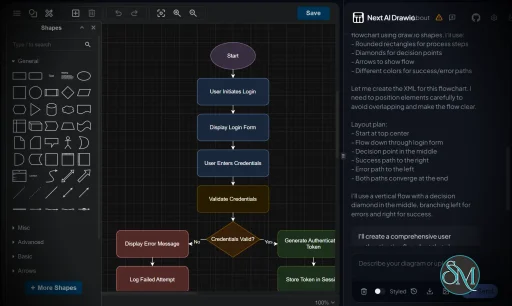
Next AI Draw.io is an open source application that brings AI-powered diagram generation to Draw.io (diagrams.net). It allows users to create flowcharts, architecture diagrams, UML diagrams, mind maps, sequence diagrams, and other visualizations using natural language prompts. Instead of manually placing shapes and connectors, users simply describe what they want, and the AI generates an editable Draw.io diagram.
Creating diagrams from scratch can be time-consuming, especially for software architecture, business processes, and technical documentation. Next AI Draw.io simplifies this process by combining large language models with the Draw.io file format, enabling users to generate professional diagrams in seconds.
Since the output is compatible with Draw.io, every generated diagram remains fully editable after creation.
Key Features of Next AI Draw.io
AI Diagram Generation
Users can describe a diagram in plain English, and Next AI Draw.io automatically generates a structured Draw.io diagram with connected shapes and proper layouts.
Multiple Diagram Types
The application supports generating various diagram styles, including:
Flowcharts
System architecture diagrams
UML class diagrams
Sequence diagrams
Entity relationship diagrams
Mind maps
Organization charts
Network diagrams
Editable Draw.io Output
Unlike image-based AI diagram generators, the output is a native Draw.io diagram. Every object, label, and connector can be modified after generation.
AI Model Support
Next AI Draw.io supports multiple AI providers and can often be configured to work with cloud-based models or locally hosted large language models, giving users flexibility over privacy and operating costs.
Modern Web Interface
The interface is clean and easy to use. Users simply enter a prompt, choose the AI model if necessary, and generate diagrams without learning complicated syntax.
Open Source
Being open source allows developers to inspect the code, self-host the application, customize workflows, and contribute improvements to the project.
Download Next AI Draw.io v0.4.16 - Software Mirrors |
|---|
Next AI Draw.io v0.4.16 for Windows |
Next AI Draw.io v0.4.16 for macOSNext-AI-Draw.io-0.4.16-arm64-mac.zip | 297.55 MB Next-AI-Draw.io-0.4.16-arm64.dmg | 305.97 MB |
Next AI Draw.io v0.4.16 for Linuxnext-ai-draw-io-0.4.16.aarch64.rpm | 188.25 MB next-ai-draw-io-0.4.16.x86_64.rpm | 193.3 MB next-ai-draw-io_0.4.16_amd64.deb | 254.39 MB next-ai-draw-io_0.4.16_arm64.deb | 249.49 MB |
Next AI Draw.io v0.4.16 Release Notes:What's New in v0.4.16Bug Fixes
Improvements
Developer Experience
Contributors
Downloads
⚠️ Note: The app is not code-signed on macOS. You may see security warnings: - macOS: "App is damaged" → Right-click the app → Open → Open, or run:
- Windows: Now code-signed with SignPath! Full Changelog: https://github.com/DayuanJiang/next-ai-draw-io/compare/v0.4.15...v0.4.16 |
Performance and User Experience
Next AI Draw.io provides a smooth experience, especially for users already familiar with Draw.io. Diagram generation is typically fast, depending on the selected AI model.
Generated diagrams generally require only minor adjustments, significantly reducing the time needed to create technical documentation. More complex architecture diagrams may still benefit from manual refinement, but the AI provides an excellent starting point.
Because diagrams remain fully editable, users are not locked into AI-generated results.
Pros
Free and open source.
Generates editable Draw.io diagrams.
Supports multiple diagram types.
Natural language prompt interface.
Compatible with various AI models.
Self-hosting support.
Saves significant time when creating documentation.
Cons
Diagram quality depends on prompt clarity.
Complex diagrams may require manual adjustments.
AI model configuration may require technical knowledge.
Performance depends on the selected AI provider or local hardware.
Who Should Use Next AI Draw.io?
Next AI Draw.io is ideal for software developers, solution architects, DevOps engineers, system administrators, technical writers, students, educators, and business analysts who frequently create diagrams.
It is especially valuable for teams already using Draw.io for software architecture, infrastructure documentation, or workflow visualization.
Final Verdict
Next AI Draw.io successfully combines the flexibility of Draw.io with the productivity of AI-generated diagrams. Its ability to transform natural language into fully editable diagrams can dramatically reduce the time spent creating technical documentation and planning system architectures.
Although complex projects may still require manual refinement, the generated diagrams provide an excellent foundation for further editing. For anyone who regularly works with Draw.io, Next AI Draw.io is a powerful productivity tool worth exploring.
Developer:
Dayuan Jiang
Operating System:
Windows / macOS / Linux
Date Added:
2026-07-11T13:02:38.441Z
Categories:
Post a Comment/Report Broken Link: