Netcatty is an open source SSH client and remote server management application designed for developers, DevOps engineers, and system administrators. Rather than being a simple terminal emulator, it combines SSH, SFTP, port forwarding, terminal management, and workspace organization into a single desktop application. Available for Windows, macOS, and Linux, Netcatty aims to streamline remote server administration with a modern interface and powerful productivity features.
Managing multiple remote servers often means juggling several terminal windows, file transfer tools, and SSH configurations. Netcatty brings these tasks together into one application with organized workspaces, split terminals, and integrated file management.
Unlike traditional SSH clients that focus solely on terminal access, Netcatty provides a complete remote administration environment with support for SSH, Telnet, Mosh, serial connections, SFTP, jump hosts, proxy servers, and port forwarding.
Key Features of Netcatty
Modern SSH Workspace
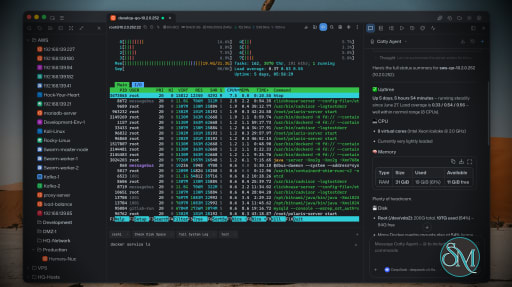
Netcatty organizes servers into a built-in Vault, allowing users to manage large numbers of hosts using grid, list, or tree views with fast search capabilities. This makes navigating complex infrastructures much easier than maintaining separate configuration files.
Split Terminal Support
Multiple terminal sessions can be displayed simultaneously using horizontal and vertical split layouts. This is especially useful when monitoring several servers or comparing outputs side by side.
Built-In SFTP Client
The integrated SFTP browser supports drag-and-drop file transfers, remote file editing, and directory management without requiring a separate application.
Multiple Connection Protocols
In addition to SSH, Netcatty supports Telnet, Mosh, and serial connections. It also includes support for jump hosts, proxy servers, and legacy SSH algorithms for compatibility with older systems.
Port Forwarding
The application supports local, remote, and dynamic port forwarding with reusable configurations and automatic startup, making it suitable for development, database access, and secure tunneling.
Secure Authentication
Netcatty supports password authentication, SSH keys, certificates, and SSH agent forwarding, providing flexibility for both personal and enterprise environments.
Cloud Configuration Sync
Users can synchronize their configuration across multiple devices using supported cloud storage providers such as GitHub, Google Drive, OneDrive, or Amazon S3.
AI Assistant
Recent versions include an integrated AI assistant that helps automate terminal workflows and assists with remote administration tasks directly within the application.
Download Netcatty v1.1.63 - Software Mirrors |
|---|
Netcatty v1.1.63 for WindowsNetcatty-1.1.63-portable-win-arm64.exe | 129.12 MB Netcatty-1.1.63-portable-win-x64.exe | 129.09 MB Netcatty-1.1.63-portable-win.exe | 257.86 MB Netcatty-1.1.63-win-arm64.exe | 129.35 MB Netcatty-1.1.63-win-x64.exe | 129.32 MB |
Netcatty v1.1.63 for macOSNetcatty-1.1.63-mac-arm64.dmg | 148.67 MB Netcatty-1.1.63-mac-arm64.zip | 148.71 MB |
Netcatty v1.1.63 for LinuxNetcatty-1.1.63-linux-aarch64.pacman | 103.81 MB Netcatty-1.1.63-linux-aarch64.rpm | 152.25 MB Netcatty-1.1.63-linux-amd64.deb | 155.25 MB Netcatty-1.1.63-linux-arm64.AppImage | 155.67 MB Netcatty-1.1.63-linux-arm64.deb | 152.3 MB Netcatty-1.1.63-linux-x64.pacman | 110.77 MB |
Netcatty v1.1.63 Release Notes:✨ Release Highlights🚄 Mosh is now native, cross-platform, and dependablev1.1.63 completes Netcatty's move to MoshCatty, a pure Rust Mosh client shared by Windows, macOS, and Linux. The old Windows Cygwin runtime and terminal-definition bundle are gone, so Mosh now ships as a single native client with the same connection path on every supported platform. The first MoshCatty rollout exposed two serious Windows and terminal-integration problems, and both are fixed here. Arrow keys, Ctrl/Alt-modified arrows, Alt shortcuts, and Ctrl+C now pass through Windows terminals correctly. Mosh sessions also stay in Netcatty's normal terminal buffer, which brings keyword highlighting and scrollback back to life instead of hiding the active session in a separate screen. Netcatty now restores cursor, mouse, and styling state when a Mosh connection ends, without throwing away the scrollback that users need after a disconnect. Packaging is locked to MoshCatty 0.1.4 or newer, so older affected clients cannot be bundled accidentally.🖥️ More stable terminal panes and workspacesTerminal panes now remain continuously rendered unless hibernation is enabled, reducing visual resets and state loss when moving between tabs and side panels. Split workspaces also recover their geometry when older saved layouts do not include an explicit view mode. Closing a pane from the workspace toolbar now returns it to a standalone terminal tab instead of destroying the session. SFTP surfaces use an opaque background over the continuous terminal layer, and side-panel tooltips avoid the macOS traffic-light area.🌐 Better SSH, SFTP, imports, and host informationSSH latency now reports the real network round-trip time instead of a less useful local measurement, and remote locale handling no longer overwrites the server's environment unexpectedly. OpenWrt process discovery and MobaXterm host imports have also been corrected. SFTP uploads no longer report a false failure when the remote side has already completed successfully but closes the stream in a slightly different order.🎨 Desktop and appearance polishThe default window can be maximized normally again, and switching from System appearance to Dark no longer loses the user's choice during an operating-system theme update. macOS Dock icon sizing has been corrected while keeping the packaged application icon unchanged.Download based on your OS:
What's Changed
New Contributors
|
Performance and User Experience
Netcatty delivers a polished desktop experience with a clean interface and responsive terminal performance. Workspace restoration allows users to resume previous sessions after restarting the application, reducing setup time for daily work.
Although the application is built with Electron, performance is generally smooth on modern hardware. Memory usage is higher than lightweight native SSH clients, but the added functionality justifies the additional resource consumption for most professional users.
The project is actively maintained, with frequent updates introducing new features, performance improvements, and bug fixes.
Pros
Free and open source.
Modern interface with workspace management.
SSH, SFTP, Telnet, Mosh, and serial support.
Split terminal layouts.
Built-in SFTP browser.
Flexible port forwarding.
Secure authentication options.
Cross-platform support.
Active development.
Cons
Electron-based application uses more memory than native SSH clients.
Advanced features may be unnecessary for users who only need basic SSH access.
Some enterprise users may prefer highly specialized commercial SSH management tools.
Who Should Use Netcatty?
Netcatty is an excellent choice for developers, DevOps engineers, cloud engineers, system administrators, security professionals, and IT consultants who regularly manage multiple remote servers.
It is particularly valuable for users looking to replace separate SSH clients, SFTP applications, and terminal windows with a unified workspace.
Final Verdict
Netcatty is far more than a traditional SSH client. By combining terminal management, secure file transfers, workspace organization, port forwarding, and modern productivity features into one application, it offers an impressive environment for remote server administration.
Its clean interface, broad protocol support, and active development make it one of the most compelling open source SSH workspaces currently available. For professionals managing remote infrastructure on a daily basis, Netcatty is well worth considering.
Post a Comment/Report Broken Link: