Multica is an open-source platform designed to manage and orchestrate AI agents within development workflows. Instead of running a single AI assistant, it allows multiple agents to collaborate, execute tasks, and share knowledge across projects.
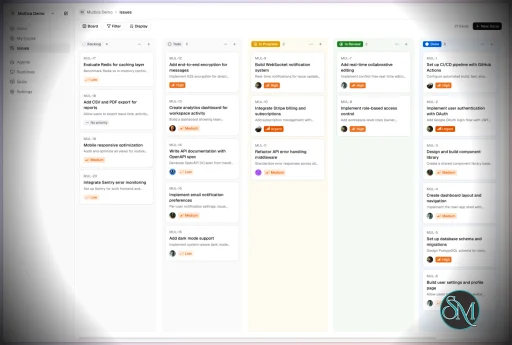
It essentially acts like a control center where:
AI agents are assigned tasks
Progress is tracked in real time
Outputs and skills are reused across workflows
Multica currently supports Claude Code, Codex, OpenClaw, and OpenCode out of the box. The daemon auto-detects whichever CLIs you have installed. Since it’s open source, you can also add your own backends.
Download Multica v0.4.0 - Software Mirrors |
|---|
Multica v0.4.0 for Windowsmultica-cli-0.4.0-windows-amd64.zip | 5.75 MB multica-cli-0.4.0-windows-arm64.zip | 5.13 MB multica-desktop-0.4.0-windows-arm64.exe | 504.88 MB multica-desktop-0.4.0-windows-x64.exe | 165.35 MB multica_windows_amd64.zip | 5.75 MB multica_windows_arm64.zip | 5.13 MB |
Multica v0.4.0 for macOSmultica-cli-0.4.0-darwin-amd64.tar.gz | 5.65 MB multica-cli-0.4.0-darwin-arm64.tar.gz | 5.22 MB multica-desktop-0.4.0-mac-arm64.dmg | 215.38 MB multica-desktop-0.4.0-mac-arm64.zip | 205.76 MB multica_darwin_amd64.tar.gz | 5.65 MB multica_darwin_arm64.tar.gz | 5.22 MB |
Multica v0.4.0 for Linuxmultica-cli-0.4.0-linux-amd64.tar.gz | 5.58 MB multica-cli-0.4.0-linux-arm64.tar.gz | 5.04 MB multica-desktop-0.4.0-linux-aarch64.rpm | 762 MB multica-desktop-0.4.0-linux-amd64.deb | 156.49 MB multica-desktop-0.4.0-linux-arm64.AppImage | 956 MB multica-desktop-0.4.0-linux-arm64.deb | 815.52 MB multica-desktop-0.4.0-linux-x86_64.AppImage | 222.29 MB multica-desktop-0.4.0-linux-x86_64.rpm | 133.66 MB multica_linux_amd64.tar.gz | 5.58 MB multica_linux_arm64.tar.gz | 5.04 MB |
Multica v0.4.0 Release Notes: Changelog- 12e3c393d7e51df3040805b95c80ddbdcbcd0a73 Add auto-save confirmation toasts (#5261)
- 41b3045efa7599187f944b67cbd0eab438542a15 MUL-4424: bound Codex app-server startup RPCs (#5319)
- 3bd69bdaa2ec64d0a26db4308acf011f6eafc835 MUL-4432: add DM button on agent detail page (#5289)
- ab54c2be54f9f77930c7962309027384c444e756 MUL-4471: refresh workspace repos on demand (#5334)
- 69ad80688162ebfa33d454cea7306a070bcebb43 MUL-4472: fetch runtime profiles on demand
- 3a382d92b34d2203f45d0ab6b7d39fbe3478b593 Refine agent access scopes in create flow and inspector (#5269)
- 9a071b827fda15cb4dc8ba0d1acf5aafd51d879b Revert "fix(chat): correct unread — archived sessions + mount-race auto-read …" (#5332)
- d51a3cbbbda8f76876a399d86eb0d2c43e1f3375 Unify settings layout and auto-save (#5257)
- 014eb0496df249b17ad0abbe2e7f168d2b0a809a docs(changelog): v0.4.0 release notes (#5339)
- 1427e8abd3add9c5a54694238fac8117bba8743e feat(agents): add conversational creation studio (#5296)
- e1c65b016257cb39ad690079b8d04bafee084084 feat(agents): remove template entry from agent creation ModeChooser (MUL-4481) (#5343)
- 2affa34f767205426000c70b3bf7b28d6a507e68 feat(agents): two-level runtime picker on agent settings — machine, then runtime (MUL-4421) (#5276)
- a19e60a9e64156b9794350d0a6c44eb41aa4d7ab feat(chat): support images/files in agent chat replies (MUL-4287) (#5164)
- 8e1bf6cc51624a9bec90eb189e2ff77c4bb8f866 feat(desktop): merge active tab into content surface, Chrome-style (#5314)
- 53f05cca5efd9308b8be79711c37e1d78fbecf9e feat(github): fan out PR/check_suite webhooks to all bound workspaces (MUL-4343) (#5218)
- 80e54094a87f78c9d5d66af7bebac68bce04fe7c feat(issues): sticky setting for the issue comment bar (MUL-4435) (#5293)
- 835b1d5e4fa89dfc80243e0015ca1509ed11f53d feat(issues): thread quick-jump minimap on issue detail (MUL-4389) (#5234)
- c377d7fb4f4a101bce7548c91caa77a26fcca388 feat(labels): add scoped label management (#5279)
- bf288349f6791f700f627cd9f643c0d0a1e5c0e7 feat(project): add start_date and due_date fields (MUL-4388) (#5313)
- 47e3fdedd06ebe5c60eab12246740626b3293d03 feat(projects): start_date / due_date UI + create-project footer aligned with create-issue (MUL-4388) (#5331)
- b0133261d6249d311351cc5f4ab7298a9c8927f1 feat(settings): improve API tokens page guidance and token-created dialog (#5254)
- b72bd55d16ddb45f56572b9efa6060c60b93e4b9 feat(shortcuts): make browser-reserved accelerators recordable on desktop (#5327)
- 54b34f8ccdeab8add82e855790f678ba3d97e35f feat(skills): search runtime local skills (#5104)
- 4efcfb96e368af93be784e86c06e661dcdb63f84 feat(ui): establish surface system (#5248)
- d8165bac4e46cf9a6ffadef1447d7ebd8dfd431a feat(views): unify reply and comment send buttons to the circular chat style (#5288)
- b64ebd60b57c386242b4909dcc48d0adf5307784 feat: add customizable keyboard shortcuts (#5294)
- abeee82cd09a7cc5913fb7cd227ad9277abed2b0 feat: animate numeric metrics with NumberFlow (#5317)
- a14098288be4cc38cd664a79b482e08380113f55 feat: redesign agent Skills and MCP capabilities (#5277)
- eacc842280f2ee6719e3720a9d5c6a05aac92f24 fix(agents): constrain builder models to runtime (#5323)
- 05d929858237eeed3edac4df7329397181bf9c34 fix(agents): let workspace members view runtime capabilities (MUL-4427) (#5281)
- 8a05af0342e5c61bd1c0e9d1ddc3791c204be771 fix(agents): pin capability/settings sub-nav while content scrolls (MUL-4426) (#5280)
- 0b054b5c8b04cd5a8b16a39fa1369b5238d11d2b fix(chat): clear external channel binding on archive, drop archived from FAB unread (#5214)
- cec071dc06d3161c47a24e159460d7cace39a103 fix(chat): correct unread — archived sessions + mount-race auto-read (MUL-4360) (#5315)
- e10bb3fff0bae04dcbb34a9cfac796def214740e fix(chat): unify unread badge counting across sidebar, mobile, and thread list (MUL-4286) (#5239)
- 9f775db16edd0d65375726886a70974aacec9ec8 fix(cli): stop pflag from garbling login --token help output (MUL-4410) (#5253)
- 9d453fac1ea9e60acc8debb4d7a57bcd3e8ca868 fix(comments): clarify 409 for top-level comment from a comment-triggered task (MUL-4417) (#5292)
- c7002e3b308306a00b8431db9167ebef82681aaa fix(daemon): detect Codex CLI under ChatGPT.app on macOS (#5250)
- 7a405fd1cf9863ccd43e4e61a48ac6419346cc65 fix(daemon): keep the task transcript ordered and complete (#5210)
- 932bbf2bb501d9b451f6827aaad84eada15d762b fix(editor): guard Mod-Enter submit against open IME composition (#5231)
- 489657cfb508a20af836c8a8f35803c462b990c7 fix(inbox): align inbox list left padding with chat list (#5240)
- 65ccab172abab3b2008195bc7b6c27909507ce8f fix(issues): float find bar above sticky resolve collapse bars (MUL-4414) (#5264)
- b9b9e73e4942b5cf0ceb09c51484060efd01b881 fix(issues): keep detail content column centered under classic scrollbars (#5255)
- 45ff984518788b33b8e98f74ffcdc9310e0bc02d fix(labels): sweep resource-label junctions on bulk deletes (MUL-4479) (#5348)
- 1de4b2d688ea04e8657c15ff6c8b1a631722c034 fix(migrations): make 164_attachment_task_id idempotent to self-heal #5307 renumber drift (#5324)
- 8567ebffd94277478ce73f8f79c2b0cef75b98db fix(migrations): rebuild legacy label index CONCURRENTLY on rollback (MUL-4479) (#5357)
- 94f9dcaa7795013e4d3900b4683ab59768f2b7f9 fix(migrations): renumber attachment_task_id to resolve 161/162 prefix collision (#5307)
- 5f767d671a0b153dbeaa77bea75177e3c1734807 fix(redact): cover credential formats that leaked unredacted (#5274)
- 411a160b995908943dd877682dda81c5a319f9cb fix(release): harden v0.3.44 migrations (#5345)
- 2a48ffa2aa734a4a362c2c52a786cd98a20bcef6 fix(runtimes): simplify local machine list row (#5298)
- 79c4589f7dc9b9e3690e697bb167e6ecb0f926d3 fix(server): don't cancel active tasks when issue status → cancelled (#5328)
- f686901bd64171024138d0e4ca1ef9afd4b00ac7 fix(settings): align read-only fields and flatten cards (#5310)
- 4ad060ec54e1e866900908d69d92267240750962 fix(settings): unify form control widths with SettingsRow size tiers (#5291)
- 7356b56a10f3dbc519141babefdfdf3f41abdf09 fix(taskfailure): anchor HTTP status-code matches to digit boundaries (#5275)
- ca46fdb483cbb2e8b9df1016582d21af0d12eb26 fix(ui): lighten menu shadows with dedicated --menu-shadow token (#5256)
- 3e03d8f97b33e15ceb5de0d2045c5198bd9381ea fix(views): keep in-card side panels on the content surface color (#5329)
- 6aed9b40ee7a94cb170809973c90b061ae02e70c fix: confirm shortcut reset and refresh translations (#5295)
- 220fa58264be27c593e0c7b0c43c8180ddfc0f03 fix: guide SSH installs to token login (#5318)
- 57ecdef38bdc84e816b359c7f7d442c581a3d2c8 fix: hide disabled model-invocation skills from briefs (#5311)
- 4ee34b9fcbdfa38adc79a5228a027b3dd9565062 fix: return stage from issue list APIs
- b47e835d7d6bdcc4f872eb1a0ab02908be7db7c1 refactor(runtimes): organize runtime management by machine (#5297)
- 5541819f9817db1d6793236b71e8a79739f3f401 refactor(ui): unify collection page patterns (#5258)
- 06df00f414a8b66151fea8cfbbca5ea4d6d7780b refactor(views): remove Runtimes tab CLI-update red dot (#5228)
|
Key Features
1. AI Agents as Teammates
Multica treats AI agents like real contributors. You can assign tasks, monitor progress, and manage their work similar to human developers.
2. Multi-Agent Orchestration
Instead of relying on a single AI model, Multica coordinates multiple agents working together on complex tasks, improving efficiency and scalability.
3. Skill Reuse and Compounding
One of its most innovative features is skill accumulation. Agents can reuse previously learned solutions, reducing redundancy and improving performance over time.
4. Real-Time Workflow Tracking
You get a unified dashboard where you can:
This makes it suitable for structured development environments.
5. CLI and Web Interface
Multica provides both:
It supports local and cloud-based environments, offering flexibility in deployment.
6. Open Source and Flexible
Being open source, Multica allows:
This makes it appealing for teams that want control over their AI infrastructure.
Performance and Use Cases
Multica is designed for advanced workflows rather than casual use. It performs best in environments where multiple AI agents are needed to collaborate.
Typical use cases include:
AI-assisted software development
Automation pipelines
Multi-step research and analysis
DevOps and engineering workflows
Its ability to coordinate agents makes it especially useful for complex tasks that go beyond simple prompts.
Quick Install
curl -fsSL https://raw.githubusercontent.com/multica-ai/multica/main/scripts/install.sh | bash
Installs the Multica CLI on macOS and Linux. Works with Homebrew or downloads the binary directly.
Windows (PowerShell):
irm https://raw.githubusercontent.com/multica-ai/multica/main/scripts/install.ps1 | iex
Then configure, authenticate, and start the daemon in one command:
multica setup # Connect to Multica Cloud, log in, start daemon
Self-hosting? Add --with-server to deploy a full Multica server on your machine:
curl -fsSL https://raw.githubusercontent.com/multica-ai/multica/main/scripts/install.sh | bash -s -- --with-server
multica setup self-host
Requires Docker. See the Self-Hosting Guide for details.
Getting Started
1. Set up and start the daemon
multica setup # Configure, authenticate, and start the daemon
The daemon runs in the background and auto-detects agent CLIs (claude, codex, openclaw, opencode) on your PATH.
2. Verify your runtime
Open your workspace in the Multica web app. Navigate to Settings → Runtimes — you should see your machine listed as an active Runtime.
What is a Runtime? A Runtime is a compute environment that can execute agent tasks. It can be your local machine (via the daemon) or a cloud instance. Each runtime reports which agent CLIs are available, so Multica knows where to route work.
3. Create an agent
Go to Settings → Agents and click New Agent. Pick the runtime you just connected and choose a provider (Claude Code, Codex, OpenClaw, or OpenCode). Give your agent a name — this is how it will appear on the board, in comments, and in assignments.
4. Assign your first task
Create an issue from the board (or via multica issue create), then assign it to your new agent. The agent will automatically pick up the task, execute it on your runtime, and report progress — just like a human teammate.
User Experience
The concept behind Multica is powerful, but it comes with complexity.
Requires understanding of AI agents and workflows
Setup may involve configuring runtimes and integrations
More suited for developers than beginners
However, once configured, it provides a highly structured and scalable system.
Pros and Cons
Pros
Open source and highly customizable
Supports multi-agent collaboration
Reusable skill system improves efficiency
Real-time workflow tracking
Flexible deployment options
Cons
Still early-stage and evolving
Setup complexity is high
Requires technical knowledge
Not suitable for simple AI tasks
Who Should Use Multica
Multica is ideal for:
Developers working with AI agents
Teams building automated workflows
Companies experimenting with agent-based systems
Advanced users exploring AI orchestration
It is not designed for casual users who just need a simple chatbot.
Final Verdict
Multica represents the next step in AI tooling, moving from single assistants to collaborative AI systems. While still evolving, it introduces a powerful concept that could shape how teams use AI in development.
Multica is a promising platform for advanced users who want to build scalable, multi-agent AI workflows with full control and flexibility.
If you are exploring multi-agent AI systems or building automated development workflows, Multica is an emerging tool worth paying attention to. It introduces a new way to treat AI agents not just as tools, but as collaborative team members working alongside developers.
Post a Comment/Report Broken Link: