AdGuard VPN for Mac is a privacy-focused VPN application that encrypts your Internet traffic and routes it through AdGuard's VPN servers. Unlike a basic VPN client that simply provides an on/off switch, AdGuard VPN offers selective routing, allowing you to choose which websites use the VPN and which continue using your normal connection.
This makes it particularly interesting for Mac users who want VPN protection without necessarily routing their entire Internet connection through a VPN server.
AdGuard VPN is separate from AdGuard Ad Blocker for Mac.
The two products solve different problems:
AdGuard Ad Blocker blocks advertisements, trackers, malicious domains, and unwanted web content.
AdGuard VPN encrypts traffic between your Mac and the VPN server and hides your public IP address.
They can be used together when you want both network-level VPN protection and content filtering.
Key Features of AdGuard VPN for Mac
System-Wide VPN
AdGuard VPN can protect traffic from the Mac as a whole rather than limiting the VPN to one browser.
This means supported applications can use the VPN connection without requiring separate browser extensions or individual VPN configurations.
Selective Routing
Selective routing is one of AdGuard VPN's most useful features.
You can configure the VPN so that:
Most traffic uses the VPN, while selected destinations bypass it.
Most traffic bypasses the VPN, while selected websites use it.
This is useful when only certain websites or services need a VPN connection.
For example, you can keep normal browsing on your regular connection while routing specific destinations through a VPN server.
AdGuard VPN Protocol
AdGuard VPN uses its own VPN protocol based on WireGuard technology, designed to provide modern VPN performance while incorporating additional mechanisms intended to make VPN traffic less recognizable.
This gives AdGuard control over both the VPN protocol and its routing behavior rather than simply wrapping a conventional VPN protocol in a graphical interface.
IP Address Protection
When traffic is routed through AdGuard VPN, websites see the VPN server's IP address instead of your normal public IP address.
This can help prevent websites from directly determining your home or mobile network's public IP address.
It can also allow you to connect through VPN servers in different geographic locations.
A VPN does not, however, make you completely anonymous. Logged-in accounts, cookies, browser fingerprints, and other identifiers can still associate activity with you.
Traffic Encryption
AdGuard VPN encrypts traffic between your Mac and the VPN server.
This is particularly useful on untrusted networks such as public Wi-Fi because someone monitoring the local network cannot simply read the encrypted VPN traffic.
The VPN provider can still potentially see metadata associated with your VPN connection, so choosing a provider with an appropriate privacy policy remains important.
DNS Protection
DNS requests can be handled through the VPN connection, helping prevent your normal DNS provider from receiving DNS queries that would otherwise reveal the domains you are accessing.
This complements the IP-address protection provided by the VPN.
SOCKS5 Proxy
AdGuard VPN also provides SOCKS5 proxy functionality.
This is useful for advanced users who want to configure individual applications to use the VPN rather than routing the entire Mac through it.
It can also be useful in development, testing, and other workflows where application-specific routing is preferable to system-wide VPN operation.
AdGuard Ecosystem Integration
AdGuard's VPN and ad-blocking products are designed to work alongside each other.
This gives users the option of combining:
Advertisement blocking
Tracker blocking
DNS filtering
Malicious-site protection
VPN encryption
IP address masking
The distinction between these functions is important. A VPN does not inherently block advertisements, while an ad blocker does not inherently hide your public IP.
Download AdGuard VPN for Windows Latest Version
Download AdGuard VPN for Mac Latest Version
Download AdGuard VPN for Android Latest Version
Download AdGuard VPN for iOS Latest Version
Download AdGuard VPN for Edge Latest Version
Download AdGuard VPN for Firefox Latest Version
Download AdGuard VPN for Chrome Latest Version
Download AdGuard VPN for Opera Latest Version
Download AdGuard VPN v2.10.0.1130 - Software Mirrors |
|---|
AdGuard VPN v2.10.0.1130 for macOS |
AdGuard VPN v2.10.0.1130 Source Code |
AdGuard VPN v2.10.0.1130 Release Notes:Disclaimer: AdGuard VPN for macOS is not an open-source project. We use Github as an open bug tracker for users to see what developers are working on.AdGuard VPN for Mac v2.10 marks another milestone in our effort to make the app accessible to everyone. For us, accessibility isn’t just a feature, it’s a core part of creating a product that’s intuitive, reliable, and comfortable to use, regardless of how you interact with your device. This journey began in version 2.9, when we started bringing accessibility improvements to AdGuard VPN. With v2.10, we’re completing that work by making the last remaining sections — Website and app exclusions, Statistics, and Advanced settings — fully accessible. As a result, every key area of the app now supports screen readers and can be navigated entirely with a keyboard. Let’s take a closer look at what’s changed in these sections. Better keyboard navigationWe’ve improved how focus moves throughout the interface, making navigation more logical and predictable. No more unexpected focus jumps or getting “stuck” in certain parts of the app. This means faster navigation and a smoother overall experience, whether you’re a power user or simply prefer keyboard shortcuts.Improved screen reader supportScreen readers can now correctly identify and announce interface elements, including their names, roles, and states. This makes interacting with settings and more complex sections of the app significantly easier.Stability improvementsAlongside accessibility enhancements, we’ve also worked on improving the app’s stability to make your everyday VPN experience even more reliable.ChangelogImprovements
Sciter (UI engine)
VPN client (TrustTunnel protocol implementation)
|
Performance and User Experience
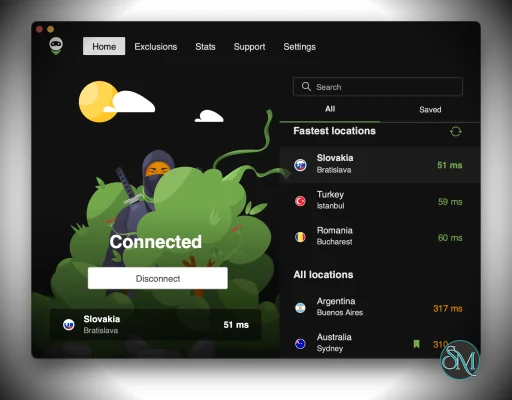
AdGuard VPN's interface is relatively straightforward for normal VPN use. Select a server, connect, and the application handles the underlying VPN configuration.
The more interesting functionality appears when selective routing is configured.
For example, you can use the VPN only for particular websites while leaving other traffic untouched. This avoids unnecessarily sending latency-sensitive or bandwidth-heavy traffic through a remote VPN server.
Performance naturally varies according to the VPN server, geographic distance, network quality, and current server load.
A nearby VPN server will generally provide better latency than one located far away.
Pros
System-wide VPN.
Selective routing.
Modern VPN protocol.
Hides your public IP.
Encrypts traffic to the VPN server.
Multiple VPN locations.
DNS protection.
SOCKS5 proxy support.
Useful on public Wi-Fi.
Flexible enough for advanced users.
Works well alongside AdGuard's ad-blocking products.
Straightforward interface.
Cons
Does not provide complete anonymity.
VPN performance depends on server location and network conditions.
Selective routing takes some configuration.
SOCKS5 requires additional application configuration.
VPN and ad blocking are separate functions.
Routing traffic through distant servers can increase latency.
Advanced features may be unnecessary for users who only need a simple VPN.
Who Should Use AdGuard VPN for Mac?
AdGuard VPN is a good choice for Mac users who want more control than a conventional VPN client provides.
It is particularly useful if you need a VPN for specific websites or services but don't want all Mac traffic to use the VPN.
It is also a sensible option for users already using AdGuard's privacy products who want to add IP masking and encrypted VPN connectivity to their setup.
If you simply want to block advertisements on your Mac, however, AdGuard Ad Blocker is the more appropriate product.
Final Verdict
AdGuard VPN for Mac is a capable VPN with one particularly useful differentiator: flexible traffic routing.
Rather than forcing users to choose between "everything through the VPN" and "nothing through the VPN," selective routing makes it possible to tailor the connection to specific websites and use cases.
The SOCKS5 option adds another layer of flexibility for technically advanced users, while the straightforward system-wide mode makes the application accessible to less technical users.
It is not a replacement for AdGuard's ad-blocking application, but the two products complement each other well. The VPN handles encrypted connectivity and IP masking, while the ad blocker handles advertisements, trackers, and unwanted web content.
For Mac users who want a flexible VPN with strong control over where their traffic goes, AdGuard VPN is a compelling option.
Developer:
Adguard Software Ltd.
Operating System:
macOS
Date Added:
2026-09-08T06:30:41.165Z
Categories:
Post a Comment/Report Broken Link: