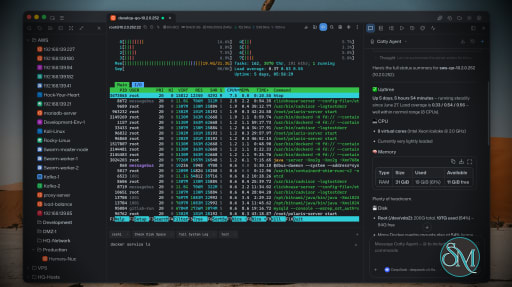
Netcatty is an open source SSH client and remote server management application designed for developers, DevOps engineers, and system administrators. Rather than being a simple terminal emulator, it combines SSH, SFTP, port forwarding, terminal management, and workspace organization into a single desktop application. Available for Windows, macOS, and Linux, Netcatty aims to streamline remote server administration with a modern interface and powerful productivity features.
Managing multiple remote servers often means juggling several terminal windows, file transfer tools, and SSH configurations. Netcatty brings these tasks together into one application with organized workspaces, split terminals, and integrated file management.
Unlike traditional SSH clients that focus solely on terminal access, Netcatty provides a complete remote administration environment with support for SSH, Telnet, Mosh, serial connections, SFTP, jump hosts, proxy servers, and port forwarding.
Key Features of Netcatty
Modern SSH Workspace
Netcatty organizes servers into a built-in Vault, allowing users to manage large numbers of hosts using grid, list, or tree views with fast search capabilities. This makes navigating complex infrastructures much easier than maintaining separate configuration files.
Split Terminal Support
Multiple terminal sessions can be displayed simultaneously using horizontal and vertical split layouts. This is especially useful when monitoring several servers or comparing outputs side by side.
Built-In SFTP Client
The integrated SFTP browser supports drag-and-drop file transfers, remote file editing, and directory management without requiring a separate application.
Multiple Connection Protocols
In addition to SSH, Netcatty supports Telnet, Mosh, and serial connections. It also includes support for jump hosts, proxy servers, and legacy SSH algorithms for compatibility with older systems.
Port Forwarding
The application supports local, remote, and dynamic port forwarding with reusable configurations and automatic startup, making it suitable for development, database access, and secure tunneling.
Secure Authentication
Netcatty supports password authentication, SSH keys, certificates, and SSH agent forwarding, providing flexibility for both personal and enterprise environments.
Cloud Configuration Sync
Users can synchronize their configuration across multiple devices using supported cloud storage providers such as GitHub, Google Drive, OneDrive, or Amazon S3.
AI Assistant
Recent versions include an integrated AI assistant that helps automate terminal workflows and assists with remote administration tasks directly within the application.
Download Netcatty v1.1.65 - Software Mirrors |
|---|
Netcatty v1.1.65 for WindowsNetcatty-1.1.65-portable-win-arm64.exe | 129.17 MB Netcatty-1.1.65-portable-win-x64.exe | 129.15 MB Netcatty-1.1.65-portable-win.exe | 257.96 MB Netcatty-1.1.65-win-arm64.exe | 129.4 MB Netcatty-1.1.65-win-x64.exe | 129.38 MB |
Netcatty v1.1.65 for macOSNetcatty-1.1.65-mac-arm64.dmg | 148.75 MB Netcatty-1.1.65-mac-arm64.zip | 148.79 MB |
Netcatty v1.1.65 for LinuxNetcatty-1.1.65-linux-aarch64.pacman | 103.86 MB Netcatty-1.1.65-linux-aarch64.rpm | 152.3 MB Netcatty-1.1.65-linux-amd64.deb | 155.31 MB Netcatty-1.1.65-linux-arm64.AppImage | 155.74 MB Netcatty-1.1.65-linux-arm64.deb | 152.37 MB Netcatty-1.1.65-linux-x64.pacman | 110.82 MB |
Netcatty v1.1.65 Release Notes:✨ Release Highlights🔐 Per-host SSH authentication modesHosts can now declare how they log in: Automatic, Password only, Key, or Certificate. The same policy applies across direct SSH, jump hosts, SFTP, port forwarding, Mosh, and EternalTerminal, so a password-only host stops probing local keys everywhere instead of only on some paths. Automatic mode still tolerates an unavailable agent and keeps convenient key discovery. Hosts that inherit a group authentication policy keep following that group until you override them, including future group policy changes. Ordinary host edits also preserve the login policy that was effective before save, so casual form work does not silently change auth behavior.🛡️ Safer MFA, EDR step-up, and password-only loginKeyboard-interactive challenges that look like secondary / EDR passwords (including Chinese “二次认证密码” banners) open a clean MFA modal instead of auto-filling the host login password. Save-password is suppressed for true second factors, while Duo-style Password+OTP multi-prompt forms still prefill and allow saving the password slot. Afterpublickey partialSuccess, Netcatty still auto-fills a following Password challenge when that is the next required factor. Password-only hosts no longer fall back to ~/.ssh default keys after a bad password, which previously made wrong credentials look fine on direct login but fail on ProxyJump and SFTP.
📋 Cleaner terminal copy from soft-wrapped selectionsCopying from the terminal now normalizes soft wraps and written padding so multi-line selections reassemble into readable prose instead of glued tokens or broken paths. Heuristics cover CJK, URLs and query strings, Windows paths, CLI flags, hyphenated wraps, and sentence boundaries after complete URLs. A new Normalize text on copy setting makes this cleanup optional when you need the raw buffer. Column selections and Windows CRLF are preserved so bulk copies stay usable in editors and tickets.🖥️ Terminal stability under flood and workspace polishLine-timestamp gutters survive heavy flood output without thrashing markers or freezing scroll: bulk prune, deferred measure, scroll throttle, and capacity sized to the full scrollback setting. An xterm black-block rendering glitch is fixed, and the workspace pane X control again closes the session as expected instead of only detaching the pane.Download based on your OS:
What's Changed
|
Performance and User Experience
Netcatty delivers a polished desktop experience with a clean interface and responsive terminal performance. Workspace restoration allows users to resume previous sessions after restarting the application, reducing setup time for daily work.
Although the application is built with Electron, performance is generally smooth on modern hardware. Memory usage is higher than lightweight native SSH clients, but the added functionality justifies the additional resource consumption for most professional users.
The project is actively maintained, with frequent updates introducing new features, performance improvements, and bug fixes.
Pros
Free and open source.
Modern interface with workspace management.
SSH, SFTP, Telnet, Mosh, and serial support.
Split terminal layouts.
Built-in SFTP browser.
Flexible port forwarding.
Secure authentication options.
Cross-platform support.
Active development.
Cons
Electron-based application uses more memory than native SSH clients.
Advanced features may be unnecessary for users who only need basic SSH access.
Some enterprise users may prefer highly specialized commercial SSH management tools.
Who Should Use Netcatty?
Netcatty is an excellent choice for developers, DevOps engineers, cloud engineers, system administrators, security professionals, and IT consultants who regularly manage multiple remote servers.
It is particularly valuable for users looking to replace separate SSH clients, SFTP applications, and terminal windows with a unified workspace.
Final Verdict
Netcatty is far more than a traditional SSH client. By combining terminal management, secure file transfers, workspace organization, port forwarding, and modern productivity features into one application, it offers an impressive environment for remote server administration.
Its clean interface, broad protocol support, and active development make it one of the most compelling open source SSH workspaces currently available. For professionals managing remote infrastructure on a daily basis, Netcatty is well worth considering.
Post a Comment/Report Broken Link: