Kernel Google Workspace Backup is a backup and migration solution designed to help organizations protect data stored in Google Workspace. It enables administrators to back up Gmail, Google Drive, Contacts, Calendar, and other Workspace data to local storage or migrate it to another environment, providing an additional layer of protection beyond Google's native services.
While Google Workspace offers robust cloud infrastructure, it does not replace the need for dedicated backups. Accidental deletion, ransomware, insider threats, and compliance requirements often make independent backups essential. Kernel Google Workspace Backup addresses these concerns by allowing organizations to create local copies of Workspace data and restore them when needed.
The software is intended for businesses, educational institutions, managed service providers, and IT administrators responsible for protecting organizational data.
Key Features of Kernel Google Workspace Backup
Comprehensive Google Workspace Backup
Kernel Google Workspace Backup supports backing up multiple Google Workspace services, including Gmail, Google Drive, Contacts, and Calendar. Administrators can protect user accounts individually or perform bulk backups for the entire organization.
Incremental Backup
The software supports incremental backups, meaning only newly added or modified data is copied after the initial backup. This reduces backup time and storage requirements.
Flexible Export Options
Backed-up data can be saved in various file formats suitable for archiving, migration, or individual access. This flexibility makes it easier to retrieve data outside the Google Workspace environment.
Selective Backup
Administrators can choose specific users, folders, labels, or date ranges instead of backing up every item, allowing more efficient use of storage and bandwidth.
Backup Scheduling
Automatic scheduling enables backups to run daily, weekly, or at custom intervals without requiring manual intervention.
Migration Capabilities
In addition to backup, the software supports migration between Google Workspace accounts and can assist organizations moving data during tenant consolidation or organizational changes.
Performance and User Experience
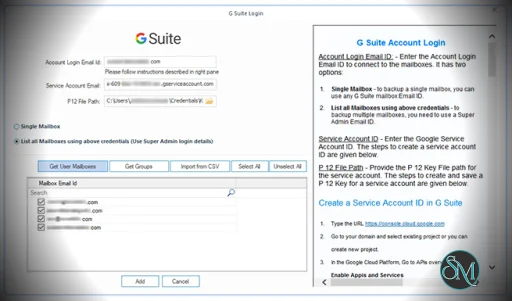
Kernel Google Workspace Backup offers a straightforward interface that is suitable for both experienced administrators and smaller organizations with limited IT resources. Setting up connections to Google Workspace is generally uncomplicated, and the backup wizard guides users through the configuration process.
Performance largely depends on internet bandwidth and the volume of Google Workspace data being processed. Incremental backups help reduce the time required after the initial synchronization.
Pros
Supports backup of multiple Google Workspace services.
Incremental backup reduces storage usage and backup time.
Flexible export formats.
Selective backup options.
Automated backup scheduling.
Migration features included.
User-friendly interface.
Cons
Full backups of large organizations can take considerable time.
Windows-only application.
Advanced migration scenarios may require planning and testing.
Commercial software with licensing costs for full functionality.
Who Should Use Kernel Google Workspace Backup?
Kernel Google Workspace Backup is well suited for businesses, schools, government organizations, managed service providers, and IT administrators that need reliable backups of Google Workspace data. It is particularly useful for organizations with compliance, retention, or disaster recovery requirements.
Small businesses with only basic backup needs should evaluate whether the available features justify the licensing cost, while larger organizations are more likely to benefit from its automation and centralized management.
Final Verdict
Kernel Google Workspace Backup provides a practical solution for protecting Google Workspace data through scheduled backups, incremental synchronization, and migration capabilities. Its broad service coverage, flexible backup options, and straightforward interface make it a valuable tool for organizations seeking greater control over their cloud data.
Although it is a commercial product and large backups require time and storage resources, its feature set makes it a strong choice for businesses that need dependable Google Workspace backup and recovery.
Developer:
KernelApps Pvt. Ltd.
Operating System:
Windows
Date Added:
2026-07-03T15:43:14.000Z
Categories:
Post a Comment/Report Broken Link: