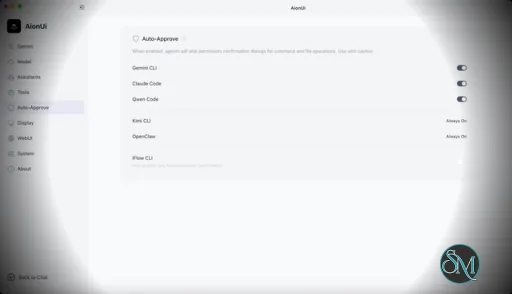
AionUi is a cross platform desktop application that transforms command line AI agents into an intuitive graphical interface. It detects locally installed AI CLI tools and presents them in a structured environment where users can manage conversations, sessions, and files more efficiently.
The software is open source, allowing users to customize and extend its functionality according to their workflow requirements.
Download AionUI v2.1.28 - Software Mirrors |
|---|
Download AionUI v2.1.28
for Windows 64bit (exe) | 256.57 MB Download AionUI v2.1.28
for Windows ARM64 (exe) | 409.51 MB | Download AionUI v2.1.28
for macOS Intel (zip) | 429.23 MB Download AionUI v2.1.28
for macOS Intel (dmg) | 420.55 MB Download AionUI v2.1.28
for macOS ARM64 (zip) | 425.18 MB Download AionUI v2.1.28
for macOS ARM64 (dmg) | 416.61 MB | Download AionUI v2.1.28
for Linux ARM64 (deb) | 367.09 MB Download AionUI v2.1.28
for Linux 64bit (deb) | 384.8 MB |
Highlights
New languages
- Added complete Spanish (es-ES) and Persian (fa-IR) translations across the whole app, and filled in gaps in the existing locales. AionUi now detects and switches to these automatically when they match your system language.
Skills in the slash menu
- Skills loaded on a conversation now appear in the
/ command menu, not just the + menu. Type / to see your session's skills and pick one — it fills the input as /name so you can add arguments before sending, matching the CLI's slash behavior.
Conversation sidebar that keeps up with you
- When a conversation becomes active (via search, a notification, or a link), the sidebar now expands the section and project folder it lives in and scrolls it into view, instead of silently missing when it was collapsed.
- Project folder headers stay pinned at the top while you scroll their contents, and the batch-selection panel stays in view while scrolling.
Bug Fixes
- If the local database gets corrupted, startup now offers a confirmation dialog to rebuild it instead of failing silently — your choice, with the app restarting into recovery only after you confirm.
- Team chat now correctly passes along the conversation's skills and MCP tools to the send box, so team-mode conversations have the same capabilities available.
- Scheduled tasks handle team-context jobs better: team cron tasks are locked from editing where they shouldn't be edited, manual task assistant selection stays in sync, and team-context jobs navigate correctly.
- Foreground conversation and team pages now hold an active lease so visible tasks aren't cleaned up as idle; runtime preparation was consolidated to remove redundant warmup requests.
- Empty avatars render consistently, the assistant engine badge uses the correct warning tone, duplicate ACP runtime-option requests are deduped, macOS waits for update install readiness before applying, and frontend logs support a dated layout.
What's Changed
- feat(conversation): surface session skills in slash command menu by @IceyLiu in https://github.com/iOfficeAI/AionUi/pull/3482
- fix(desktop): wait for macOS update install readiness by @piorpua in https://github.com/iOfficeAI/AionUi/pull/3484
- fix(cron): sync manual task assistant selection by @kaizhou-lab in https://github.com/iOfficeAI/AionUi/pull/3485
- fix(assistant): correct engine section badge tone to warning by @IceyLiu in https://github.com/iOfficeAI/AionUi/pull/3487
- feat(conversation): keep active conversation, project headers, and batch panel in view by @IceyLiu in https://github.com/iOfficeAI/AionUi/pull/3483
- fix(acp): dedupe runtime option requests by @kaizhou-lab in https://github.com/iOfficeAI/AionUi/pull/3490
- fix(cron): support team context job navigation by @kaizhou-lab in https://github.com/iOfficeAI/AionUi/pull/3492
- fix(assistant): render empty avatars consistently by @kaizhou-lab in https://github.com/iOfficeAI/AionUi/pull/3493
- fix(desktop): support dated frontend log layout by @kaizhou-lab in https://github.com/iOfficeAI/AionUi/pull/3495
- fix(runtime): coordinate foreground leases and runtime ensure by @piorpua in https://github.com/iOfficeAI/AionUi/pull/3497
- fix(cron): lock team cron task editing by @kaizhou-lab in https://github.com/iOfficeAI/AionUi/pull/3496
- fix(team): pass capabilities to team chat send box by @kaizhou-lab in https://github.com/iOfficeAI/AionUi/pull/3501
- fix(startup): confirm corrupted database rebuild by @piorpua in https://github.com/iOfficeAI/AionUi/pull/3502
- fix(i18n): resolve main locale gaps by @kaizhou-lab in https://github.com/iOfficeAI/AionUi/pull/3503
- feat(i18n): add complete Spanish (es-ES) translation — 500M+ speakers by @365diascollaboration-prog in https://github.com/iOfficeAI/AionUi/pull/3402
- feat(i18n): add Persian (fa-IR) locale support by @NkAntony777 in https://github.com/iOfficeAI/AionUi/pull/3284
- chore: bump version to 2.1.28 by @piorpua in https://github.com/iOfficeAI/AionUi/pull/3504
New Contributors
- @365diascollaboration-prog made their first contribution in https://github.com/iOfficeAI/AionUi/pull/3402
- @NkAntony777 made their first contribution in https://github.com/iOfficeAI/AionUi/pull/3284
Full Changelog: https://github.com/iOfficeAI/AionUi/compare/v2.1.27...v2.1.28 |
Key Features
Multi Agent Support
AionUi allows users to run multiple AI sessions simultaneously. Each session maintains its own context, enabling parallel workflows without cross interference.
Modern Chat Interface
The application provides a clean and organized chat environment. Users can scroll through conversation history, manage session tabs, and interact with AI responses in a visually structured format.
Smart File Management
AionUi includes drag and drop support, file previews, and structured file browsing. This improves productivity when working with code, documents, or AI generated content.
Multi Model Compatibility
The software supports various AI models through local or API based configurations. Users can switch between models depending on task requirements.
Session Control and Workflow Tools
Users can manage sessions independently, review outputs, and maintain organized AI workflows. This structure helps reduce clutter when working on complex tasks.
Cross Platform Availability
AionUi runs on major operating systems, ensuring accessibility for developers working in different environments.
Ease of Use
The interface is designed to simplify complex AI workflows. While some familiarity with AI tools is helpful, the graphical layout significantly reduces the learning curve compared to pure command line usage.
Navigation is intuitive, and core features are accessible without excessive configuration.
Performance and Compatibility
AionUi operates efficiently as a desktop application. Performance depends partly on the underlying AI services or APIs being used, but the interface itself remains responsive during normal use.
Compatibility with standard AI command line tools ensures flexibility for technical users.
Final Verdict
AionUi is a powerful desktop interface for managing AI command line tools in a structured and visual way. Its ability to handle multiple sessions, integrate different models, and organize workflows makes it a valuable productivity solution for advanced users.
For professionals seeking greater control and efficiency in AI driven projects, AionUi delivers a practical and modern solution.
AionUi is a free and open source desktop application that provides a modern graphical interface for command line AI tools. It is designed to simplify AI workflows by replacing terminal based interaction with a visual environment that supports multiple AI models, parallel sessions, and productivity focused features. AionUi is suitable for developers, researchers, and advanced users who want a unified way to manage AI driven tasks.
Post a Comment/Report Broken Link: