InstallerClean is a small Windows tool that helps detect and remove leftover files, folders, and registry entries created by installed software. It is built for users who want to keep their system clean without manually digging through directories.
InstallerClean is a focused utility designed to clean up files and traces that remain after uninstalling programs. While many uninstallers remove the main application, leftover data often stays behind. InstallerClean aims to fix that with a simple and lightweight approach.
The application is typically portable, meaning it can run without installation and does not add extra load to your system.
Download InstallerClean v2.2.0 - Software Mirrors |
|---|
Download InstallerClean v2.2.0 Download InstallerClean v2.2.0 Download InstallerClean v2.2.0 |
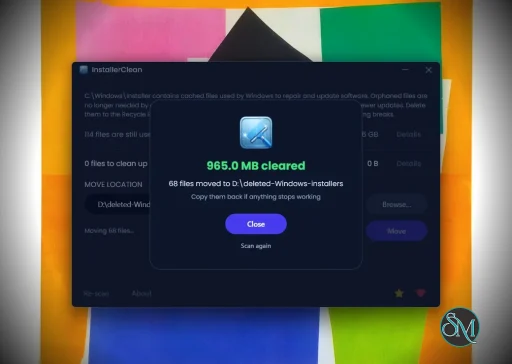
InstallerClean v2.2.0 Release Notes:InstallerClean 2.2.0It tells you when there's a newer versionInstallerClean now checks whether a newer version exists, once each time you open it. If there is one, a quiet "Version X is available." link appears in the bottom bar, and clicking it opens that release's page in your normal browser. If you're up to date, or the check cannot get through, it says nothing at all. It only ever asks. Nothing is downloaded, nothing about you or your machine is sent, and the app never updates itself. It's a single request to GitHub's releases page. If you'd prefer it not to, there is a Check for updates automatically checkbox in About. With it off, the app makes no network request at all unless you click the "Check for updates" button. The Check for updates button has moved from the About window to the bottom bar, with a status line beside it when you click it. It was a bit too hidden before and it's better for you if you're on the latest version.The About windowAbout has been reworked: the version, a link to the README, a link to report a problem, and the updates setting. Guide and FAQ opens the README, which is the app's real manual, in whatever language the app is running in (remember that as of v2.0.0, InstallerClean is available in 15 languages). Report a problem opens the issue tracker.The bottom barThe "Leave a star on GitHub" star button and the "Donate" heart button have gone from the bottom bar of the main window.A small heart at the endAfter a clean-up (but only when it actually found unneeded files to delete), a small heart button appears in the bottom right corner of the completion screen; hovering it invites a small donation if you're feeling kind.Stricter still about what it will touchThe safety check that runs immediately before any Move or Delete now refuses any file that is not directly in the top level ofC:\Windows\Installer. Since 2.1.0 the scan has not offered a file from a subfolder, so nothing you would see changes; it means nothing further down could act on one either, which is what SECURITY.md promises.
The downloads carry the versionFrom this release the downloads on this page are namedInstallerClean-2.2.0-setup.exe and InstallerClean-2.2.0-portable.exe. A copy sitting in a Downloads folder, on a USB stick or on a mirror months later now says which release it is, and so does the .sha256 beside it.
installerclean-cli.exe deliberately keeps its plain name. Scheduled tasks, scripts and deployment jobs hold a path to it, and a versioned filename would break every one of them on each update. It reports its own version with --version.
LanguagesEverything this release adds or rewords is translated into all fourteen non-English languages: the links and the checkbox in About, the update status line, the ask at the end of a clean-up, the warning shown when a setting cannot be saved, and everything a screen reader reads out on each of them. Five languages had their keyboard access keys re-picked along the way, so every control on the main window keeps a unique Alt shortcut whichever language the app is running in. A new check on every push keeps it that way. Thanks again to @coolvitto and @bovirus, whose Japanese and Italian work this release keeps building on.Fixed
Everything elseThe changelog lists every change in this release.Downloads
Verify your download (SHA-256).sha256 sidecar files alongside each binary on this release. To verify in PowerShell:
VirusTotal
|
Key Features of InstallerClean
Leftover File Detection
InstallerClean scans your system for files and folders that remain after uninstalling applications. This helps free up disk space and reduce clutter.Registry Cleanup
It can identify unused or orphaned registry entries related to removed programs, helping maintain system organization.Simple Interface
The tool is designed to be straightforward. Users can scan and clean with minimal steps, making it accessible even for non technical users.Portable Usage
InstallerClean often runs as a portable application, so you can use it on multiple systems without installation.Fast Scanning
The scanning process is quick and does not heavily impact system performance.
User Experience
InstallerClean is easy to use, with a minimal interface that focuses on functionality. It does not overwhelm users with advanced settings, which makes it suitable for quick maintenance tasks.
However, advanced users may find it lacks deeper customization compared to more comprehensive system cleanup tools.
Performance and Compatibility
The software performs efficiently and works on most Windows systems. It is lightweight and does not consume significant resources during scanning or cleaning.
Because it targets leftover files specifically, it complements rather than replaces full system maintenance tools.
Pros
Lightweight and fast
Simple and easy to use
Helps remove leftover files and registry entries
Portable and convenient
Cons
Limited advanced features
Not as comprehensive as full system cleaners
Requires careful review before deleting files
InstallerClean is ideal for users who frequently install and uninstall software and want to keep their system tidy. It is also useful for those who prefer simple tools over complex system utilities.
InstallerClean delivers a focused solution for removing leftover files after uninstallations. While it is not a full system optimizer, its simplicity and efficiency make it a valuable addition to basic PC maintenance tools.
Post a Comment/Report Broken Link: