Plannotator is an open-source platform designed to review and validate plans and code generated by AI coding agents.
The platform provides a centralized interface where developers can:
Review AI-generated plans
Annotate proposed actions
Approve or reject tasks
Inspect code changes
Provide structured feedback
Improve agent outputs
Maintain human oversight
Rather than replacing developers, Plannotator aims to keep humans involved in critical decision-making during AI-assisted development.
As AI coding agents become increasingly capable, developers face a growing challenge: ensuring that AI-generated plans and code changes align with project requirements before they are executed. Plannotator addresses this problem by acting as a review layer between developers and AI coding agents.
Instead of generating code itself, Plannotator focuses on making AI-driven development more transparent and controllable. It allows teams to review, annotate, approve, reject, and refine agent-generated plans and code changes before they affect a project.
Download Plannotator v0.20.2 - Software Mirrors |
|---|
Plannotator v0.20.2 for Windowsplannotator-paste-win32-arm64.exe | 106.86 MB plannotator-paste-win32-x64.exe | 110.08 MB |
Plannotator v0.20.2 for macOSplannotator-darwin-arm64 | 103.72 MB plannotator-darwin-x64 | 108.19 MB |
Plannotator v0.20.2 for Linuxplannotator-linux-arm64 | 139.29 MB plannotator-linux-x64 | 139.82 MB |
Plannotator v0.20.2 Release Notes:Follow @plannotator on X for updatesMissed recent releases?| Release -- -- -- -- -- -- -- -- -- -- -- -- -- -- -- -- -- | Highlights -- -- -- -- -- -- -- -- -- -- -- -- -- -- -- -- -- -- -- -- -- -- -- -- -- -- -- -- -- | | ---------------------------------------------------------------------------- | -------------------------------------------------------------------------------------------------------------------------------- | | v0.20.1 | Pi extension install hotfix (pinned@pierre/diffs after a broken upstream release) -- -- -- -- -- -- -- -- -- -- -- |
| v0.20.0 | Multi-repo workspace reviews, semantic diff overview, UI 2.0 themes and plan look chooser, leaner single-source skill install |
| v0.19.27 | Kiro CLI integration, Glimpse native window, annotate-last message picker -- -- -- -- -- -- -- -- -- -- -- -- -- -- |
| v0.19.26 | Amp plugin production fixes, Mermaid rendering fix, Settings flicker fix, update notification toast and shimmer -- -- -- -- |
| v0.19.24 | Amp integration, configurable data directory, Auto Mode permission option, Pi plan approval fix -- -- -- -- -- -- -- -- |
| v0.19.23 | Droid integration, Windows Pi AI fix, quieter update indicator -- -- -- -- -- -- -- -- -- -- -- -- -- -- -- -- |
| v0.19.22 | Safari copy fix in plan viewer, CLAUDE_CONFIG_DIR support for session logs -- -- -- -- -- -- -- -- -- -- -- -- -- |
| v0.19.21 | Ask AI in plan review and annotate mode, shared AI runtime, origin-aware provider defaults -- -- -- -- -- -- -- -- -- |
| v0.19.20 | Interactive goal setup UI, OpenCode submit_plan fixes, browser no-op sentinel handling for Claude agents -- -- -- -- -- -- |
| v0.19.18 | Edit-based submit_plan for OpenCode, Pi namespace migration, Codex annotate-last fix, OpenCode commands dir fix -- -- -- -- |
| v0.19.17 | Reworked goal setup skill (interview-driven flow), CLI --version flag -- -- -- -- -- -- -- -- -- -- -- -- -- -- -- |
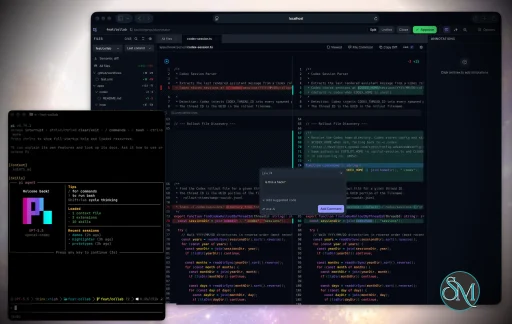
What's New in v0.20.2v0.20.2 is a code-review-heavy release of nine PRs, two of them from first-time contributors. The largest work rebuilds the all-files review view on Pierre's CodeView and adds a pipeline that keeps very large pull requests fast and complete instead of failing or rendering empty. Agent engine selection is unified across review and tour modes, the Pi extension gains a programmatic plan-mode control event, and several reliability fixes land across review cleanup, annotate error messaging, and markdown rendering.All-Files Code Review on Pierre CodeViewThe all-files code review surface was rebuilt on Pierre's CodeView renderer, replacing the previous custom diff view and its lazy-mounting layer. The new foundation virtualizes large diffs, renders change-type status in file headers and the file tree, and presents renames asold/path → new/path rather than as a blank change. The annotation model, drafts, feedback export, and keyboard shortcuts carry over unchanged, so the way you review and send feedback is the same.
Large Pull Request Pipeline, Instant-Open Checkout, and Scroll PerformanceReviewing very large pull requests previously hit several walls: GitHub refused oversized diffs outright, the local checkout blocked the review from opening, and some files came back from the platform with no patch content and rendered as empty stubs. This release addresses all three. When a platform refuses an oversized diff, Plannotator now pages through the per-file API and stitches the result into a unified diff, so the review still loads. When the platform withholds per-file content on a truncated diff, an amber "Partial diff · Load full diff" notice offers to recompute the exact diff locally, and a staleness check surfaces a refresh prompt when the underlying files change mid-review. The--local checkout no longer blocks startup: the review server opens as soon as the platform diff arrives and the checkout warms in the background, with agent jobs, full-stack diff, and code navigation waiting on it only when they need real files.
Scrolling the all-files view was also reworked. Syntax highlighting moved off the main thread into a worker pool, lazy full-content augmentation no longer hitches mid-scroll, and visibility tracking was coalesced to once per frame. The result is smoother scrolling on large diffs, with a clean fallback to unhighlighted text if the worker pool is unavailable.
Unified Agent Mode Engine SelectionThe agent panel's engine selection was reworked so review and tour modes share one consistent model. Previously the selection conflated provider and mode in a single setting; it now separates the active mode from the engine choice (Claude or Codex) for each, with existing settings migrated forward. The change makes it clearer which engine runs for review versus tour and removes a class of confusing defaults.
Programmatic Plan Mode for PiThe Pi extension gained aplan-mode event so other extensions and automation can drive Plannotator's plan mode programmatically. A request can enter, exit, toggle, or query plan mode, and receives the resulting phase (idle, planning, or executing) in return. This opens the plan workflow to scripted and multi-extension setups on Pi without requiring a manual command or shortcut.
Review Cleanup and PR Feedback FixesTwo reliability fixes for the review path. First, the standalone server now routesSIGINT and SIGTERM through its normal shutdown so the existing cleanup runs on interrupt or termination. Aborting a review while a large pull request was still checking out in the background previously left clone and fetch processes running and stale git worktree registrations behind; those are now cleaned up, with a second interrupt still forcing an immediate quit.
Second, the review feedback sent to the agent on "Send Feedback" now includes the triage instruction (review the feedback, verify it against the code, and discuss before changing anything) for pull request reviews, not just local diffs. The instruction is appended whenever you send annotations and is correctly omitted for platform actions that post an approval or comment directly to the host. The behavior is consistent across Claude Code, OpenCode, and Pi.
Clearer Annotate and Markdown BehaviorRunningplannotator annotate on a file type it does not support (for example a .cs or .pdf file) reported a misleading "File not found" even when the file was present. It now reports that the type is unsupported, lists the supported extensions, and points to plannotator review for code. Separately, custom angle-bracket autolinks are kept literal instead of having their contents parsed for markdown styling, so links that contain markdown-like characters render correctly.
Additional Changes
Install / UpdatemacOS / Linux:/plugin in Claude Code, find plannotator, and click "Update now".
OpenCode: Clear cache and restart:
opencode.json:
What's Changed
New Contributors
Contributors@ishowman landed two fixes in their first contributions: a clearer error fromplannotator annotate when a file type is not supported, and a markdown fix that keeps custom angle-bracket autolinks literal instead of styling their contents. @Termina1 added the programmatic plan-mode event to the Pi extension, letting other extensions and automation enter, exit, toggle, or query plan mode and read back the resulting phase. @codythatsme unified agent mode engine selection so review and tour modes share one consistent model for choosing between Claude and Codex, with existing settings migrated forward.
This release also resolved community-reported issues. @NikiforovAll reported the misleading "File not found" message from plannotator annotate on unsupported file types, with a concrete .cs reproduction. @Thraka reported the markdown autolink rendering issue, and @MannXo contributed to the discussion that shaped the fix.
Full Changelog: https://github.com/backnotprop/plannotator/compare/v0.20.1...v0.20.2 |
Key Features of Plannotator
Plan Review System
One of Plannotator's core capabilities is reviewing plans generated by AI agents before execution.
Developers can examine:
Proposed tasks
Implementation strategies
Agent reasoning
Planned file modifications
Workflow sequences
This visibility helps reduce unintended changes and costly mistakes.
Annotation Tools
The platform allows users to add comments, notes, and guidance directly to AI-generated plans.
These annotations can be used to:
Clarify requirements
Correct misunderstandings
Provide context
Guide future agent actions
AI Code Review
Plannotator extends the review process beyond planning by supporting inspection of generated code.
Developers can:
Review modifications
Analyze diffs
Leave comments
Request revisions
Validate implementation details
This workflow resembles modern pull-request review systems.
Human-in-the-Loop Workflows
A major design goal is ensuring that AI actions remain subject to human approval.
Organizations can establish review processes where important actions require validation before execution.
Open Source Foundation
Plannotator is open source, allowing teams to inspect, modify, and self-host the platform according to their needs.
This transparency is particularly valuable for organizations adopting AI-assisted software development.
User Experience
The interface is designed around review workflows rather than direct code generation.
Instead of interacting with a chatbot, users primarily:
Receive agent-generated plans
Review proposed actions
Add feedback
Approve or reject changes
Monitor execution results
The workflow feels familiar to developers accustomed to pull requests, code reviews, and project planning tools.
Productivity Benefits
As AI coding tools become more autonomous, review processes become increasingly important.
Plannotator helps organizations:
Reduce risky AI actions
Improve code quality
Increase accountability
Preserve architectural consistency
Encourage collaboration between developers and AI agents
For teams adopting AI-driven development, these safeguards can be as valuable as the coding agents themselves.
Collaboration Features
The platform supports collaborative review workflows where multiple team members can participate in evaluating AI-generated outputs.
This allows:
Peer review
Team approval processes
Shared annotations
Collective decision-making
Such features are especially useful for larger engineering teams.
Performance
Because Plannotator focuses on workflow management and review rather than model inference, performance largely depends on the connected AI agents and integrations.
The platform itself is lightweight and primarily serves as an orchestration and review layer.
Open Source Advantages
Being open source provides several benefits:
Transparent development
Self-hosting capabilities
Custom integrations
Community contributions
Vendor independence
Organizations concerned about compliance, security, or proprietary workflows may find these advantages particularly appealing.
Limitations
Plannotator is designed as a companion tool rather than a complete AI development platform.
Common limitations include:
Requires external AI coding agents
Best suited for teams already using AI-assisted development
Smaller ecosystem than mature developer platforms
Additional review steps may slow rapid prototyping
Some users may prefer fully autonomous workflows
The software delivers the most value in environments where oversight and quality control are priorities.
Pros
Improves transparency of AI-generated plans
Supports structured review workflows
Human-in-the-loop design
Useful annotation system
Open source
Self-hosting support
Familiar review experience for developers
Helps reduce AI-generated mistakes
Cons
Not a standalone coding agent
Requires integration with AI development tools
Smaller community than established developer platforms
Adds review overhead to workflows
Best suited for teams rather than casual users
Who Should Use Plannotator?
Plannotator is ideal for:
Software development teams
Engineering managers
AI-assisted development workflows
Organizations adopting coding agents
Open-source projects
Teams prioritizing code quality and governance
It is particularly valuable for environments where AI-generated code requires oversight before reaching production systems.
Plannotator fills an increasingly important role in the AI development ecosystem by providing visibility and control over AI-generated plans and code changes. Its focus on human oversight, structured reviews, and collaborative workflows makes it a useful companion for modern coding agents. While it is not a replacement for AI coding tools themselves, it offers a practical solution for teams seeking greater confidence and accountability in AI-assisted software development.
Developer:
backnotprop
Operating System:
Windows / macOS / Linux
Date Added:
2026-06-14T23:01:28.829Z
Categories:
Post a Comment/Report Broken Link: