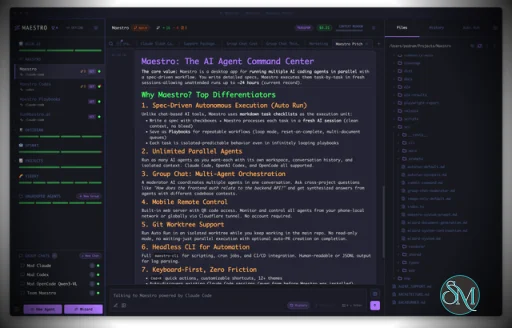
Maestro is a cross platform desktop application built to orchestrate multiple AI agents with isolated contexts. Each agent operates independently while still being managed under a unified command center. This allows users to execute complex workflows, parallel tasks, and long running processes efficiently.
The tool is open source and actively developed, targeting users who work with AI assisted development, research, automation, and experimentation.
Download Maestro v0.17.0 - AI Agent Command Center - Software Mirrors |
|---|
Maestro v0.17.0 - AI Agent Command Center for Windows |
Maestro v0.17.0 - AI Agent Command Center for macOSmaestro-0.17.0-arm64-mac.dmg | 211.38 MB maestro-0.17.0-arm64-mac.zip | 201.19 MB |
Maestro v0.17.0 - AI Agent Command Center for Linuxmaestro-0.17.0-aarch64.rpm | 118.38 MB maestro-0.17.0-amd64.deb | 153.12 MB maestro-0.17.0-arm64.AppImage | 211.53 MB maestro-0.17.0-arm64.deb | 147.78 MB |
Maestro v0.17.0 - AI Agent Command Center Release Notes:Major 0.17.x Additions⚠️ Please update before June 15. Anthropic is reclassifying Claude's headless 🔐 Claude Token Source control keeps Claude running on your Max/Pro subscription quota by driving Claude's interactive session instead of the headless API path. A three-way Interactive / API / Dynamic selector is available everywhere agents run (new and existing agents, Cue runs, Group Chat, and background tasks). Dynamic mode uses your subscription quota automatically and only falls back to API billing when that quota is exhausted. 🪄 Maestro Cue is a new trigger-based cross-agent orchestration capability that lets heartbeats, GitHub issues/PRs, file system monitors, and other data sources bring your agents to life and pass work between one another. 💻 Full-featured xterm.js terminal tabs sit alongside your AI and file preview tabs, with support for opening and renaming multiple terminals. 🧑✈️ GitHub Copilot-CLI joins Maestro as a first-class agent with end-to-end integration for both local and remote (over SSH) execution. 🛠️ A vastly expanded maestro-cli now drives the whole running desktop app, and your agents know how to use it. That means you can just talk to an agent in plain language to create and run Auto Run playbooks, change settings, set up Maestro Cue pipelines, manage groups, agents, tabs, and themes, and much more, instead of clicking through menus yourself.Also in 0.17.0🌍 Browser tabs open web pages directly inside Maestro as first-class tabs with a full address bar, navigation controls, in-page find, and session persistence across restarts. 🔗 SSH Shared History synchronizes Maestro instances working on the same project, with each host writing per-hostname history files so participants see each other's work. 🌐 The web/mobile interface gained real PTY terminals, swipeable panels, notification dropdowns, and dozens of desktop-equivalent features for a full touch-friendly experience on tablets and phones. 📊 A new Usage Dashboard tracks Claude and Codex token consumption over time with p50 to p99 duration percentiles, and read-only maestro-cli stats brings the same metrics to your terminal.✏️ All core system prompts (Auto Run, commit messages, Group Chat moderation, Spec-Kit/OpenSpec, and more) are now fully editable. 🎨 New Image Annotation tool for marking up screenshots with freehand strokes, pan/zoom, and configurable pen styling. 📝 File preview was rebuilt on CodeMirror 6 with shared Shiki syntax highlighting across every code surface. 🧠 A Claude per-project memory viewer lets you see and manage what your agent remembers across sessions. 🎚️ Model and reasoning-effort quick-change pills let you switch model and effort from the input area without opening settings. 🧮 Auto Run now auto-picks fresh context per Document or per Task based on your agent's context window, letting wider-window models like Opus 4.8 and GPT-5.5 absorb more tasks per fresh context before splitting them up. 🔎 A new JSONL viewer opens .jsonl/.ndjson files in a sortable, schema-aware table with per-row tree expansion and a built-in jq-style filter syntax (select(), map(), group_by(), pipes, and 40+ more) with live evaluation.🔱 Fork a brand-new session off any point in an AI message's history without disturbing the original thread. 🔍 Type-to-filter Settings search, with full keyboard navigation, instantly surfaces any setting across every tab. ⭐ A Starred Sessions list in the Left Bar keeps special sessions pinned up top, with Cmd+[ and Cmd+] to cycle straight through them from the keyboard. Full Changelog: https://github.com/RunMaestro/Maestro/compare/v0.15.2...v0.17.0 |
Key Features
Maestro allows users to run multiple AI agents in parallel while keeping their context, state, and execution separated. This enables large tasks to be broken down and handled simultaneously.
The Auto Run and Playbook system lets users define workflows that execute steps automatically. These workflows can loop, batch tasks, or run unattended, making them suitable for long or repetitive operations.
Maestro supports group chat coordination where multiple agents collaborate within a single task. The tool handles routing and coordination to produce unified results.
Remote monitoring and control features allow users to observe and manage agent activity even when away from the main workstation.
A built in command line interface enables headless execution and scripting, allowing Maestro to integrate into broader automation workflows.
Ease of Use
Maestro is designed for users with technical experience. While it is not a beginner focused tool, its interface is structured for efficiency, especially for users familiar with development tools and multitasking environments.
Once configured, workflows are repeatable and easy to manage.
Performance and Compatibility
Maestro runs on Windows, macOS, and Linux. Performance scales based on system resources and the number of agents running concurrently. The application remains responsive even during complex orchestration tasks when used on modern hardware.
Because Maestro coordinates agents rather than performing heavy computation itself, overall performance largely depends on external AI services and configurations.
Pros and Cons
Advantages include powerful multi agent orchestration, parallel execution, automation through playbooks, command line support, and open source flexibility.
Limitations include a learning curve for new users, reliance on external AI models for functionality, and a focus on advanced workflows rather than simple chat usage.
Final Verdict
Maestro is a capable and thoughtfully designed orchestration tool for managing AI agents at scale. Its focus on parallel workflows, automation, and centralized control makes it a strong choice for advanced users working with AI assisted tasks.
For those who need structured AI agent orchestration rather than simple interaction, Maestro delivers a reliable and efficient solution.
Maestro is an open source agent orchestration tool that provides a centralized desktop environment for managing and running multiple AI agents and workflows simultaneously. It is designed for developers and advanced users who need structured coordination, parallel execution, and automation across AI driven tasks.
Maestro focuses on improving productivity when working with multiple agents by offering orchestration, monitoring, and workflow control from a single interface.
Developer:
Pedram Amini
Operating System:
Windows / macOS / Linux
Date Added:
2026-06-15T05:13:55.646Z
Categories:
Post a Comment/Report Broken Link: