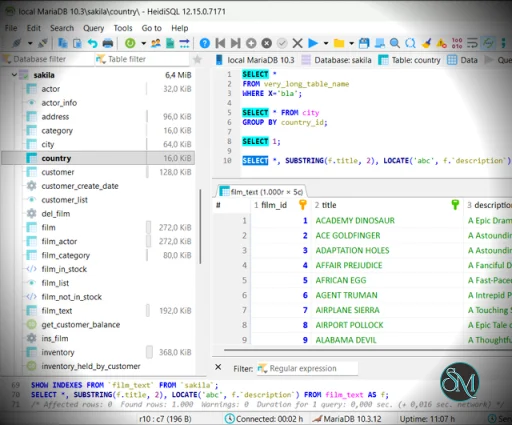
HeidiSQL is a small database client that allows users to connect to and manage databases such as MySQL, MariaDB, PostgreSQL, Microsoft SQL Server, and SQLite. It offers tools for browsing data, editing tables, running SQL queries, importing and exporting data, and managing database structures.
The software is free to use and actively maintained, making it a trusted choice for both personal and professional database work.
Download HeidiSQL 12.18 - Software Mirrors |
|---|
Download HeidiSQL 12.18
for Linux 64 bit GTK2 build Download HeidiSQL 12.18
for Linux 64 bit QT5 build Download HeidiSQL 12.18
for Linux 64 bit QT6 build Download HeidiSQL 12.18
for Windows 64 bit Installer Download HeidiSQL 12.18
for Windows 64 bit Portable Download HeidiSQL 12.18
for Linux 64 bit DEB package Download HeidiSQL 12.18
for macOS ARM64 App Bundle |
HeidiSQL 12.18 Release Notes: 12.18 - 2026-06-09
⛰️ Features
- (packaging) Create .rpm package through Makefile, plus let GH action run that step in release mode - (fc728cf)
- Create checkbox in advanced session setting for new ForceUnicode setting - (75a0f7f)
- Create opt-out setting "ForceUnicode", for sessions which shall not force Unicode communication - (ed9a94f)
- Enable connection port visible in a column of the session tree - (7cfdb97)
- Display auth plugin in a new column of the user listing tree - (3e4f562)
- Support authentication plugin selection in user manager - (07112a0)
- Grid export option for exporting the focused grid column only - (d896680)
- Bypass automatic foreign key lookup in data grid editing through new menu item - (a5ae04b)
- Add a separate menu item "copy formatted text", using the old code for copying SynEdit-highlighted text as HTML - (84c63c6)
- Filter edit box for shortcuts in preferences - (fb243fc)
- Create CLI app for adding PE security flags to heidisql.exe - (3e797e2)
- Rename snippet per right-click on query helpers tree - (7171e48)
- Name columns in SELECT when exporting table with invisible columns - (1799b0d)
- Support invisible indexes on MySQL 8.0+ and ignored indexes on MariaDB 10.6+ - (b3fa484)
- Support assigning a default role to a user - (96d2aef)
- Support assigning roles to a user or role - (96717cd)
- Do not require MySQL's RELOAD privilege just for opening the user manager - (f79d9a5)
- When nodes are filtered, change "Check all" action to "Change all visible" - (ebd60b3)
- Disable role rename, add menu item for creating a role, support role deletion - (83472c5)
- Prevent editing contents of generated columns in data grid - (9ecdff0)
- Basic support for MariaDB user roles, loaded without SQL error and shown with a different icon - (3249401)
- Add context menu item for deleting a single query from the history - (0035d5e)
- Reset a table's current auto_increment value in "delete + insert data" mode - (0422bb3)
- Support cancelling server login dialog - (e5b9574)
- Keep EXPLAIN output format traditional, on newer MySQL servers - (90f9937)
- Make HTML export dark/light mode aware - (dc046e9)
- Allow setting database to in PostgreSQL connections, and show and in the pulldown selector - (950e2ca)
🚀 Enhancements
- Disable plugin selector as long as no user was selected - (54dd7d8)
- Do not copy default type and value from previous column when adding columns to a table - (42a061d)
- Suppress dialog for saving modified SQL on app close, when tabs get auto-restored - (4ca01d9)
- Remove FLUSH PRIVILEGES from the user managers FormShow handler. If a click on a non-flushed user in the tree produces an exception, that is caught and shown as a normal error message. - (fe7a5ef)
- 50% black grid lines, should fit on both light and dark theme - (1872916)
- Increase supported table size and row limit for quick filter menu showing distinct values - (48eca57)
🐛 Bug Fixes
- (ui) Filter away vertical writing fonts with an @ prefix - (1814ee9)
- (ui) Size and margin of buttons on SQL help dialog - (61bc258)
- (ui) Apply the same larger tree node height on Linux - (c770406)
- (ui) Remove default "add user" event from add button, turn it into a pure dropdown button - (d7910c1)
- Copy table dialog crashes when none of dbtree and listtables has Focused=True - (9216061)
- Prefer SHOW KEYS over SHOW INDEXES, which are synonyms, while very old servers only accept the one with KEYS - (b97122c)
- Prevent grid queries from doing "WHERE intcol::text = 1", due to "1" being incompatible to the text value on the left - (bcea889)
- Vulnerability CVE-2025-70873, updating SQLite libs to v3.53.1 - (2930be8)
- Complaint about invalid password length on user plugins which have no fixed password length - (510b141)
- SUBSTRING() on array typed VARCHARs throw "function substr(...) does not exist" - (5f2959d)
- MS SQL throws "Cannot drop database xyz, because it is currently in use" when user is about to drop the current database - (fa2bb05)
- Wrong tab order after inserting new checkbox in the middle - (59d4f1f)
- Space missing in CREATE TABLE code of PG table with SERIAL column - (1633c33)
- Quick filter prompts on numbers break WHERE clause through local formatting - (e7646a0)
- Restore displayed session name in message dialog caption, was removed in commit:63028518f8b0d5869383d3bc0c42f188851797ed - (a6d6e70)
- Missing bottom anchor on shortcuts tree - (f8c4bde)
- Broken ci compilation for Windows - (570fab1)
- Broken ci compilation, move -WB -WR linker options to the conditionals section of the lpi file - (97ec20b)
- Turn exception in ParseViewStructure into a log message - (7562a1e)
- Data grid filter cut with several double-dash comments on one line - (dac7b0e)
- Hidden input box for line terminator in csv import dialog - (f20d634)
- Mouse click in edited row calls save action although focus did not change - (b8313e5)
- SSH command line tweaks, patch from jarczakpawel - (454571e)
- Broken compilation due encoding update to utf-8: ellipsis char constant seen as string now, instead of char - (26b9696)
- Replace hardcoded Windows directory separator with DirectorySeparator - (41615e6)
- Explicitly set client encoding on PG connection - (79c5e4c)
- MSSQL foreign key lookup to include table schema - (305534d)
- Wrong ENUM column type detection, due to less strict regex - (e731fd0)
- Do not start edit mode in ListTables on right mouse button click - (89ccbac)
- Staying on current table by click on "follow foreign key" when the foreign table lives in a different database - (8643172)
- Some crashes found in uploaded crash reports - (7bed735)
- Enable save button after changing default role per combobox - (508b139)
- Support backtick quoted user roles, and some other TValueListEditor related bug fixes - (86ea19c)
- A few compiler warnings - (c6dffe1)
- Pre-select nothing in BOOL grid cell editor on PostgreSQL - (1895959)
- Allow non existent SQLite files, only complain when its path does not exist - (02cf4cb)
- Solution for #2431 breaks other stuff, reverting a part of it - (e940863)
- Editing table data on mysql versions without generated column support - (32f3e6b)
- EAbort crash when copying text from SynEdit without a highlighter - (6c219b9)
- Missing anchors and autosize in user manager form - (91b90bc)
- Reset tree refresh marker earlier, so SetActiveDatabase triggers events and hides the table + data tab after dropping tables - (d2c9c96)
- Prevent crash due to unsupported edit-database feature on MS SQL - (68aeb96)
- Clear data grid before indicating a broken or temporary table for which we get no columns from IS.COLUMNS - (b4ec223)
- Populate SSH executable combo with only a global "ssh" command, do not add .exe files on Linux and macOS - (37f57ce)
- Call to non existent inherited constructor version of TSQLBatch - (b2f4d5b)
- TSQLBatch using backslash for escaping single quotes on all server types. Introduce server type specific TSQLBatch.FEscape char. - (e9af525)
- Crash in SQL export to database for zero length SQL, plus upgrade old-style string handling - (056b5e9)
- Do not delete selected SQL text from editor when trying to focus the position of erroneous SQL - (f5c5f33)
- Crash after canceling query - (ee16571)
🚜 Refactor
- Convert remaining latin1 unit to utf-8 - (85fb0bd)
- Revert most of what I did for #2424 - (3d547fd)
- Prefer qAutoInc in SQLProvider over dedicated AutoIncName method - (2fbb779)
- Simplify some more calls to Query() with the overloaded variants - (b0ab0fc)
- Convert more TFeatureOrRequirement's to TQueryId - (9f21853)
Localize
- Update compiled .mo translation files - (53f95d2)
Contributors
New Contributors ❤️
|
Key Features of HeidiSQL
Multi Database Support
HeidiSQL supports MySQL, MariaDB, PostgreSQL, Microsoft SQL Server, and SQLite, enabling users to manage different database systems from one interface.
User Friendly Interface
The clean layout makes it easy to navigate databases, tables, views, and procedures.
SQL Query Editor
A powerful SQL editor with syntax highlighting and code completion helps users write and execute queries efficiently.
Table and Data Editing
Users can view, insert, edit, and delete data directly within tables using a spreadsheet like interface.
Import and Export Tools
HeidiSQL supports importing and exporting data in formats such as SQL, CSV, XML, and HTML.
Database Structure Management
Users can create and modify tables, indexes, triggers, views, and stored procedures.
Session Management
Multiple connections and sessions can be saved and reused for faster access.
Secure Connections
Supports SSH tunneling and SSL for secure database connections.
Lightweight and Fast
HeidiSQL runs efficiently even on systems with limited resources.
Benefits of Using HeidiSQL
Saves Time
Quick access to databases and fast query execution improve productivity.
Easy to Learn
The intuitive interface is suitable for beginners while offering advanced tools for professionals.
Flexible Database Management
Supports multiple database engines in a single application.
Free and Open Source
No licensing cost, making it ideal for individuals and businesses.
Reliable for Daily Use
Stable performance for routine database administration tasks.
HeidiSQL is a dependable and efficient database management tool that balances simplicity with powerful functionality. With support for multiple database systems, a strong SQL editor, and lightweight performance, it is an excellent choice for managing databases on Windows. For users seeking a free, fast, and versatile database client, HeidiSQL remains one of the best options available.
HeidiSQL is a popular open source database management software designed for developers, database administrators, and data analysts. It provides an easy and efficient way to manage, edit, and query databases while maintaining a lightweight footprint and fast performance. HeidiSQL is widely appreciated for its simplicity, flexibility, and support for multiple database systems.
Post a Comment/Report Broken Link: