AOMEI Partition Assistant Technician is an enterprise-grade disk partition management toolkit built for large-scale environments. Unlike standard or server editions, it allows usage across unlimited PCs and servers, making it ideal for IT professionals and managed service providers.
It is not just a tool, but a full solution for handling storage, migration, and recovery tasks across multiple systems.
Buy AOMEI Partition Assistant With Discounts
AOMEI Partition Assistant 10.10.1 Professional (Lifetime Upgrades / 2 PCs) - Discount 65% Off
AOMEI Partition Assistant 10.10.1 Professional (1 Year / 2 PCs) - Discount 30% OFF
AOMEI Partition Assistant 10.10.1 Server (Yearly / 2 Servers) - Discount 30% Off
AOMEI Partition Assistant 10.10.1 Server Ultimate (Lifetime / Unlimited Servers) - Discount 30% Off
AOMEI Partition Assistant 10.10.1 Server (Lifetime Upgrades / 2 Servers) - Discount 30% Off
AOMEI Partition Assistant 10.10.1 Technician (Yearly / Unlimited PCs & Servers) - Discount 30% Off
Key Features
1. Complete Partition Management
You can perform all core disk operations:
Resize, move, merge, and split partitions
Create, delete, and format volumes
Allocate free space between drives
All operations are designed to work without data loss, which is critical in production environments.
2. Unlimited Usage for IT Services
One major advantage is licensing flexibility. Technician edition allows deployment on unlimited computers and servers, even across multiple locations.
This makes it suitable for:
IT consultants
Repair technicians
Managed service providers
It also allows offering paid technical services using the software.
3. Disk Cloning and OS Migration
You can:
Clone entire disks or partitions
Migrate OS to SSD or HDD without reinstalling
Upgrade storage with minimal downtime
These features are essential for system upgrades and hardware transitions.
4. Advanced Disk Conversion
Supports multiple conversions without data loss:
MBR to GPT and vice versa
NTFS to FAT32
Dynamic disk to basic disk
This flexibility is useful for modern storage setups and compatibility fixes.
5. Bootable Media and Recovery Tools
You can create bootable environments to:
Fix systems that fail to boot
Recover lost partitions
Manage disks outside the OS
This is critical for troubleshooting and disaster recovery scenarios.
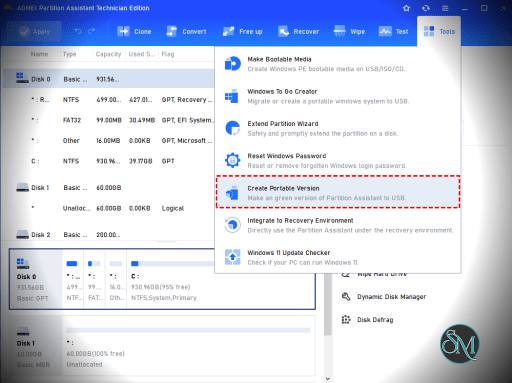
6. Portable Toolkit for Technicians
The software can run from external devices without installation. This allows technicians to carry it on USB drives and use it on client machines instantly.
7. Data Recovery and Disk Utilities
Additional tools include:
Partition recovery
Secure disk wiping
Bad sector checks
SSD optimization
These features make it more than just a partition manager.
Performance and Real-World Use
AOMEI Partition Assistant Technician is built for reliability in professional environments. It is commonly used for:
Managing storage across multiple clients
Performing disk upgrades and migrations
Fixing partition errors without reinstalling systems
Handling large-scale IT infrastructure
Its ability to safely queue operations and execute them reduces the risk of errors during critical tasks.
User Experience
Despite its advanced capabilities, the interface is user-friendly and wizard-based. Tasks are guided step by step, which helps reduce mistakes even in complex operations.
However, due to its depth, beginners may need time to fully understand all features.
Pros and Cons
Pros
Unlimited usage across PCs and servers
Comprehensive disk and partition tools
Portable version for field work
Supports system migration and cloning
Includes recovery and troubleshooting tools
Cons
Overkill for home users
Requires technical understanding for advanced features
Higher-tier solution compared to standard editions
Who Should Use It
This software is ideal for:
IT service providers and MSPs
System administrators managing multiple systems
Technicians offering repair or maintenance services
Businesses with distributed infrastructure
It is not designed for casual users, as simpler editions are more appropriate for personal use.
Final Verdict
AOMEI Partition Assistant Technician is a powerful all-in-one toolkit for professionals who manage storage at scale. It combines flexibility, reliability, and enterprise-level features into a single solution.
If you need unlimited deployment, portability, and advanced disk management, this edition stands out as one of the best tools available.
If you are managing multiple client systems or running IT services, AOMEI Partition Assistant Technician is one of the most powerful editions in the AOMEI lineup. It is designed specifically for technicians, consultants, and service providers who need to handle disk operations across many machines.
Post a Comment/Report Broken Link: