AOMEI Partition Assistant Server is a professional disk partition management tool built for Windows Server systems. It helps administrators resize, move, merge, and manage partitions efficiently while maintaining system stability.
It supports multiple server versions, including Windows Server 2025, 2022, 2019, and older releases.
Buy AOMEI Partition Assistant With Discounts
AOMEI Partition Assistant 10.10.1 Professional (Lifetime Upgrades / 2 PCs) - Discount 65% Off
AOMEI Partition Assistant 10.10.1 Professional (1 Year / 2 PCs) - Discount 30% OFF
AOMEI Partition Assistant 10.10.1 Server (Yearly / 2 Servers) - Discount 30% Off
AOMEI Partition Assistant 10.10.1 Server Ultimate (Lifetime / Unlimited Servers) - Discount 30% Off
AOMEI Partition Assistant 10.10.1 Server (Lifetime Upgrades / 2 Servers) - Discount 30% Off
AOMEI Partition Assistant 10.10.1 Technician (Yearly / Unlimited PCs & Servers) - Discount 30% Off
Key Features
1. Advanced Partition Management
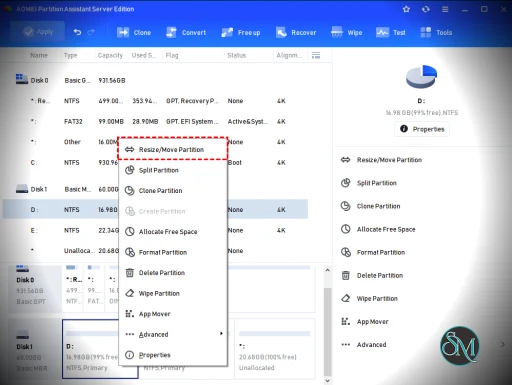
You can perform essential operations such as:
Resize or move partitions without data loss
Merge or split partitions
Allocate free space between drives
These features help optimize disk usage without reinstalling the system.
2. Disk Conversion Tools
AOMEI allows conversion between MBR and GPT without deleting data, which is critical when upgrading systems or handling large disks.
3. SSD Optimization
It includes partition alignment tools to improve SSD performance and extend lifespan.
4. OS Migration
You can migrate your operating system from HDD to SSD without reinstalling Windows, making upgrades faster and safer.
5. Bootable Media Creation
The software can create bootable media to manage partitions even when the OS cannot start, which is essential for recovery scenarios.
6. Dynamic Disk Support
It supports resizing and managing dynamic disks, including software RAID configurations.
Performance and Real-World Use
AOMEI Partition Assistant Server is designed for stability in production environments. It is commonly used for:
Expanding system partitions on live servers
Managing storage in virtualized environments
Migrating systems to SSD
Fixing partition issues without downtime
Its ability to queue operations and apply them safely reduces the risk of data loss.
User Experience
The interface is clean and wizard-based, making complex operations easier to execute. Even though it targets professionals, the guided workflow helps reduce mistakes.
However, advanced features may still require technical knowledge, especially in production environments.
Pros and Cons
Pros
Designed specifically for Windows Server
Safe partition resizing without data loss
Supports MBR to GPT conversion
Includes bootable recovery tools
Reliable for enterprise environments
Cons
Paid software with no full free version for servers
Some features locked behind higher editions
Requires caution when used on production systems
Who Should Use It
This software is ideal for:
System administrators
IT professionals managing servers
Businesses handling storage optimization
Users migrating systems or upgrading disks
It is not intended for casual home users, as the Standard or Professional edition is more suitable for PCs.
Final Verdict
AOMEI Partition Assistant Server is a powerful and dependable solution for managing disk partitions in Windows Server environments. It balances ease of use with advanced capabilities, making it a strong choice for both small businesses and enterprise setups.
If you need safe, efficient partition management on servers, this tool is one of the best options available today.
If you manage Windows servers and need safe, flexible control over disk partitions, AOMEI Partition Assistant Server is one of the most widely used tools in this category. It is designed specifically for server environments, offering advanced partition management without risking data loss.
Post a Comment/Report Broken Link: