Antigravity IDE is an AI-first integrated development environment built on a modified Visual Studio Code foundation. The platform combines code editing, terminal access, browser automation, and AI orchestration into a single environment powered primarily by Gemini models, while also supporting selected third-party AI models.
Unlike conventional AI coding tools that primarily suggest code, Antigravity allows autonomous agents to:
Plan implementation strategies
Modify multiple files
Execute terminal commands
Run tests
Verify browser behavior
Generate implementation reports
Coordinate parallel development tasks
This agent-driven workflow is the core feature that differentiates Antigravity from traditional AI coding assistants.
Antigravity IDE is Google's bold attempt to redefine software development for the AI era. Rather than simply adding an AI assistant to a traditional editor, Antigravity is built around the concept of autonomous coding agents that can plan, implement, test, and verify tasks with minimal developer intervention. Since its launch, it has become one of the most discussed AI development tools, often compared with Cursor, Claude Code, and GitHub Copilot.
The platform introduces a fundamentally different workflow where developers manage AI agents instead of writing every line of code themselves. While this approach offers impressive productivity gains, it also introduces new challenges related to reliability, resource consumption, and security.
Download Antigravity IDE 2.0.4 - Software Mirrors |
|---|
Download Antigravity IDE 2.0.4 for macDownload for Apple Silicon - mac Download Antigravity IDE 2.0.4 for windowsDownload Antigravity IDE 2.0.4 for linux |
Download Antigravity 2.0 Hub
Key Features of Antigravity IDE
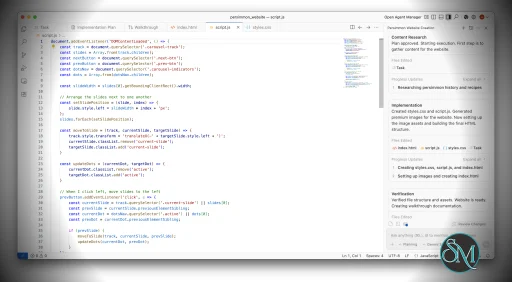
Multi-Agent Manager View
One of Antigravity's most distinctive capabilities is its Manager View, which allows developers to coordinate multiple AI agents simultaneously.
Rather than handling one task at a time, users can assign different agents to separate portions of a project, potentially accelerating development for large codebases. Several reviewers consider this the platform's most innovative feature.
Built-In Browser Verification
Antigravity includes an integrated Chromium-based browser that allows agents to test web applications directly.
This enables automated UI validation, screenshot generation, interaction testing, and visual verification without requiring external tools.
Agent Artifacts
The platform generates verification artifacts such as:
Task lists
Execution plans
Screenshots
Browser recordings
Implementation summaries
These artifacts help developers review what agents have done before accepting changes.
Autonomous Development Workflow
Instead of requesting individual code snippets, developers can assign higher-level objectives and allow agents to execute complex workflows involving multiple files and tools.
VS Code Foundation
Because Antigravity is based on a VS Code fork, many developers will find the editor environment familiar while gaining access to advanced AI orchestration features.
User Experience
Using Antigravity feels significantly different from traditional development environments.
The workflow shifts from writing code to directing AI workers. Developers describe it as moving from "coding" toward "managing" software creation. This approach can be highly productive for large projects but requires a different mindset than conventional programming.
For experienced developers comfortable reviewing AI-generated code, the platform can dramatically accelerate repetitive development tasks.
However, beginners may find the agent orchestration model more confusing than a conventional editor with AI assistance.
Performance
Performance results are mixed.
The multi-agent architecture can speed up development by parallelizing tasks, particularly for large projects and complex refactoring efforts.
On the other hand, community feedback frequently mentions:
High memory consumption
Heavy resource usage
Occasional UI sluggishness
Rate limit interruptions
Model overload issues during peak demand
Some users report memory usage reaching several gigabytes during intensive workloads.
Security and Reliability Concerns
Security remains one of Antigravity's most controversial areas.
Researchers have identified concerns involving:
Prompt injection attacks
Autonomous command execution
Sensitive file access
Credential exposure risks
Agent permission management
Because agents can execute commands and interact with local systems, careful supervision remains essential.
Several widely discussed incidents have also highlighted the risks of granting excessive autonomy to AI agents. One reported case involved accidental deletion of user data after an agent misinterpreted instructions.
These concerns do not make the platform unusable, but they reinforce the importance of reviewing AI actions before execution.
Community Feedback
Developer reactions are divided.
Supporters praise:
Multi-agent orchestration
Browser automation
Faster implementation workflows
Advanced AI integration
Critics point to:
Resource consumption
Inconsistent reliability
Windows compatibility issues
Frequent platform changes
Learning curve challenges
Several Reddit discussions describe the platform as promising but still maturing.
Antigravity IDE vs Traditional AI Editors
Compared to tools like Cursor and GitHub Copilot, Antigravity focuses less on autocomplete and more on autonomous execution.
Traditional AI editors typically assist developers while they remain the primary author of code.
Antigravity instead attempts to make AI agents active participants capable of independently performing substantial portions of the development process.
This distinction makes Antigravity particularly attractive for developers interested in agentic software development workflows.
Pros
Innovative multi-agent workflow
Built-in browser testing and verification
Strong support for autonomous development tasks
Familiar VS Code foundation
Useful implementation artifacts and planning tools
Effective for large-scale refactoring projects
Active development and rapid feature expansion
Cons
High memory and resource usage
Security concerns around autonomous execution
Learning curve for traditional developers
Occasional rate limit and stability issues
Reliability varies depending on task complexity
Some Windows users report compatibility challenges
Who Should Use Antigravity IDE?
Antigravity IDE is best suited for:
Experienced software developers
AI-assisted coding enthusiasts
Technical leads
Full-stack engineers
Teams experimenting with agentic development
It is especially valuable for users managing large projects where autonomous task execution can save significant time.
Developers seeking a lightweight editor or simple code completion tool may find traditional alternatives easier to adopt.
Antigravity IDE is one of the most ambitious attempts to reimagine software development around autonomous AI agents. Its multi-agent architecture, integrated browser testing, and agent orchestration capabilities offer a glimpse into what future development environments may look like. While the platform still faces challenges related to security, performance, and reliability, it stands out as one of the most innovative AI coding environments currently available.
Post a Comment/Report Broken Link: