Antigravity 2.0 is a standalone desktop application designed to coordinate AI agents that can perform complex development tasks independently.
The platform expands beyond a traditional IDE by introducing:
Multi-agent orchestration
Background task execution
Agent workflows
Native voice interaction
CLI integration
SDK support
Enterprise deployment options
Automated software delivery workflows
Rather than focusing on code completion, Antigravity 2.0 emphasizes supervising AI workers that execute development tasks on behalf of the user.
Antigravity 2.0 is one of the most ambitious AI development platforms released in recent years. Introduced during Google I/O 2026, the platform moves beyond traditional AI-assisted coding and embraces a fully agent-driven workflow where autonomous AI agents can plan, build, test, and iterate on software projects with minimal manual intervention.
Unlike the original Antigravity IDE, which blended AI assistance with a familiar coding environment, Antigravity 2.0 reimagines development around agent orchestration, positioning itself as a competitor to tools such as Claude Code, Codex, and Cursor.
Download Antigravity 2.0 (2.0.11) - Software Mirrors |
|---|
Download Antigravity 2.0 (2.0.11) for macDownload for Apple Silicon - mac Download Antigravity 2.0 (2.0.11) for windowsDownload Antigravity 2.0 (2.0.11) for linux |
Download Antigravity IDE
Key Features of Antigravity 2.0
Multi-Agent Orchestration
The headline feature is the ability to run multiple AI agents simultaneously.
Developers can delegate different portions of a project to separate agents, allowing parallel execution of research, implementation, testing, and validation tasks.
Standalone Agent Workspace
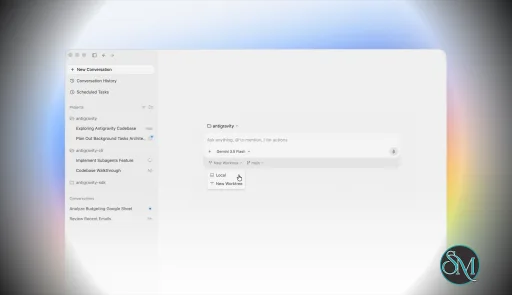
Unlike the original IDE-centric approach, Antigravity 2.0 operates as its own desktop environment focused entirely on managing agents and reviewing their outputs.
CLI and SDK Support
Google introduced both a command-line interface and a software development kit, allowing developers to build custom workflows and automate agent interactions beyond the desktop application.
Voice Commands
Native voice interaction allows developers to communicate with agents through speech, including live transcription capabilities integrated directly into the application.
Background Task Scheduling
Users can assign long-running jobs that continue executing asynchronously while they work on other activities.
Gemini 3.5 Flash Integration
Antigravity 2.0 is heavily powered by Google's Gemini 3.5 Flash model, which focuses on faster agent execution and improved responsiveness for complex workflows.
User Experience
Using Antigravity 2.0 feels very different from using a conventional code editor.
Developers spend less time manually writing code and more time managing AI-generated work. The experience resembles directing a team of junior developers rather than interacting with a traditional coding assistant.
For users already comfortable with AI-assisted development, this workflow can be extremely productive.
For developers who prefer direct control over every file and implementation detail, the transition may feel uncomfortable at first. Some community members have criticized the removal of familiar IDE elements and traditional project navigation.
Performance
Performance is one of the platform's strongest areas.
The new architecture delivers significantly faster agent execution than earlier versions, particularly when multiple agents work simultaneously. Users report that many tasks complete far more quickly than in the original Antigravity environment.
The ability to run agents asynchronously can dramatically improve productivity during:
Large refactoring projects
Research-heavy tasks
Full-stack application development
Testing and verification workflows
Documentation generation
However, the platform can still be resource-intensive, particularly when managing numerous active agents. Community feedback also mentions occasional quota limitations and usage restrictions during heavy workloads.
Real-World Development Workflow
Antigravity 2.0 is particularly effective for:
Rapid prototyping
Feature implementation
Automated testing
Codebase analysis
Large-scale refactoring
Documentation generation
Multi-service applications
The platform's biggest strength is reducing the amount of repetitive work developers must perform manually.
Instead of requesting code snippets, users can assign high-level objectives and allow agents to execute most of the implementation process.
Community Reception
Developer reactions have been mixed.
Many users praise:
Faster workflows
Better AI performance
Multi-agent execution
Powerful automation capabilities
At the same time, some longtime Antigravity users dislike the shift away from a traditional IDE experience. Several community discussions highlight migration issues, interface changes, and workflow disruptions during the transition from the original platform.
The most common criticism is that Antigravity 2.0 feels less like an IDE and more like an agent management console. Whether this is viewed positively or negatively depends largely on the developer's preferred workflow.
Security Considerations
Because agents can execute tasks autonomously, developers should still carefully review generated outputs and permissions.
While the platform includes safeguards and review mechanisms, relying entirely on autonomous execution without oversight can introduce risks in production environments.
As with any advanced AI coding platform, human review remains essential.
Pros
Innovative multi-agent architecture
Significantly faster development workflows
Native voice interaction
Background task execution
CLI and SDK support
Strong integration with Gemini models
Excellent for large projects and automation
Cross-platform desktop application
Cons
Steeper learning curve than traditional IDEs
Less direct control over implementation details
Migration frustrations for existing users
Resource intensive during large workloads
Usage quotas may affect heavy users
Traditional developers may miss familiar IDE workflows
Who Should Use Antigravity 2.0?
Antigravity 2.0 is best suited for:
Professional software developers
AI-focused engineering teams
Technical founders
Automation enthusiasts
Developers managing large codebases
Users comfortable supervising AI agents
It is particularly valuable for those who want to maximize productivity through autonomous AI workflows rather than traditional coding methods.
Antigravity 2.0 represents one of the most significant shifts in software development tooling since the rise of AI coding assistants. Its agent-first architecture, multi-agent orchestration, and autonomous workflow capabilities make it one of the most advanced development platforms currently available. While the departure from traditional IDE workflows will not appeal to everyone, Antigravity 2.0 offers a compelling vision of how software development may evolve over the coming years.
Post a Comment/Report Broken Link: