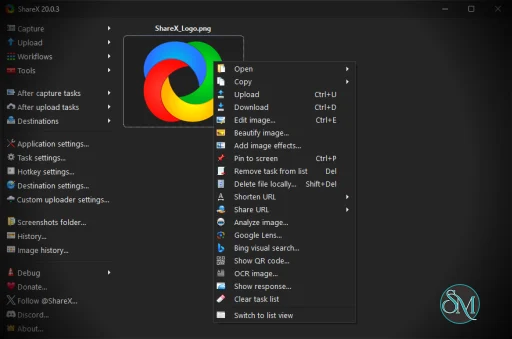
ShareX is a free and open-source screen capture and file sharing application for Windows. It allows users to capture screenshots, record screens, edit images, and upload files to various destinations with full customization.
Unlike many alternatives, ShareX is completely free with no ads or restrictions, making it highly popular among developers, content creators, and IT professionals.
If you need a feature-rich screen capture tool without paying for premium software, ShareX is one of the most powerful options available. It goes far beyond basic screenshots, offering automation, editing, and advanced workflows that appeal to both casual users and professionals.
Download ShareX 20.0.4 - Software Mirrors |
|---|
Download ShareX 20.0.4 Download ShareX 20.0.4 |
ShareX 20.0.4 Release Notes:Changelog: https://getsharex.com/changelog#v20.0.4| File | SHA256 | | --- | --- | | ShareX-20.0.4-portable-x64.zip | DAD02B51D0E120F8D3D07DB4812198D7AB8E615BC615CA6BC1DEDB7C994EBBED || ShareX-20.0.4-setup-x64.exe | C456718C80BD940233F7B7E1A36DD25146BB99444207293F3D76626900D23F01 | |
Key Features of ShareX
1. Advanced Screen Capture Options
ShareX supports multiple capture modes:
Full screen
Active window
Region selection
Scrolling capture for long webpages
This flexibility makes it suitable for everything from quick screenshots to detailed documentation.
2. Built-In Screen Recording
You can record your screen as:
Video (MP4)
Animated GIF
It uses FFmpeg integration, allowing high-quality recordings with customizable settings.
3. Powerful Annotation and Editing Tools
ShareX includes a built-in editor where you can:
Add text, arrows, and shapes
Blur or highlight sensitive areas
Apply effects and watermarks
This is especially useful for tutorials and bug reporting.
4. Automated Workflows
One of ShareX’s strongest features is automation:
Auto-upload after capture
Custom file naming rules
Post-capture actions like copying links or saving locally
You can create complete workflows that run automatically after each capture.
5. Extensive Upload Destinations
ShareX supports uploading to many services, including:
Image hosting platforms
Cloud storage providers
FTP and custom servers
This makes sharing content fast and efficient.
6. Productivity Tools
Beyond screen capture, ShareX includes:
Color picker
Image splitter
Hash checker
QR code generator
These extras make it a versatile utility tool for daily tasks.
Performance and Real-World Use
ShareX is lightweight and performs efficiently even with advanced features enabled. It is commonly used for:
Creating tutorials and documentation
Bug reporting and developer workflows
Quick sharing of screenshots and recordings
Automating repetitive capture tasks
Because it supports hotkeys and automation, it significantly improves productivity for frequent users.
User Experience
The interface is functional rather than minimal. While beginners can use basic features easily, the large number of options may feel overwhelming at first.
However, once configured, ShareX becomes extremely efficient and tailored to your workflow.
Pros and Cons
Pros
Completely free and open source
Extremely feature-rich
Powerful automation capabilities
Built-in editing and recording tools
Supports many upload destinations
Cons
Windows-only
Steeper learning curve for beginners
Interface can feel complex initially
Who Should Use ShareX
ShareX is ideal for:
Developers and IT professionals
Content creators and tutorial makers
Users who need automation in workflows
Anyone looking for a powerful free alternative to paid tools
It may not be the best choice for users who want a very simple, minimal interface.
Final Verdict
ShareX is one of the most powerful free screen capture tools available. Its combination of advanced features, automation, and flexibility makes it stand out from both free and paid alternatives.
If you are willing to spend a little time learning it, ShareX delivers unmatched value and productivity in a completely free package.
Developer:
ShareX Team
Operating System:
Windows
Date Added:
2026-05-03T06:30:42.752Z
Categories:
Post a Comment/Report Broken Link: