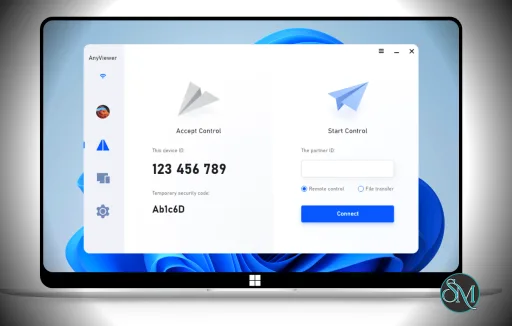
AnyViewer is a remote access and control software that allows users to connect to Windows, macOS, iOS, and Android devices. It supports unattended access, file transfer, screen sharing, and multi session management. The tool is designed for both personal and professional use cases, from helping family members with computer issues to supporting remote employees.
Download AnyViewer - Software Mirrors |
|---|
Download AnyViewer for Windows 64bit Download AnyViewer for Windows 32bit Download AnyViewer for Windows (Portable) |
Key Features of AnyViewer
Quick and Easy Remote Connection
AnyViewer allows users to establish a connection with a simple ID and password system. Once the software is installed, users can save trusted devices for even quicker reconnection in the future.
Unattended Access
Unattended access enables users to connect to a remote device without someone on the other end approving the session. This is useful for managing servers, home computers, or client systems on demand.
File Transfer Between Devices
The file transfer function lets users send or receive documents, images, and software files during a remote session. Transfers occur quickly and securely, improving productivity during support and collaboration.
Multi Platform Support
AnyViewer supports major operating systems, including Windows, macOS, iOS, and Android. This allows flexibility for users who work across different devices.
Screen Sharing and Live View
Screen sharing provides a real time view of the remote system. Users can see exactly what is happening and provide guidance or make changes directly.
Session Recording
Some versions of AnyViewer include session recording, which lets users save remote sessions for future review or training.
Performance and Reliability
AnyViewer is engineered for smooth performance even on slower connections. Screen updates are efficient, and mouse and keyboard inputs register quickly. The software prioritizes low latency to make remote control feel responsive.
The connection quality can vary with internet speed, but overall stability remains consistent with other top remote access tools.
Security and Privacy
Security is a key consideration for any remote access software. AnyViewer uses encrypted connections to protect data transmitted between devices. The tool also provides password protection and optional two factor authentication to prevent unauthorized access.
User permissions can be set to control what remote users can and cannot do during sessions. These settings help ensure privacy and prevent unwanted changes on the remote device.
Who Should Use AnyViewer
AnyViewer is suitable for:
IT professionals providing remote support
Small business owners managing remote employees
Individuals helping friends or family with technical issues
Users who need secure remote access to home or work computers
The user friendly interface and cross platform support make it appropriate for both personal and commercial environments.
How It Compares to Built In Tools
Windows and other operating systems include basic remote access functionality, but these built in tools may be limited in compatibility and features. AnyViewer extends remote access capabilities with:
Cross platform support
Unattended access
File transfer features
Centralized device management
These enhancements make AnyViewer more flexible and powerful than many native solutions.
Final Verdict
AnyViewer is a dependable and versatile remote access solution. It offers a strong combination of features, security, and ease of use across multiple platforms. With a high overall rating and practical functionality, AnyViewer is a valuable tool for anyone who needs reliable remote control and support capabilities.
Whether for personal use or professional IT support, AnyViewer delivers a balanced and effective remote access experience.
Remote access software has become essential for businesses, IT support, and individuals who need to connect to another device from anywhere. AnyViewer is a remote desktop solution that enables secure, fast connections between computers and mobile devices. This article provides a detailed overview of features, benefits, performance, security, rating, and ideal users for AnyViewer.
Post a Comment/Report Broken Link: