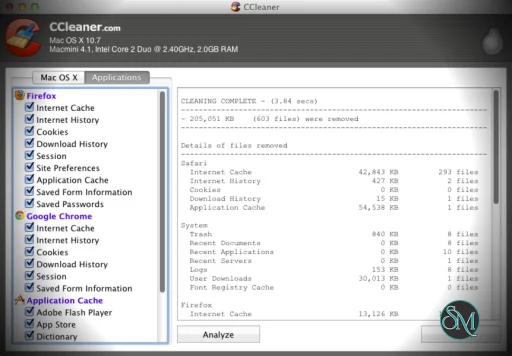
CCleaner for Mac is a desktop cleanup utility for macOS. It scans for temporary files, app caches, browser caches, logs, and other files that take up space on your Mac. It helps users free disk space and maintain basic system hygiene.
Unlike some all-in-one optimization suites, CCleaner focuses on core cleanup and privacy tasks.
Key Features of CCleaner Free for Mac
Junk and Cache Cleaning
The primary feature is scanning for unneeded files such as:
System cache files
Browser caches and logs
Old application data
Trash and temporary folders
Removing these files can recover disk space and reduce clutter.
Browser Privacy Cleanup
CCleaner can clear:
Browser history
Cookies
Cache data
Download lists
This helps protect privacy and can speed up browser performance.
Simple Interface
CCleaner for Mac has a clean, beginner-friendly interface. It guides you through scanning and cleanup steps with clear buttons and options.
You don’t need advanced knowledge to remove unnecessary files.
Application Management
It can show large files and old applications, helping you decide what to remove manually to free additional space.
While not a full uninstaller, it highlights items that may be worth cleaning up.
Performance and Usability
CCleaner for Mac runs quickly and uses minimal system resources. Scans are usually fast, and cleanup selections can be made with just a few clicks.
Because it focuses on file cleanup, it does not include advanced optimization tools such as disk defragmentation or memory tuning.
Pros and Cons
Pros
Easy to use and intuitive
Helps free disk space quickly
Includes privacy cleanup
Lightweight and fast
Cons
Basic feature set compared with full utilities
Not a replacement for deep maintenance tools
Limited control over individual system settings
Who Should Use CCleaner for Mac
CCleaner for Mac is ideal for:
Users who want to reclaim disk space quickly
People who want a simple cleanup tool without complexity
Casual users who need a lightweight maintenance utility
Anyone who wants basic privacy cleanup
If you need more advanced optimization or system tuning, you may pair CCleaner with other utilities.
Final Verdict
CCleaner for Mac is a straightforward and effective cleanup tool. It offers basic junk removal, privacy cleanup, and disk space recovery in an easy-to-use package.
CCleaner for Mac is a system maintenance utility designed to help macOS users remove unnecessary files, free up disk space, and clean up browser and application clutter. It provides basic cleanup and privacy tools in a straightforward interface that is easy to use. CCleaner for Mac scores well for simplicity and its ability to free up space quickly.
Developer:
Piriform Ltd
Operating System:
macOS
Date Added:
2026-04-30T12:01:15.937Z
Categories:
Post a Comment/Report Broken Link: