Cursor has quickly become one of the most popular AI-powered coding editors, designed as a VS Code–compatible environment with deep AI integration for code generation, refactoring, debugging, and project-wide reasoning. Cursor blends a full modern IDE with ChatGPT-like reasoning and VSCode-like familiarity.

Cursor is an AI-first code editor built on top of the VS Code ecosystem. It includes:

  • A modern editor with familiar VS Code UI

  • Support for VS Code extensions, themes, shortcuts, and tools

  • Deep AI integration that can analyze your entire codebase

  • Project-level understanding instead of just single-file suggestions

  • Chat-style reasoning infused directly into your project workspace

Cursor combines the speed of a traditional editor with the intelligence of a developer assistant that can read, write, and help you refactor code.

Benefits of Using Cursor

  • Faster Development
    AI-driven suggestions dramatically cut boilerplate time and help produce features faster.

  • Better Code Quality
    Refactoring and rewrite tools help improve structure, consistency, and clarity.

  • Enhanced Understanding
    Developers can ask Cursor to explain complex workflows, making onboarding easier.

  • Easier Debugging
    The AI can analyze errors, suggest fixes, or point to related logic across files.

  • Improved Architectures
    Cursor can propose reorganized structures or modern patterns for cleaner design.

Cursor represents the next evolution of programming tools: an editor where AI is not an add-on, but a core part of the development experience. By blending VS Code familiarity with powerful project-aware AI assistance, Cursor helps developers write better code, learn faster, and build software more efficiently.

Changelog: https://cursor.com/changelog

Cursor 3.13.25
Free
Software Informations:
Developer:

Operating System:
Windows / Mac / Linux
Date Added:
2026-07-29T05:02:21.597Z

OfficeCLI is an open source command-line productivity tool developed by iOfficeAI that brings AI-powered document creation and editing directly to the terminal. Instead of using a traditional graphical office suite, OfficeCLI lets users generate, edit, convert, and manage documents using simple commands and natural language prompts. It is designed for developers, technical writers, automation engineers, and anyone who prefers a keyboard-driven workflow.

OfficeCLI takes a different approach from conventional office software. Rather than opening a graphical editor, users interact with documents through a command-line interface enhanced by AI. This makes it particularly useful for scripting, automation, remote servers, and development environments where a graphical interface may not be available.

The project is open source and actively developed, making it an attractive option for users who want transparency and the ability to customize or contribute to the software.

Key Features of OfficeCLI

AI-Powered Document Generation

OfficeCLI can generate documents from natural language prompts, helping users create reports, letters, meeting notes, summaries, and other content with minimal effort.

Command Line Workflow

Everything is managed through terminal commands, allowing users to integrate document creation into shell scripts, automation workflows, and CI/CD pipelines.

Multiple Document Formats

OfficeCLI supports working with common office document formats, making it easier to generate and manage files without relying on a full desktop office suite.

AI-Assisted Editing

Users can rewrite, summarize, expand, translate, or improve existing documents using AI directly from the command line.

Automation Friendly

Because it is designed as a CLI application, OfficeCLI fits naturally into automated workflows where documents need to be created or updated programmatically.

Open Source

The project is released as open source, allowing developers to inspect the code, contribute improvements, and adapt it to their own environments.

Download OfficeCLI v1.0.143 - Software Mirrors

OfficeCLI v1.0.143 for Windows

officecli-win-arm64.exe | 32.23 MB

officecli-win-x64.exe | 31.81 MB

OfficeCLI v1.0.143 for macOS

officecli-mac-arm64 | 32.18 MB

officecli-mac-x64 | 33.07 MB

OfficeCLI v1.0.143 for Linux

officecli-linux-alpine-arm64 | 33.14 MB

officecli-linux-alpine-x64 | 33.68 MB

officecli-linux-arm64 | 33.1 MB

officecli-linux-x64 | 33.66 MB

Others Download related to OfficeCLI v1.0.143

SHA256SUMS | 710 B

OfficeCLI v1.0.143 Release Notes:

What's Changed

  • fix(pptx): notes slides get the package relationships they require by @leomem in https://github.com/iOfficeAI/OfficeCLI/pull/265
  • fix(cli): decode piped stdin as UTF-8 without mutating the console by @leomem in https://github.com/iOfficeAI/OfficeCLI/pull/264
  • Preserve Excel drawing hyperlinks and grouped shapes during round-trip by @tjlstar in https://github.com/iOfficeAI/OfficeCLI/pull/266

New Contributors

  • @leomem made their first contribution in https://github.com/iOfficeAI/OfficeCLI/pull/265
  • @tjlstar made their first contribution in https://github.com/iOfficeAI/OfficeCLI/pull/266
Full Changelog: https://github.com/iOfficeAI/OfficeCLI/compare/v1.0.142...v1.0.143

Performance and User Experience

OfficeCLI is lightweight and fast to install for users familiar with command-line tools. Commands are straightforward, and the AI integration reduces the amount of manual writing required for many common tasks.

The terminal-based interface will appeal to developers and system administrators, but users accustomed to traditional word processors may face a learning curve. Since the project is actively evolving, new features and improvements continue to be added over time.

Pros

  • Free and open source.

  • AI-powered document generation and editing.

  • Excellent for terminal-based workflows.

  • Easily integrates into automation and scripting.

  • Lightweight compared to traditional office suites.

  • Suitable for remote and headless environments.

  • Active development on GitHub.

Cons

  • Command-line interface may not appeal to all users.

  • Lacks the visual editing experience of traditional office applications.

  • Some features are still evolving as the project matures.

  • Best suited for technical users familiar with terminal workflows.

Who Should Use OfficeCLI?

OfficeCLI is ideal for developers, DevOps engineers, technical writers, system administrators, and AI enthusiasts who spend much of their time in the terminal. It is especially useful for automating document generation, integrating AI into development workflows, or creating documents on systems without a graphical desktop.

Users looking for a full-featured visual office suite for everyday document editing may be better served by traditional desktop applications.

Final Verdict

OfficeCLI offers an innovative approach to document creation by combining AI capabilities with the flexibility of the command line. Its focus on automation, scripting, and natural language document generation makes it a valuable tool for technical users who want to streamline repetitive writing tasks.

While it is not intended to replace conventional office suites for every scenario, OfficeCLI stands out as a promising open source solution for AI-assisted productivity in terminal-based environments.

OfficeCLI v1.0.143
Free
Software Informations:
Developer:

Operating System:
Windows / macOS / Linux
Date Added:
2026-07-29T05:02:21.407Z

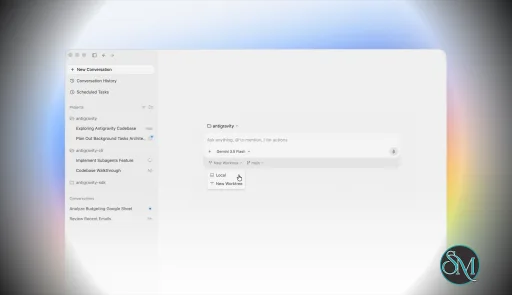
Antigravity 2.0 is a standalone desktop application designed to coordinate AI agents that can perform complex development tasks independently.

The platform expands beyond a traditional IDE by introducing:

  • Multi-agent orchestration

  • Background task execution

  • Agent workflows

  • Native voice interaction

  • CLI integration

  • SDK support

  • Enterprise deployment options

  • Automated software delivery workflows

Rather than focusing on code completion, Antigravity 2.0 emphasizes supervising AI workers that execute development tasks on behalf of the user.

Antigravity 2.0 is one of the most ambitious AI development platforms released in recent years. Introduced during Google I/O 2026, the platform moves beyond traditional AI-assisted coding and embraces a fully agent-driven workflow where autonomous AI agents can plan, build, test, and iterate on software projects with minimal manual intervention.

Unlike the original Antigravity IDE, which blended AI assistance with a familiar coding environment, Antigravity 2.0 reimagines development around agent orchestration, positioning itself as a competitor to tools such as Claude Code, Codex, and Cursor.

Download Antigravity 2.0 (2.4.3) - Software Mirrors

Antigravity 2.0 (2.4.3) for Windows

Download for x64

Download for ARM64

Antigravity 2.0 (2.4.3) for macOS

Download for Apple Silicon

Download for Intel

Antigravity 2.0 (2.4.3) for Linux

Download for x64

Download for ARM64

Download Antigravity IDE

Key Features of Antigravity 2.0

Multi-Agent Orchestration

The headline feature is the ability to run multiple AI agents simultaneously.

Developers can delegate different portions of a project to separate agents, allowing parallel execution of research, implementation, testing, and validation tasks.

Standalone Agent Workspace

Unlike the original IDE-centric approach, Antigravity 2.0 operates as its own desktop environment focused entirely on managing agents and reviewing their outputs.

CLI and SDK Support

Google introduced both a command-line interface and a software development kit, allowing developers to build custom workflows and automate agent interactions beyond the desktop application.

Voice Commands

Native voice interaction allows developers to communicate with agents through speech, including live transcription capabilities integrated directly into the application.

Background Task Scheduling

Users can assign long-running jobs that continue executing asynchronously while they work on other activities.

Gemini 3.5 Flash Integration

Antigravity 2.0 is heavily powered by Google's Gemini 3.5 Flash model, which focuses on faster agent execution and improved responsiveness for complex workflows.

User Experience

Using Antigravity 2.0 feels very different from using a conventional code editor.

Developers spend less time manually writing code and more time managing AI-generated work. The experience resembles directing a team of junior developers rather than interacting with a traditional coding assistant.

For users already comfortable with AI-assisted development, this workflow can be extremely productive.

For developers who prefer direct control over every file and implementation detail, the transition may feel uncomfortable at first. Some community members have criticized the removal of familiar IDE elements and traditional project navigation.

Performance

Performance is one of the platform's strongest areas.

The new architecture delivers significantly faster agent execution than earlier versions, particularly when multiple agents work simultaneously. Users report that many tasks complete far more quickly than in the original Antigravity environment.

The ability to run agents asynchronously can dramatically improve productivity during:

  • Large refactoring projects

  • Research-heavy tasks

  • Full-stack application development

  • Testing and verification workflows

  • Documentation generation

However, the platform can still be resource-intensive, particularly when managing numerous active agents. Community feedback also mentions occasional quota limitations and usage restrictions during heavy workloads.

Real-World Development Workflow

Antigravity 2.0 is particularly effective for:

  • Rapid prototyping

  • Feature implementation

  • Automated testing

  • Codebase analysis

  • Large-scale refactoring

  • Documentation generation

  • Multi-service applications

The platform's biggest strength is reducing the amount of repetitive work developers must perform manually.

Instead of requesting code snippets, users can assign high-level objectives and allow agents to execute most of the implementation process.

Community Reception

Developer reactions have been mixed.

Many users praise:

  • Faster workflows

  • Better AI performance

  • Multi-agent execution

  • Powerful automation capabilities

At the same time, some longtime Antigravity users dislike the shift away from a traditional IDE experience. Several community discussions highlight migration issues, interface changes, and workflow disruptions during the transition from the original platform.

The most common criticism is that Antigravity 2.0 feels less like an IDE and more like an agent management console. Whether this is viewed positively or negatively depends largely on the developer's preferred workflow.

Security Considerations

Because agents can execute tasks autonomously, developers should still carefully review generated outputs and permissions.

While the platform includes safeguards and review mechanisms, relying entirely on autonomous execution without oversight can introduce risks in production environments.

As with any advanced AI coding platform, human review remains essential.

Pros

  • Innovative multi-agent architecture

  • Significantly faster development workflows

  • Native voice interaction

  • Background task execution

  • CLI and SDK support

  • Strong integration with Gemini models

  • Excellent for large projects and automation

  • Cross-platform desktop application

Cons

  • Steeper learning curve than traditional IDEs

  • Less direct control over implementation details

  • Migration frustrations for existing users

  • Resource intensive during large workloads

  • Usage quotas may affect heavy users

  • Traditional developers may miss familiar IDE workflows

Who Should Use Antigravity 2.0?

Antigravity 2.0 is best suited for:

  • Professional software developers

  • AI-focused engineering teams

  • Technical founders

  • Automation enthusiasts

  • Developers managing large codebases

  • Users comfortable supervising AI agents

It is particularly valuable for those who want to maximize productivity through autonomous AI workflows rather than traditional coding methods.

Antigravity 2.0 represents one of the most significant shifts in software development tooling since the rise of AI coding assistants. Its agent-first architecture, multi-agent orchestration, and autonomous workflow capabilities make it one of the most advanced development platforms currently available. While the departure from traditional IDE workflows will not appeal to everyone, Antigravity 2.0 offers a compelling vision of how software development may evolve over the coming years.

Antigravity 2.0 (2.4.3)
Free
Software Informations:
Developer:

Operating System:
Windows / macOS / Linux
Date Added:
2026-07-29T04:02:12.964Z

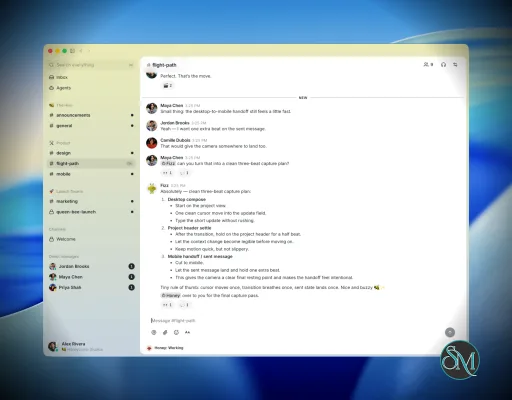
Buzz is an open source desktop application developed by Block that combines team messaging, AI agents, and decentralized communication into a single platform. Built on the Nostr protocol, Buzz allows users to create communities where people and AI agents collaborate through channels, shared knowledge, and automated workflows. Unlike traditional messaging platforms, organizations can host their own Buzz relay, giving them full control over their data and infrastructure.

Buzz is designed as more than just a chat application. It provides a workspace where team members and AI agents can communicate, perform tasks, and collaborate inside dedicated communities.

The platform uses relays instead of centralized servers. Users can connect to Block-hosted communities or independently operated relays, and organizations can deploy their own infrastructure for greater privacy and control. Buzz is released under the Apache 2.0 License, making it suitable for both personal and enterprise use.

Key Features of Buzz

AI Agent Collaboration

One of Buzz's standout features is native support for AI agents. Agents can participate in conversations, automate repetitive work, answer questions, and collaborate alongside human users within the same channels.

Community-Based Workspaces

Instead of organizing everything in a single chat list, Buzz groups conversations into communities and channels. Each community has its own members, permissions, and moderation policies.

Self-Hosted Relays

Organizations that require complete ownership of their communication platform can run their own Buzz relay. This provides full control over stored messages, users, and access policies without depending on a third-party service.

Built on Nostr

Buzz leverages the Nostr protocol for identity and communication. This gives users portable identities while allowing different relay operators to host independent communities.

Cross-Platform Desktop Application

Buzz is available as a desktop application for Windows, macOS, and Linux, offering a consistent experience across major operating systems.

Open Source

The entire platform is open source, allowing developers to inspect the code, contribute improvements, or customize the application for their own deployments.

Download Buzz v0.5.0 - Software Mirrors

Buzz v0.5.0 for Windows

Buzz_0.5.0_x64-setup_alpha-unsigned.exe | 40.59 MB

Buzz v0.5.0 for macOS

Buzz_0.5.0_x64.dmg | 67.25 MB

Buzz_0.5.0_aarch64.dmg | 84.02 MB

Buzz v0.5.0 for Linux

Buzz_0.5.0_amd64.deb | 67.25 MB

Buzz_0.5.0_amd64.AppImage | 130.74 MB

Buzz v0.5.0 Release Notes:

  • fix(node): bump Buzz-supplied Node runtimes past OpenClaw's >=24.15.0 floor (#3218) (98a7b1334)
  • fix(desktop): preserve thread anchor through layout reflow (#3212) (9810d8545)
  • feat(search): parse from:/in:/after:/before: and pass them in the filter (#2871) (cb2a265b5)
  • fix(desktop): fetch join policies through native networking (#2862) (0019f8076)
  • fix(desktop): republish agent identity records when a persona rename propagates (#2607) (7ca0bbd94)
  • Fix composer selection formatting and drop overlay (#3172) (99da5b7eb)
  • fix(desktop): recover full local storage on startup (#3182) (174c38e4b)
  • fix(desktop): keep collapsed table separators out of spoilers (#3169) (4d8b676bb)
  • fix(desktop): use forward slashes for git credential.helper on Windows (#3023) (899531684)
  • chore(desktop): add AgentCreationPreview file-size override to unblock main CI (#3154) (b92a1f4bf)
  • fix(desktop): make the test loader work on Windows (#2758) (8bb43d519)
  • fix(desktop): make lint and unit-test gates work on Windows (#2943) (545bb46b8)
  • fix(desktop): keep identity key help dialog readable in dark mode (#2854) (be275cfc6)
  • feat(acp): title agent sessions from the agent and channel name (#3028) (f2fe3b63c)
  • feat(git): use agent display name as git author name (#3040) (18eef633d)
  • fix(deps): bump nostr to 0.44.6 for RUSTSEC-2026-0216 (NIP-44 remote DoS) (#3135) (31e2de196)
  • fix(desktop): read the newest pair-scoped harness log (#3134) (654f38490)
  • fix(desktop): clarify identity key button when key exists (#2357) (87b3fcd3c)
  • Restore Goose and Buzz Agent to onboarding harness selection (#2731) (7fc0cc82d)
  • fix(desktop): render rich project work item content (#3100) (afb272bb7)
  • feat(acp): bring your own harness (BYOH) — generic ACP runtime seam + settings gallery (#2773) (95fdf9788)
  • feat(desktop): use collective mesh routing for Auto (#2825) (16d4ec335)
  • fix(desktop): strip legacy baked team instructions from stored prompts (#3035) (aee631448)
  • feat(agents): lower default agent parallelism from 24 to 10 (#3038) (5d8ede446)
  • fix(desktop): remove bundled libsystemd from AppImage (#2353) (a31fc4d2f)
  • fix(desktop): make agent definition authoritative for model/provider/prompt (#1968) (8c0e8cb16)
  • chore(desktop): delete dead persona catalog UI cluster (#2886) (8e67cf399)
  • fix(desktop): surface install failures hidden by curl-pipe exit codes (#2892) (166c6655e)
  • Refactor managed-agent runtime into cohesive modules (#2974) (74b63e184)
  • fix(desktop): make Linux AppImage GStreamer work on non-Debian distros (#2176) (cc6c4d347)
  • refactor(desktop): remove Agent directory section from Agents page (#2290) (5d1233e84)
  • fix(desktop): enable arboard Wayland backend so Linux copies reach the Wayland clipboard (#2904) (ab7aa8b12)
  • fix(desktop): supervise and re-arm relay-mesh runtime (#2823) (aa51dab9d)
  • fix(agents): run live Databricks discovery instead of the fallback list (#2890) (8eb6e3eb6)
  • fix(desktop): retire prepend mode on every reader wheel (#2913) (07d0265cf)
  • fix(desktop): consolidate prepend scroll correction (#2855) (25e7864b3)
  • fix(desktop): track concurrent agent turns up to the harness maximum (#2882) (20bff5910)
  • fix(desktop): clear stale working badges on agent stop/restart (#2803) (a64cc71f6)
  • fix(desktop): surface agent rename relay profile sync failure as a warning toast (#2279) (5e3d2e484)
  • fix(discovery): inject PATH into Codex adapter planning (#2767) (6ab3835f3)

Performance and User Experience

Buzz has a clean and modern interface that feels familiar to users of workplace messaging platforms. Community switching is straightforward, and conversations remain organized through channels.

The integration of AI agents is one of the platform's strongest features. Instead of treating AI as a separate chatbot, Buzz allows agents to become active participants in collaborative workflows.

Because the project is relatively new, its ecosystem is still growing, and the number of available integrations is smaller than that of long-established collaboration platforms. However, active development suggests the platform will continue to expand.

Pros

  • Free and open source.

  • Built-in AI agent collaboration.

  • Self-hosted deployment option.

  • Based on the Nostr protocol.

  • Modern desktop interface.

  • Community and channel organization.

  • Privacy-focused architecture.

  • Apache 2.0 licensed.

Cons

  • Smaller ecosystem than Slack or Discord.

  • Enterprise integrations are still developing.

  • Requires running or joining a relay.

  • Best suited for users interested in AI-assisted collaboration.

Who Should Use Buzz?

Buzz is an excellent choice for development teams, open source communities, startups, researchers, and organizations that want a collaborative messaging platform with integrated AI agents.

It is particularly appealing to users who value open source software, self-hosting, and decentralized infrastructure over proprietary collaboration services.

Final Verdict

Buzz offers a refreshing approach to team communication by combining community chat, AI agents, and decentralized infrastructure into a single platform. Its open source nature, self-hosting capabilities, and Nostr-based architecture provide flexibility that many commercial collaboration tools lack.

Although the project is still maturing, its focus on AI-assisted collaboration and user-controlled infrastructure makes it a promising option for teams looking beyond traditional workplace chat applications.

Buzz v0.5.0
Free
Software Informations:
Developer:

Operating System:
Windows / macOS / Linux
Date Added:
2026-07-29T04:02:12.957Z

croc is a free and open source command-line utility that makes it incredibly easy to transfer files and folders securely between two computers. Developed by Schollz, it uses end-to-end encryption, requires no port forwarding, and works across Windows, macOS, Linux, Android, and many other platforms. With a simple one-command workflow, croc has become one of the most popular file transfer tools for developers and system administrators.

Sharing files between computers often involves cloud storage, SSH configuration, or complicated networking. croc eliminates these obstacles by using a relay server to establish the connection while encrypting all transferred data using Password-Authenticated Key Exchange (PAKE). The relay never has access to the contents of your files or the encryption keys.

Sending a file is as simple as:

croc send myfile.zip

The sender receives a short code, which the recipient enters:

croc code-phrase

Once connected, the transfer begins automatically.

Key Features of croc

End-to-End Encryption

Every transfer is protected using PAKE, ensuring that only the sender and recipient can decrypt the transferred data. Neither the relay server nor third parties can access the file contents.

Extremely Simple Workflow

Unlike SCP, SFTP, or rsync, croc requires no SSH configuration, firewall changes, VPN, or account registration. Users only need to exchange a temporary code phrase.

Cross-Platform Support

croc runs on:

  • Windows

  • macOS

  • Linux

  • BSD

  • Android

  • Termux

  • Docker

  • NixOS

Installation is available through Homebrew, Winget, Chocolatey, Scoop, apt-compatible repositories, pacman, dnf, Conda, and Go.

Folder Transfers

Entire directories can be transferred while preserving their structure, making croc useful for sharing projects, backups, or datasets.

Resume Interrupted Transfers

If a transfer is interrupted due to a network issue, croc can resume the transfer instead of starting from the beginning.

Multiple File Support

Users can send multiple files and folders together in a single command without creating archives manually.

IPv6 and Proxy Support

The application prefers IPv6 when available, falls back to IPv4 when necessary, and supports SOCKS5 proxies, including Tor.

Self-Hosted Relay

Organizations that prefer not to use the public relay can deploy their own croc relay server, giving complete control over the transfer infrastructure. Docker support makes deployment straightforward.

Open Source

Released under the MIT License, croc is actively maintained on GitHub with frequent updates and a large open source community. Recent releases continue to improve stability and networking capabilities.

Download croc v10.7.0 - Software Mirrors

croc v10.7.0 for Windows

croc_v10.7.0_Windows-ARM64.zip | 9.4 MB

croc_v10.7.0_Windows-64bit.zip | 10.17 MB

croc_v10.7.0_Windows-32bit.zip | 10 MB

croc v10.7.0 for macOS

croc_v10.7.0_macOS-ARM64.tar.gz | 5.8 MB

croc_v10.7.0_macOS-64bit.tar.gz | 6.11 MB

croc v10.7.0 for Linux

croc_v10.7.0_Linux-RISCV64.tar.gz | 9.65 MB

croc_v10.7.0_Linux-ARMv5.tar.gz | 9.54 MB

croc_v10.7.0_Linux-ARM64.tar.gz | 9.34 MB

croc_v10.7.0_Linux-ARM.tar.gz | 9.52 MB

croc_v10.7.0_Linux-64bit.tar.gz | 10.05 MB

croc_v10.7.0_Linux-32bit.tar.gz | 9.83 MB

croc v10.7.0 for BSD

croc_v10.7.0_OpenBSD-ARM64.tar.gz | 9.17 MB

croc_v10.7.0_OpenBSD-64bit.tar.gz | 9.88 MB

croc_v10.7.0_NetBSD-ARM64.tar.gz | 9.16 MB

croc_v10.7.0_NetBSD-64bit.tar.gz | 9.86 MB

croc_v10.7.0_NetBSD-32bit.tar.gz | 9.64 MB

croc_v10.7.0_FreeBSD-ARM64.tar.gz | 9.19 MB

croc_v10.7.0_FreeBSD-64bit.tar.gz | 9.9 MB

croc_v10.7.0_DragonFlyBSD-64bit.tar.gz | 9.87 MB

Others Download related to croc v10.7.0

croc_v10.7.0_src.tar.gz | 7.02 MB

croc_v10.7.0_checksums.txt | 1.92 kB

croc v10.7.0 Release Notes:

What's Changed

  • fix: use 0o600 for --remember config files by @skdishansachin in https://github.com/schollz/croc/pull/1187
  • fix: harden existing remembered config permissions by @divyanshu-iitian in https://github.com/schollz/croc/pull/1189
  • Fix/web receiver silent hang by @NICE-DEV226 in https://github.com/schollz/croc/pull/1188
  • Fix/web receiver silent hang by @NICE-DEV226 in https://github.com/schollz/croc/pull/1192
  • fix: reject receive paths through symlink parents by @divyanshu-iitian in https://github.com/schollz/croc/pull/1191
  • fix: return error instead of panic in EncryptChaCha by @skdishansachin in https://github.com/schollz/croc/pull/1190
  • docs: document --exclude-file flag by @sridhar-3009 in https://github.com/schollz/croc/pull/1179
  • docs: add FlCroc to third-party GUI list by @sridhar-3009 in https://github.com/schollz/croc/pull/1180
  • build(deps): bump actions/stale from 10 to 11 by @dependabot[bot] in https://github.com/schollz/croc/pull/1194
  • Add encrypted temporary stored transfers by @schollz in https://github.com/schollz/croc/pull/1196
  • fix: support NetBSD disk usage builds by @schollz in https://github.com/schollz/croc/pull/1198

New Contributors

  • @skdishansachin made their first contribution in https://github.com/schollz/croc/pull/1187
  • @NICE-DEV226 made their first contribution in https://github.com/schollz/croc/pull/1188
  • @sridhar-3009 made their first contribution in https://github.com/schollz/croc/pull/1179
Full Changelog: https://github.com/schollz/croc/compare/v10.6.0...v10.7.0

Performance and User Experience

One of croc's biggest strengths is its simplicity. Installation takes only a few minutes, and transferring files requires just two commands.

Transfer performance is generally excellent, especially on high-speed networks. The application automatically uses multiple TCP connections to improve throughput while maintaining encrypted communication. Since no manual networking configuration is required, it works well even when both users are behind NAT or firewalls.

For advanced users, croc also supports custom code phrases, QR codes, piping through standard input and output, scripting, proxy configuration, custom encryption curves, and fully self-hosted relay servers.

Pros

  • Free and open source.

  • End-to-end encrypted transfers.

  • Extremely easy to use.

  • No account registration required.

  • No port forwarding or firewall configuration.

  • Cross-platform compatibility.

  • Resume interrupted transfers.

  • Supports folders and multiple files.

  • Self-hosted relay option.

  • Active development.

Cons

  • Command-line interface may not appeal to non-technical users.

  • Transfer speed depends on network conditions and relay availability.

  • Public relay availability may vary, although self-hosting is supported.

  • Primarily designed for temporary file sharing rather than long-term synchronization.

Who Should Use croc?

croc is an excellent choice for developers, system administrators, DevOps engineers, IT professionals, and power users who frequently need to transfer files securely between computers.

It is particularly useful for sharing files with colleagues, moving data between personal devices, transferring backups, or sending project folders without relying on cloud storage services.

Final Verdict

croc is one of the best command-line file transfer tools available today. Its combination of strong encryption, effortless setup, cross-platform compatibility, and self-hosting capabilities makes it an outstanding solution for secure file sharing.

Whether you are sending a single document or an entire project directory, croc provides a fast, reliable, and privacy-focused experience that is difficult to match with traditional file transfer utilities.

croc v10.7.0
Free
Software Informations:
Developer:

Operating System:
Windows / macOS / Linux / BSD
Date Added:
2026-07-29T03:02:14.260Z

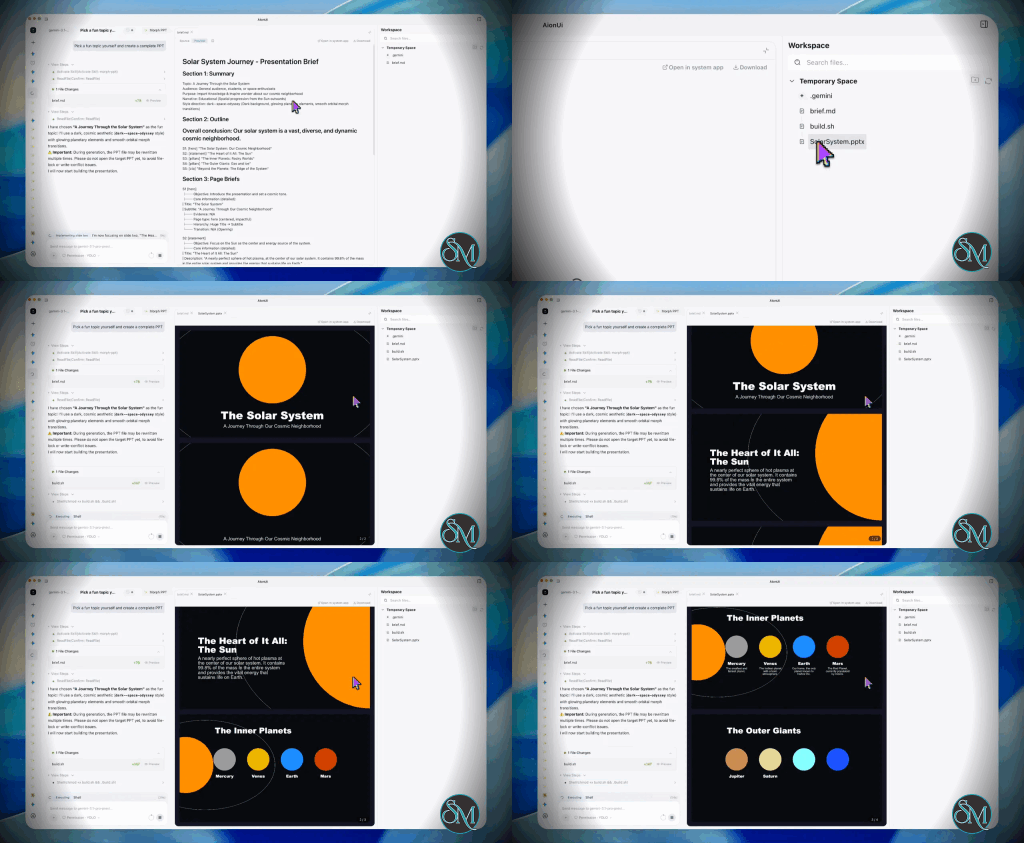
The Gemini app for Mac brings Google’s AI assistant directly to the macOS desktop. Instead of opening Gemini in a browser tab, users can access a dedicated app with keyboard shortcuts, screen-aware assistance, creative AI tools, and deeper integration with local workflows.

The app is designed to reduce context switching. You can quickly ask questions, summarize information, write content, brainstorm ideas, analyze what is visible on your screen, and work with selected files without leaving your current application.

Gemini for Mac feels more like a native desktop assistant than a simple web app wrapped in a desktop window. The application can be opened from the menu bar, Dock, or customizable keyboard shortcuts.

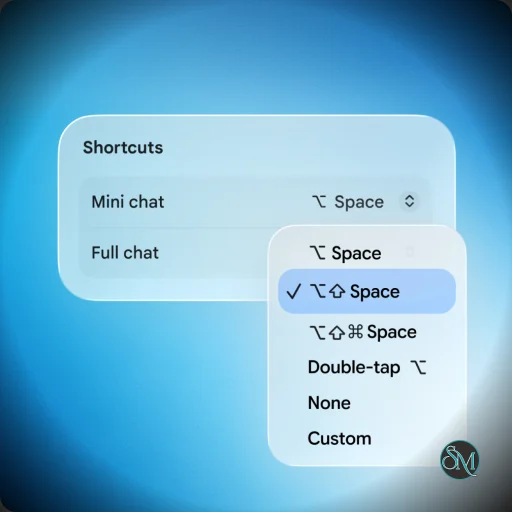
By default, Option + Space opens a compact chat interface, while Option + Shift + Space opens the full Gemini experience. These shortcuts make it convenient to access AI assistance while coding, writing documents, researching, or managing everyday tasks.

The app is available at no cost in supported Gemini regions and supports the languages available through the Gemini service. However, some advanced features depend on account type, subscription level, location, and language availability.

Key Features of Gemini app for Mac

Fast Desktop Access

The global keyboard shortcuts are one of the app’s strongest features. Instead of switching to a browser or searching through open tabs, users can bring up Gemini almost instantly.

The compact interface is useful for quick questions, short writing tasks, code explanations, and simple research. The full interface provides a more complete workspace for longer conversations and complex projects.

Screen Context

Gemini can use the active application window as context. This allows users to ask questions about what they are currently viewing without manually describing every detail.

For example, you can open a document, webpage, code editor, or spreadsheet and ask Gemini to explain, summarize, review, or improve the visible content. The screen-sharing shortcut can be customized in the app settings.

Local File Assistance

The macOS app can work with files and folders that users explicitly connect. This makes it useful for reviewing documents, organizing information, and performing tasks involving local content.

Gemini does not automatically receive access to every file on the Mac. Connected folders must be selected by the user, providing more control over what the assistant can access.

Gemini Spark

Gemini Spark expands the app beyond ordinary chat by helping with multi-step tasks involving local files and connected applications. It can work directly with approved folders and assist with desktop workflows.

This feature is intended to make Gemini more proactive and useful for tasks that involve multiple steps rather than only generating a single response. Availability may depend on the user’s region and Gemini plan.

Writing and Research

Gemini can help users draft emails, improve writing, summarize information, generate ideas, create plans, and answer questions. The native desktop experience makes these capabilities easier to use alongside productivity applications.

It is particularly useful for people who frequently switch between documents, browsers, messaging apps, and development tools.

Coding Assistance

Developers can use Gemini to explain code, generate functions, troubleshoot errors, review logic, and help with technical documentation.

The screen-context feature can be useful when working in an IDE because users can share the active code window rather than copying every section into the chat manually.

Image and Video Creation

The Mac app provides access to Gemini’s creative tools, including image generation and supported video-generation capabilities. This makes it useful for creating visual concepts, marketing materials, illustrations, and other media from a single desktop interface.

Performance and User Experience

Gemini for Mac has a clean and focused interface that fits naturally into macOS. The keyboard-first workflow is especially effective because the app can be opened without interrupting the current task.

The compact chat window is useful for quick interactions, while the full application provides a more complete environment for longer conversations. The menu bar integration also makes Gemini easy to access throughout the day.

The app’s biggest advantage over the browser version is convenience. Gemini’s core AI capabilities are already available on the web, but the native application improves access to screen context, local files, shortcuts, and desktop workflows.

Performance depends partly on internet connectivity because Gemini’s AI processing is cloud-based. Responses are generally fast, although complex requests and advanced AI features may take longer.

System Requirements

Gemini for Mac requires:

  • macOS Sequoia 15.0 or later

  • An Apple Silicon Mac

  • At least 8 GB of RAM

  • Approximately 200 MB of available storage for installation

The native application is designed for Apple Silicon Macs and does not support Intel-based Macs.

Pros

  • Native Gemini experience for macOS

  • Fast keyboard shortcuts

  • Compact and full chat modes

  • Screen-aware AI assistance

  • Support for selected local files and folders

  • Gemini Spark for supported multi-step workflows

  • Image and video creation tools

  • Menu bar and Dock integration

  • Free availability in supported regions

  • Clean and easy-to-use interface

Cons

  • Requires an Apple Silicon Mac

  • Requires macOS Sequoia or later

  • Most AI processing depends on an internet connection

  • Some advanced features depend on region or subscription

  • Local file access requires additional permissions

  • The browser version may still be sufficient for occasional users

Who Should Use Gemini for Mac?

Gemini for Mac is a strong choice for students, writers, developers, researchers, content creators, business users, and anyone who regularly uses Google’s AI tools.

It is especially useful for users who want AI assistance available through a keyboard shortcut instead of keeping Gemini open in a browser tab.

Developers may appreciate the ability to use Gemini alongside an IDE, while writers and office users can benefit from screen context, document assistance, and fast access to AI-generated suggestions.

Final Verdict

The Gemini app for Mac is a polished and practical desktop AI assistant. Its keyboard shortcuts, screen awareness, local file integration, and creative capabilities make it more convenient than using Gemini exclusively through a browser.

The app does not replace every specialized productivity or coding tool, but it provides a strong general-purpose AI experience that fits naturally into macOS workflows. The Apple Silicon requirement limits compatibility with older Macs, yet supported devices receive a modern and responsive AI assistant with useful desktop integration.

Gemini app for Mac - Update 2026.07.21
Free
Software Informations:
Developer:

Operating System:
macOS
Date Added:
2026-07-29T02:19:44.000Z

Apple Container is a lightweight containerization framework developed by Apple that brings native Linux container support to macOS. Designed specifically for Apple Silicon and modern macOS environments, it aims to provide developers with a faster and more integrated alternative to traditional container solutions while maintaining compatibility with standard container workflows.

Containers have become a core part of modern software development, but running Linux containers on macOS has traditionally required third-party virtualization layers. Apple Container seeks to streamline this experience by offering a native solution that integrates closely with macOS and Apple’s virtualization technologies.

The project focuses on simplicity, performance, and developer productivity. Instead of managing a full virtual machine manually, developers can run Linux containers using a lightweight environment optimized for macOS.

Download Apple Container 1.2.0 - Software Mirrors

Apple Container 1.2.0 for macOS

container-installer-unsigned.pkg | 93.9 MB

Others Download related to Apple Container 1.2.0

container-dSYM.zip | 147.3 MB

Apple Container 1.2.0 Release Notes:

What's Changed

  • Add TestCLISystemLogs and TestCLITermIO integration tests in new integration test suite by @katiewasnothere in https://github.com/apple/container/pull/1879
  • Restore reverted migrations, migrate last tests. by @jglogan in https://github.com/apple/container/pull/1880
  • Removes obsolete CLITests directory. by @jglogan in https://github.com/apple/container/pull/1886
  • Integration coverage xpc helpers by @noah-thor in https://github.com/apple/container/pull/1551
  • Upgrade grpc-swift-nio-transport to 2.9.0 and remove HTTP2ConnectBuff… by @adityabagchi24 in https://github.com/apple/container/pull/1790
  • Updates containerization to 0.36.0. by @jglogan in https://github.com/apple/container/pull/1912
  • Use containerization version 0.37.0 by @adityaramani in https://github.com/apple/container/pull/1932
  • Verify kernel archive integrity by @haoruilee in https://github.com/apple/container/pull/1703
  • Add commit/issue alert to PR template. by @jglogan in https://github.com/apple/container/pull/1945
  • Remove --skip-build from test Makefile target. by @jglogan in https://github.com/apple/container/pull/1951
  • Restore --skip-build, enable import testable for release builds. by @jglogan in https://github.com/apple/container/pull/1955
  • [package]: bump container-builder-shim to 0.13.0 by @saehejkang in https://github.com/apple/container/pull/1953
  • Validate container ID from XPC requests by @katiewasnothere in https://github.com/apple/container/pull/1956
  • Remove force unwraps on XPC error set/get by @katiewasnothere in https://github.com/apple/container/pull/1958
  • Do not follow destination symlink when copying user configuration by @katiewasnothere in https://github.com/apple/container/pull/1957
  • Fix machine ID length test. by @jglogan in https://github.com/apple/container/pull/1971
  • Address flaky TestCLIKernelSetSerial suite. by @jglogan in https://github.com/apple/container/pull/1976
  • [gitignore]: ignore vscode workspace files by @saehejkang in https://github.com/apple/container/pull/1966
  • Update containerization dependency with new EXT4Unpacker func definition by @katiewasnothere in https://github.com/apple/container/pull/1973
  • Periodic dependency updates. by @jglogan in https://github.com/apple/container/pull/1981
  • Use ordered journal mode for unpacked images. by @jglogan in https://github.com/apple/container/pull/1974
  • Reword DNS container name resolution doc information by @katiewasnothere in https://github.com/apple/container/pull/1960
  • ci: bump the github-actions group across 1 directory with 3 updates by @dependabot[bot] in https://github.com/apple/container/pull/1983
  • Pass build config in when building protoc dependencies by @katiewasnothere in https://github.com/apple/container/pull/1972
  • Container test fixture package by @katiewasnothere in https://github.com/apple/container/pull/1887
  • Downgrade swift-collections to 1.5.1. by @jglogan in https://github.com/apple/container/pull/1984
  • Use enum for warmup images. by @jglogan in https://github.com/apple/container/pull/1990
  • Add missing dependencies to new ContainerTestSupport package by @katiewasnothere in https://github.com/apple/container/pull/1994
  • Add OCI maskedPaths and readonlyPaths support to Container API. by @jglogan in https://github.com/apple/container/pull/1996
  • Integration test - miscellaneous fixture and test refinements. by @jglogan in https://github.com/apple/container/pull/1993
  • Use log instead of print for system start status messages by @adityabagchi24 in https://github.com/apple/container/pull/1889
  • Fix BuilderStart race, parallelize container build tests. by @jglogan in https://github.com/apple/container/pull/2002
  • Allow custom kernel boot args via --kernel-arg by @arirubinstein in https://github.com/apple/container/pull/1744
  • fix: Increase XPC timeout for Machine API operations by @dev-kvt in https://github.com/apple/container/pull/2006
  • Update containerization import to latest 0.40.0 by @katiewasnothere in https://github.com/apple/container/pull/2028
  • Fix image env vars, build context checks, TCP/UDP port forward buffer, and validate plugin name by @katiewasnothere in https://github.com/apple/container/pull/2027
  • Update containerization import to 0.40.1 by @katiewasnothere in https://github.com/apple/container/pull/2038

New Contributors

  • @haoruilee made their first contribution in https://github.com/apple/container/pull/1703
  • @arirubinstein made their first contribution in https://github.com/apple/container/pull/1744
  • @dev-kvt made their first contribution in https://github.com/apple/container/pull/2006
Full Changelog: https://github.com/apple/container/compare/1.1.0...1.2.0

Key Features of Apple Container

Native macOS Integration

Apple Container is built specifically for macOS, allowing tighter integration with the operating system than many third-party alternatives. This can lead to a smoother development experience and more predictable behavior.

Linux Container Support

The framework enables developers to run Linux containers on macOS while maintaining compatibility with common container images and workflows used throughout the software industry.

Apple Silicon Optimization

One of the most attractive aspects of Apple Container is its optimization for Apple Silicon hardware. Developers using M-series chips can benefit from improved efficiency and performance compared to solutions that rely heavily on emulation.

Lightweight Virtualization

Rather than requiring large virtual machine environments, Apple Container uses Apple's virtualization technologies to provide a leaner runtime environment for containers.

Command Line Workflow

The tool is designed for developers who prefer terminal-based workflows. Commands are straightforward and fit naturally into existing development and automation pipelines.

Performance and User Experience

Apple Container delivers impressive startup times and efficient resource utilization. Container operations generally feel responsive, and the integration with macOS reduces some of the complexity commonly associated with container virtualization.

Developers already familiar with Docker concepts will find the learning curve relatively manageable. However, because the project is newer than established container platforms, some workflows and ecosystem integrations may still be evolving.

The overall experience feels modern and aligned with Apple's broader strategy of providing native developer tools optimized for its hardware platform.

Pros

  • Native Linux container support on macOS.

  • Optimized for Apple Silicon hardware.

  • Lightweight virtualization architecture.

  • Fast startup and efficient resource usage.

  • Simple command-line workflow.

  • Strong integration with Apple's development ecosystem.

Cons

  • Newer ecosystem compared to mature container platforms.

  • Feature set may not yet match every capability offered by established alternatives.

  • Primarily targeted at macOS users.

  • Some third-party tooling integrations may still be developing.

Who Should Use Apple Container?

Apple Container is best suited for developers building and testing applications on macOS, especially those using Apple Silicon devices. It is particularly appealing for software engineers who want a lightweight container experience without relying heavily on third-party virtualization solutions.

Developers working with cloud-native applications, microservices, and containerized development environments may find it an attractive addition to their workflow.

Final Verdict

Apple Container represents an important step toward a more native container experience on macOS. Its focus on performance, simplicity, and Apple Silicon optimization makes it a compelling option for developers who want efficient Linux container support directly from Apple.

While it is still maturing compared to long-established container platforms, its strong integration with macOS and promising performance characteristics make it a project worth watching.

Apple Container 1.2.0
Free
Software Informations:
Developer:

Operating System:
macOS
Date Added:
2026-07-29T01:01:24.551Z

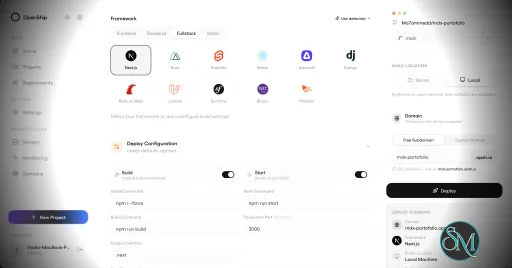
Openship is an open source application deployment platform that simplifies building, deploying, operating, and scaling applications on your own infrastructure. It combines Git-based deployments, container management, SSL automation, application monitoring, managed services, and a modern web interface into a single platform. Designed as an alternative to managed platforms such as Vercel, Netlify, and Render, Openship gives developers full ownership of their infrastructure while maintaining a streamlined deployment experience.

Deploying applications to self-managed servers often requires configuring Docker, reverse proxies, SSL certificates, deployment pipelines, and monitoring separately. Openship brings these capabilities together into a unified platform that works with cloud VPS providers, dedicated servers, and homelabs.

Unlike many self-hosted deployment tools that install build agents directly on production servers, Openship builds application images externally and deploys immutable containers over SSH. This keeps production systems focused on serving applications while simplifying rollbacks and updates.

The platform is fully open source under the AGPL-3.0 license and supports both self-hosting and managed cloud hosting.

Key Features of Openship

Git-Based Deployments

Applications are deployed automatically from Git repositories. Every commit can trigger a build, resulting in versioned container images that are easy to deploy or roll back.

Deploy Anywhere

Openship supports deployment to:

  • Virtual private servers

  • Dedicated servers

  • Home labs

  • Cloud virtual machines

  • Openship Cloud

The deployment workflow remains consistent regardless of the hosting environment.

Zero Downtime Deployments

The platform automatically routes traffic to newly deployed containers after they are ready, reducing downtime during updates. Previous versions remain available for quick rollback if necessary.

Automatic SSL

SSL certificates are automatically provisioned through Let's Encrypt, eliminating manual certificate management for hosted applications.

Integrated Monitoring

Developers can monitor deployments, view application logs, inspect metrics, and manage previous releases directly from the web dashboard, desktop application, or CLI.

Managed Infrastructure Services

Beyond application deployment, Openship includes managed services such as PostgreSQL, MySQL, Redis, MongoDB, and a built-in transactional email service with support for multiple domains.

Multiple Interfaces

Users can manage infrastructure through:

  • Web dashboard

  • Desktop application

  • Command-line interface

  • REST API

  • MCP integration for AI agents

This flexibility makes Openship suitable for both manual administration and automation workflows.

Open Source

Every component of the platform is publicly available, allowing organizations to audit the source code, customize functionality, and avoid vendor lock-in.

Download OpenShip v0.4.8 - Software Mirrors

OpenShip v0.4.8 for Windows

Openship-win32-x64.zip | 173.63 MB

OpenShip v0.4.8 for macOS

Openship-x64.dmg | 197.68 MB

Openship-arm64.dmg | 192.39 MB

OpenShip v0.4.8 for Linux

Openship.AppImage | 157.72 MB

openship-v0.4.8-linux-amd64.tar.gz | 38.74 MB

openship-email-v0.4.8-linux-amd64.tar.gz | 72.49 MB

Openship-arm64.AppImage | 158.33 MB

Others Download related to OpenShip v0.4.8

openship-dashboard-v0.4.8.tar.gz | 31.91 MB

OpenShip v0.4.8 Release Notes:

Bump to v0.4.8 + announce

Performance and User Experience

Openship provides a polished user experience that lowers the barrier to self-hosting modern applications. The interface is clean, deployments are straightforward, and infrastructure management is considerably simpler than manually configuring Docker, reverse proxies, certificates, and monitoring tools.

One of its strongest advantages is keeping production servers free from build workloads. Images are built separately and transferred to the deployment target, improving reliability and reducing resource usage on live servers.

The project is under active development, with new features such as clustering and horizontal scaling planned for future releases. Community feedback has been largely positive, particularly regarding its ease of use and modern approach to self-hosted deployments.

Pros

  • Free and open source.

  • Supports deployment to your own infrastructure.

  • Zero downtime deployments.

  • Automatic SSL certificate management.

  • Git-based deployment workflow.

  • Built-in monitoring and rollback.

  • CLI, web, desktop, REST API, and MCP support.

  • No vendor lock-in.

  • Active development.

Cons

  • Still a relatively new platform.

  • Advanced clustering features are still under development.

  • Best suited for containerized applications.

  • Smaller community than established deployment platforms.

Who Should Use Openship?

Openship is an excellent choice for developers, DevOps engineers, startups, agencies, and organizations that want a modern deployment experience without relying entirely on managed cloud platforms.

It is especially appealing to users who want the simplicity of services like Vercel while maintaining complete ownership of their servers, applications, and deployment pipeline.

Final Verdict

Openship successfully bridges the gap between traditional self-hosting and modern cloud deployment platforms. Its Git-driven workflow, automated infrastructure management, integrated monitoring, and open source philosophy provide an impressive developer experience without sacrificing control.

Although the platform is still evolving, it already delivers a compelling alternative to commercial deployment services and has strong potential to become a leading open source application platform.

OpenShip v0.4.8
Free
Software Informations:
Developer:

Operating System:
Windows / macOS / Linux
Date Added:
2026-07-29T01:01:24.030Z

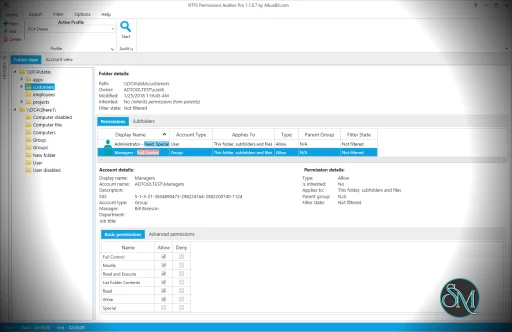
NTFS Permissions Auditor is a Windows utility designed to analyze, report, and audit NTFS file system permissions. It helps identify risky permissions, inconsistencies, and unintended access rights on files and folders across local drives or network shares.

Unlike manual examination using Windows Explorer’s security tabs (which can be slow and error-prone) this tool automates analysis and presents results in clear, actionable reports.


Key Features

Comprehensive Permission Scanning

NTFS Permissions Auditor scans folders and subfolders to gather permission data, including:

  • User access rights

  • Group memberships

  • Inherited vs explicit permissions

  • Effective rights for accounts

This provides a full picture of who can read, write, delete, or modify files.

Visual Permission Mapping

One of the helpful functions is its ability to display permission maps and hierarchies, showing how rights flow through nested folders and groups. This makes complex ACL structures easier to understand.

Report Generation and Export

The tool can export permission reports in multiple formats such as CSV, HTML, and XLSX. These reports are useful for audits, compliance documentation, and security reviews.

Group and User Filtering

You can filter results by user or group, making it easy to focus on specific accounts or sensitive folders.

Network Share Support

NTFS Permissions Auditor works not only on local drives but also on mapped and UNC network paths, making it useful for enterprise environments.


Performance and Ease of Use

The user interface is functional and focused on data presentation rather than aesthetics. Permission scans are typically fast, though very large file systems may take longer depending on system resources.

Results are displayed in expandable lists and tables, and filtering tools help narrow down specific permission issues quickly.

While the interface may feel technical to casual users, administrators and security professionals will appreciate the depth of detail provided.


Pros and Cons

Pros

  • Detailed and accurate permission scanning

  • Visual maps help simplify complex ACLs

  • Exportable reports for compliance needs

  • Works across local and network drives

  • Effective filtering based on users or groups

Cons

  • Designed for IT professionals; not ideal for casual users

  • Interface is utilitarian, not polished

  • Some advanced features may require training to master


Who Should Use NTFS Permissions Auditor?

This tool is especially useful for:

  • System administrators managing file servers

  • Security auditors performing permissions reviews

  • IT teams responsible for compliance and access control

  • Organizations with sensitive data and strict access policies

If you need to audit NTFS permissions effectively and generate clear reports, NTFS Permissions Auditor provides the necessary tools.


Final Verdict

NTFS Permissions Auditor is a strong and specialized utility for auditing file permissions on Windows systems. Its detailed analysis, reporting capabilities, and support for network paths make it valuable for administrators and security teams.

If you manage Windows file servers, network shares, or any environment where NTFS permissions matter, NTFS Permissions Auditor is a handy tool for auditing, reporting, and securing access rights. NTFS Permissions Auditor is built for administrators and auditors who need clear visibility into file and folder access controls.

For professionals who need reliable NTFS access review and reporting, NTFS Permissions Auditor is a practical choice.

Albus Bit NTFS Permissions Auditor 26.7.28 - Discount 20% OFF
$239$299
Software Informations:
Developer:

Operating System:
Windows
Date Added:
2026-07-29T01:01:23.920Z

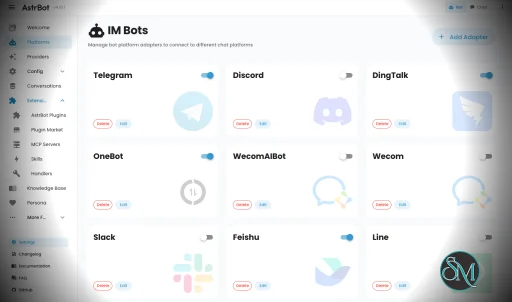
AstrBot Desktop is the official desktop edition of AstrBot, an open source AI agent platform that brings conversational AI, plugins, knowledge bases, and automation into a single local application. Instead of requiring command-line installation or Docker, AstrBot Desktop packages the WebUI, backend runtime, and desktop interface into one installer for Windows, macOS, and Linux. It is designed for users who want to start using AstrBot with minimal setup.

AstrBot Desktop provides a ready-to-use environment for running AstrBot locally. Everything needed to get started is included, allowing users to install the application and immediately access the ChatUI, plugin marketplace, and knowledge base features without manually configuring Python or server components.

Unlike the standard AstrBot deployment, which is better suited for servers and production environments, the desktop edition focuses on personal use and local development. It stores all configuration files, plugins, and user data in a dedicated local directory, making backups and migrations straightforward.

Key Features of AstrBot Desktop

Simple Local Installation

AstrBot Desktop bundles the backend runtime and WebUI into a single application. Users can install it like any other desktop program without preparing a separate development environment.

Integrated ChatUI

The application includes the full AstrBot ChatUI, allowing users to interact with AI models through a modern web interface while running everything locally.

Plugin Marketplace

AstrBot Desktop supports the same plugin ecosystem as the main AstrBot platform, giving users access to a large collection of community-developed extensions that expand the assistant's capabilities.

Knowledge Base Support

Users can build local knowledge bases that the AI can reference during conversations, making it useful for documentation, personal notes, and business information.

Stable and Nightly Releases

The project offers both stable releases for everyday use and nightly builds for users who want to test the latest features and fixes.

Local Data Storage

Configuration files, plugins, logs, and knowledge base data are stored in a dedicated .astrbot directory within the user's home folder, making migration and backup much easier.

Cross-Platform Support

AstrBot Desktop is available for Windows, macOS, and Linux, providing a consistent experience across all major desktop operating systems.

Open Source

Released under the AGPL-3.0 license, AstrBot Desktop is fully open source, allowing developers to inspect the code, contribute improvements, and customize the application.

Download AstrBot Desktop v4.26.8 - Software Mirrors

AstrBot Desktop v4.26.8 for Windows

AstrBot_4.26.8_windows_arm64_setup.exe | 132.19 MB

AstrBot_4.26.8_windows_arm64_portable.zip | 167.14 MB

AstrBot_4.26.8_windows_amd64_setup.exe | 132.46 MB

AstrBot_4.26.8_windows_amd64_portable.zip | 167.42 MB

AstrBot Desktop v4.26.8 for macOS

AstrBot_4.26.8_macos_arm64.app.tar.gz | 116.83 MB

AstrBot_4.26.8_macos_amd64.app.tar.gz | 115.36 MB

AstrBot Desktop v4.26.8 for Linux

astrbot-desktop_4.26.8_arm64.deb | 166.49 MB

astrbot-desktop_4.26.8_amd64.deb | 188.4 MB

astrbot-desktop-4.26.8-1.x86_64.rpm | 189.92 MB

astrbot-desktop-4.26.8-1.aarch64.rpm | 167.99 MB

AstrBot Desktop v4.26.8 Release Notes:

Automated desktop package release.
  • Source: https://github.com/AstrBotDevs/AstrBot.git
  • Ref: v4.26.8
  • Mode: tag-poll
  • Windows package formats: nsis installer and portable zip.
  • Windows portable zip uses manual replacement updates and requires WebView2 to already exist on the host.

What's Changed

  • Refactor/react dashboard by @Fridemn in https://github.com/AstrBotDevs/AstrBot-desktop/pull/155
  • fix(dashboard): polish form and disclosure controls by @Fridemn in https://github.com/AstrBotDevs/AstrBot-desktop/pull/156
Full Changelog: https://github.com/AstrBotDevs/AstrBot-desktop/compare/v4.26.7...v4.26.8

Performance and User Experience

AstrBot Desktop delivers a polished installation experience compared to manually deploying the full AstrBot framework. The interface is clean, startup is straightforward, and updates can usually be installed directly from within the application.

For users interested primarily in local AI conversations, plugins, and knowledge base management, the desktop edition provides nearly everything needed without the complexity of Docker or command-line deployment. Developers who later outgrow the desktop version can migrate their data to a source or server deployment with minimal effort.

Some advanced plugin features may require external tools such as Node.js or uv, depending on the plugin being used.

Pros

  • Free and open source.

  • Extremely easy to install.

  • Includes ChatUI and backend runtime.

  • Supports the full AstrBot plugin ecosystem.

  • Local knowledge base support.

  • Stable and nightly release channels.

  • Cross-platform compatibility.

  • Easy migration to server deployments.

Cons

  • Intended for desktop use rather than production servers.

  • Some plugins require additional system dependencies.

  • Advanced users may eventually prefer Docker or source deployments.

  • Documentation for some advanced topics is still evolving.

Who Should Use AstrBot Desktop?

AstrBot Desktop is an excellent choice for developers, AI enthusiasts, students, and professionals who want to explore the AstrBot ecosystem without dealing with server configuration.

It is especially suitable for users who want a local AI assistant with plugin support, knowledge base capabilities, and an easy installation process. Organizations planning long-running deployments should instead consider the standard AstrBot server or Docker installation.

Final Verdict

AstrBot Desktop makes one of the most feature-rich open source AI agent platforms accessible to everyday users. By packaging the runtime, WebUI, and desktop interface into a single application, it removes much of the complexity traditionally associated with self-hosting AI assistants.

For anyone looking to experiment with AstrBot locally or build an AI-powered personal assistant without spending time on deployment, AstrBot Desktop is an outstanding choice.

AstrBot Desktop v4.26.8
Free
Software Informations:
Developer:

Operating System:
Windows / macOS / Linux
Date Added:
2026-07-28T23:01:23.485Z