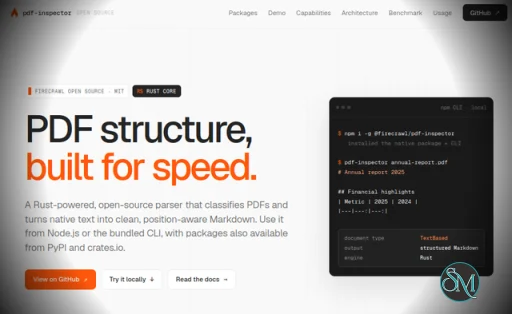
PDF Inspector is an open source Rust library from Firecrawl designed to inspect, classify, and extract content from PDF files. Rather than treating every PDF the same way, it first determines whether a document is text based, scanned, image based, or mixed. This makes it particularly useful for applications that need to decide whether a PDF should be processed locally or sent through OCR.
One of the biggest strengths of PDF Inspector is its speed. The project is designed to process native text PDFs locally in under 200 milliseconds, while PDF classification itself can take roughly 10 to 50 milliseconds. This can make a significant difference in document processing pipelines where sending every PDF through an OCR service would add unnecessary latency and cost.
PDF Inspector does more than extract plain text. Its position aware extraction keeps information about fonts and coordinates while attempting to determine the correct reading order for multi column documents. It can also convert extracted content into structured Markdown, including headings, lists, code blocks, tables, bold and italic formatting, links, and page breaks.
Table extraction is another useful feature. PDF Inspector uses both PDF drawing information and text alignment heuristics to detect tables, including financial tables, footnotes, and tables that continue across multiple pages. This makes it particularly interesting for reports, invoices, financial documents, and other structured PDFs.
The project also handles several PDF text encoding and layout problems. It supports CID fonts and different character encodings, while its layout processing can identify multi column documents and RTL text. It can also flag broken font encoding so applications can decide to fall back to OCR when necessary.
Selective OCR is an especially practical feature. Instead of running OCR against an entire document, PDF Inspector can identify pages that actually need it and route only those pages through its local OCR integration. This approach can reduce unnecessary processing while still allowing mixed documents to be handled.
Developers also have plenty of integration options. PDF Inspector provides packages and bindings for Python, Node.js, Rust, and browser WebAssembly. There are also command line tools for PDF to Markdown conversion and PDF classification. This makes it suitable for everything from small scripts to larger document processing systems.
The benchmark results are promising as well. In the project's July 31, 2026 benchmark using 200 PDFs, PDF Inspector recorded an overall score of 0.875, a reading order score of 0.915, and a table score of 0.814. It also completed the benchmark corpus in 0.470 seconds, outperforming the other listed local parsers in the overall score, reading order, table score, and benchmark speed. These results are project provided benchmarks, so they should be treated as an indication rather than a universal performance guarantee.
There are still some limitations. PDF Inspector is primarily focused on native PDF structure and extraction, so heavily scanned documents may still require OCR. OCR also introduces additional dependencies in the Python and Node.js packages, including PDFium, ONNX Runtime, and model files.
For developers building AI document pipelines, search systems, document converters, or PDF processing services, PDF Inspector is particularly compelling. Its ability to classify documents before extraction and selectively route difficult pages to OCR can help avoid spending processing resources where they are not needed.
Download pdf-inspector v1.18.0 - Software Mirrors |
|---|
pdf-inspector v1.18.0 Source Code |
pdf-inspector v1.18.0 Release Notes:Improved text geometry, superscript/subscript handling, and PDF loading. Changes since 1.17.0, released from #509.Included PRs
Migration
|
Quick start
Python
pip install pdf-inspectorimport pdf_inspector
result = pdf_inspector.process_pdf("document.pdf")
print(result.pdf_type) # "text_based", "scanned", "image_based", "mixed"
print(result.markdown) # Markdown string or None
# Selective OCR; clean text PDFs do not load the external OCR runtime.
ocr = pdf_inspector.process_pdf_with_ocr("document.pdf")
print(ocr.pages_routed_to_ocr)Node.js
npm install @firecrawl/pdf-inspectorimport { readFileSync } from 'fs';
import { processPdf, processPdfWithOcr } from '@firecrawl/pdf-inspector';
const pdf = readFileSync('document.pdf');
const result = processPdf(pdf);
console.log(result.pdfType); // "TextBased", "Scanned", "ImageBased", "Mixed"
console.log(result.markdown); // Markdown string or null
const ocr = await processPdfWithOcr(pdf); // selective OCR, off the event loop
console.log(ocr.pagesRoutedToOcr);Browser WebAssembly
npm install @firecrawl/pdf-inspector-wasmimport init, { processPdf } from '@firecrawl/pdf-inspector-wasm';
await init();
const response = await fetch('/document.pdf');
const pdf = new Uint8Array(await response.arrayBuffer());
const result = processPdf(pdf);
console.log(result.pdfType);
console.log(result.markdown);Rust
Install from crates.io:
cargo add pdf-inspectorOr add it manually:
[dependencies]
pdf-inspector = "1"
use pdf_inspector::process_pdf;
let result = process_pdf("document.pdf")?;
println!("Type: {:?}", result.pdf_type);
if let Some(markdown) = &result.markdown {
println!("{}", markdown);
}Full API reference: docs/rust-api.md
CLI
# Install the CLI tools
cargo install pdf-inspector

# Convert PDF to Markdown
pdf2md document.pdf

# JSON output (for piping)
pdf2md document.pdf --json

# Positioned TextItem JSON, including is_underline metadata
pdf2md document.pdf --items-json

# Raw markdown only (no headers)
pdf2md document.pdf --raw

# Token-efficient output (collapses long dot leaders and similar source padding)
pdf2md document.pdf --compact

# Insert page break markers (<!-- Page N -->)
pdf2md document.pdf --pages

# Process only specific pages
pdf2md document.pdf --select-pages 1,3,5-10

# Detection only (no extraction)
detect-pdf document.pdf
detect-pdf document.pdf --json

# Detection + layout analysis (tables, columns)
detect-pdf document.pdf --analyze --json
Rust and CLI consumers opt into OCR at build time:
cargo install pdf-inspector --features ocr --bin pdf2md
PDFIUM_LIB_PATH=/path/to/libpdfium ORT_DYLIB_PATH=/path/to/libonnxruntime \
  pdf2md scan.pdf --ocr auto --json
The OCR JSON envelope is versioned and reports routed pages, per-page source and confidence, warnings, and pages recommended for the hosted document pipeline. Native Python and Node packages expose the same pipeline without a source-build feature. All native entry points still require separately installed PDFium and ONNX Runtime libraries only when OCR is routed. See the OCR runtime setup guide for pinned downloads, platform support, model-cache behavior, and hosted-fallback integration. See the Rust API guide for lower-level controls.
From a source checkout, use cargo run --bin pdf2md -- document.pdf or cargo run --bin detect-pdf -- document.pdf instead.
Pros
Very fast local PDF processing
Detects text based, scanned, image based, and mixed PDFs
Converts PDFs into structured Markdown
Position aware text extraction
Automatic multi column reading order
Table detection and extraction
Selective OCR support
Python, Node.js, Rust, and WebAssembly support
CLI tools available
MIT licensed and open source
Cons
Scanned PDFs still require OCR
OCR integration adds external dependencies
Extraction quality can vary with complicated PDF layouts
Best suited to developers and document processing pipelines rather than casual users
Final Verdict
PDF Inspector is a strong choice for developers who need fast and structured PDF extraction without relying on a remote processing service. Its Rust foundation, PDF classification, position aware extraction, Markdown conversion, table handling, and selective OCR make it particularly useful for modern document processing and AI workflows.
Its biggest advantage is the ability to avoid unnecessary OCR. By determining what kind of PDF it is first, applications can process simple text PDFs locally and reserve OCR for pages that actually need it. That combination of speed and intelligent routing makes PDF Inspector an impressive addition to the PDF processing ecosystem.
Post a Comment/Report Broken Link: