InstallerClean is a small Windows tool that helps detect and remove leftover files, folders, and registry entries created by installed software. It is built for users who want to keep their system clean without manually digging through directories.
InstallerClean is a focused utility designed to clean up files and traces that remain after uninstalling programs. While many uninstallers remove the main application, leftover data often stays behind. InstallerClean aims to fix that with a simple and lightweight approach.
The application is typically portable, meaning it can run without installation and does not add extra load to your system.
Download InstallerClean v3.0.0 - Software Mirrors |
|---|
Download InstallerClean v3.0.0
InstallerClean-3.0.0-portable.exe | 63.33 MB Download InstallerClean v3.0.0
InstallerClean-3.0.0-setup.exe | 91.96 MB Download InstallerClean v3.0.0
installerclean-cli.exe | 36.85 MB |
InstallerClean v3.0.0 Release Notes: InstallerClean 3.0.0
Move is the button the app leads with now, delete is permanent, the scan is much lighter on very large folders, and there's a stack of translation fixes.
Moving files is recommended, and deleting them is permanent
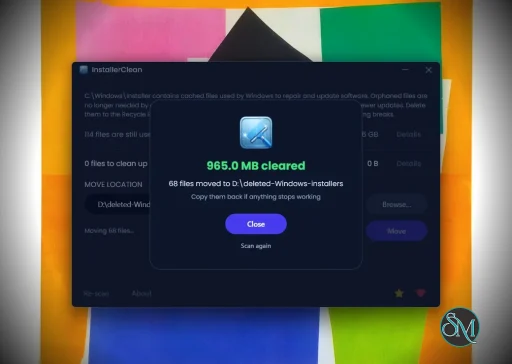
Move is now the emphasised button and Delete permanently is the quiet one beside it. As before, Move puts the unneeded files in a backup folder you choose. That gives you a chance to check your programs still update and uninstall. Put the files back into C:\Windows\Installer and everything is as it was. Once you're satisfied that all's well, delete the backup folder.
Deleting is now permanent instead of using the Recycle Bin. The bin has a size limit, and when the limit is reached Windows throws out whatever's oldest to make room, so a large clean-up could push files out of it without telling you.
Only delete the files permanently if you need to free the space on your C: drive and you're in a hurry or don't have another drive or partition to use as a backup. All the files offered by InstallerClean are safe to delete but backing them up means you don't have to trust that.
That button now reads "Delete permanently", the confirmation says the files will be deleted permanently, and /d on the command line does the same.
A lighter scan on very large folders
The scan does about a third less work on each file. On a folder of 800,000 files that takes the memory it churns through from 2.4 GB to 827 MB, and it offers exactly the same list of files as it did before.
Also changed
- The progress bar on the opening screen follows the scan. Each stage tells it which item of how many it's on, so on a machine with hundreds of installed programs the bar moves at the rate the work's actually going rather than racing up and then crawling through the rest. Press Cancel and it switches to a bar that moves without claiming a position, because the scan can take a few seconds to reach a stopping point and there's no honest position to show until it does
- The window listing what's staying shows the files InstallerClean couldn't be sure about as well as the ones Windows still holds a record for, and it's now called "Files left alone"
- InstallerClean keeps more files back where it can't be certain. A move or a delete stops rather than going ahead when one of the checks it makes immediately beforehand can't be answered; the scan asks Windows where each recorded file actually is instead of comparing paths as text; and a superseded patch is offered only when every program holding it says that none of its patches can be rolled back
- Where it can't be certain about a machine at all, it offers nothing from the folder and says so rather than calling the folder clean. The window heads that screen "Nothing offered on this PC" and gives the number of files it held back, and the command line lists the conditions that run actually met
- The path box is labelled BACKUP FOLDER where it said MOVE LOCATION, and the app calls it the backup folder everywhere else it names it: the hint inside the box, both messages about a folder that can't be used, and the command-line help
- The screen after a move says what to do next: delete that folder when you're satisfied all is well. After a move to the drive the files came from, it adds that you won't reclaim the space until you do
- A move refuses a file whose name the backup folder already holds, instead of saving it as
name (1).msi. Windows Installer looks for a cached file by the exact path it recorded, so a file put back under a different name would have restored nothing
- Eleven languages now use the words their own Windows uses, 90 changes checked against Microsoft's published terminology
- Dutch kept pace with the English as it moved. RijckAlex, who gave InstallerClean its Dutch translation in the first place, sent the lines for the strings that changed during this release (#58)
- The command-line help fits an 80-column window in every language. Russian had reached 149 columns
- The checks on your backup folder, and handing a web address to your browser, both run alongside the window rather than in front of it. Windows can take its time answering for a path on a drive or a share that isn't responding, and the window stays live while it does
- Three of the five command-line exit codes are rewritten. Exit 0 had meant every flagged file was processed, which a scan and a run with nothing to clean both return as well, and exit 1 had left out four of the failures a scheduled move actually hits, among them no destination, a relative path and not enough room. Read the help before you script against them
- The Apps and Features entry is the app's name on its own, since Windows prints the version in the next column anyway. Thanks, bovirus (#61)
- There's a privacy policy now, at PRIVACY.md. It sets out every time InstallerClean touches the network or writes anything down, and it says nothing the README didn't already (no ads, no tracking, nothing like that). It's there because SignPath ask for one as part of the free code-signing application. They have accepted InstallerClean but not issued the certificate yet. Hopefully by the next release
Fixed
- Three messages in the installer sent you to a button that isn't there. Turkish, Ukrainian and Indonesian each name the button that language actually shows
- The Italian text the installer shows is current again. bovirus maintains Inno Setup's Italian translation upstream and pointed out that the bundled copy had fallen behind (#53). Two prompts had been offering Italian users "OK" or "Annulla" to exit, when OK carries on
- The sentences that change with a number read correctly at every count, in every language. Six languages could never show the singular, so one file was described in the plural, and Russian and Ukrainian had the opposite fault at 21 files, and again at 31 and 41
- Speech input can click the Cancel button by the word printed on it, in Russian and Indonesian. The app had been giving that button a different form of the word, and that name is what speech input listens for
The changelog has the full list.
Downloads
- installerclean-cli.exe (~37 MB) - The command-line tool as a single executable, for scripting, scheduled tasks and deployment.
The apps are unsigned and freshly downloaded files carry the browser's mark, so on first run Windows SmartScreen will usually warn that the publisher is unknown. Click "More info", then "Run anyway".
Verify your download (SHA-256)
0c6d46964c502bf338f9eaf065ffae3facc79f75c4b9f280ee4f7873b293f445  InstallerClean-3.0.0-setup.exe
3679411c565f1fbcc8fe4c15cb6fe73974e85a6e1c892c624b2ff0196944b1f0  InstallerClean-3.0.0-portable.exe
1b234cbc1f0953c45b7b7073e4d3cc4ceddc1c5ce32f6fe73b5886c953db66e5  installerclean-cli.exe
Hashes are also published as .sha256 sidecar files alongside each binary on this release. To verify in PowerShell:
powershell
(Get-FileHash -Algorithm SHA256 .\InstallerClean-3.0.0-setup.exe).Hash -eq '0c6d46964c502bf338f9eaf065ffae3facc79f75c4b9f280ee4f7873b293f445'
Built with .NET SDK 10.0.112 from the v3.0.0 tag. The portable and the command-line tool are single-file builds published with compression on. Release builds are deterministic, so building that tag yourself, on that SDK and with those flags, gives you the same bytes and the same hashes for the portable and the command-line tool; the "Is it safe?" section of the README has the detail. The installer is a different case: Inno Setup packs it and stamps the build year into it, so don't expect its hash to match.
VirusTotal
- InstallerClean-3.0.0-portable.exe: 0/68 ✨
- InstallerClean-3.0.0-setup.exe: 1/67 One false positive
- installerclean-cli.exe: 0/68 ✨
One engine out of sixty-seven, Deep Instinct, flags the installer. Microsoft Defender, Bitdefender, Kaspersky, ESET, Avast, AVG and Malwarebytes all clear it, as does every other engine on VirusTotal. The installer is built by Inno Setup, with the same compiler and the same settings that built the 2.3.0 installer, which no engine flagged. I've reported the detection to Deep Instinct as a false positive.
Donate
InstallerClean is free. Any small donation is much appreciated: ko-fi.com/nofaff
|
Key Features of InstallerClean
Leftover File Detection
InstallerClean scans your system for files and folders that remain after uninstalling applications. This helps free up disk space and reduce clutter.
Registry Cleanup
It can identify unused or orphaned registry entries related to removed programs, helping maintain system organization.
Simple Interface
The tool is designed to be straightforward. Users can scan and clean with minimal steps, making it accessible even for non technical users.
Portable Usage
InstallerClean often runs as a portable application, so you can use it on multiple systems without installation.
Fast Scanning
The scanning process is quick and does not heavily impact system performance.
User Experience
InstallerClean is easy to use, with a minimal interface that focuses on functionality. It does not overwhelm users with advanced settings, which makes it suitable for quick maintenance tasks.
However, advanced users may find it lacks deeper customization compared to more comprehensive system cleanup tools.
Performance and Compatibility
The software performs efficiently and works on most Windows systems. It is lightweight and does not consume significant resources during scanning or cleaning.
Because it targets leftover files specifically, it complements rather than replaces full system maintenance tools.
Pros
Cons
Limited advanced features
Not as comprehensive as full system cleaners
Requires careful review before deleting files
InstallerClean is ideal for users who frequently install and uninstall software and want to keep their system tidy. It is also useful for those who prefer simple tools over complex system utilities.
InstallerClean delivers a focused solution for removing leftover files after uninstallations. While it is not a full system optimizer, its simplicity and efficiency make it a valuable addition to basic PC maintenance tools.
Free
Software Informations:
Developer:no-faffOperating System:WindowsDate Added:2026-09-14T16:04:05.700Z
Categories:
Utilities
Post a Comment/Report Broken Link: