VoiceInk is an open source voice-to-text application for macOS that transforms spoken words into text using local AI models. Built as a privacy-first alternative to commercial dictation tools like Superwhisper and Wispr Flow, it emphasizes fast transcription, offline processing, and customizable workflows without requiring a recurring subscription. The project is open source, while prebuilt binaries and additional services are available through a commercial license.
VoiceInk is designed for users who spend a significant amount of time writing emails, coding, taking notes, or chatting. Instead of typing, users can activate VoiceInk with a keyboard shortcut, speak naturally, and have the transcribed text inserted into almost any application.
Unlike many cloud-based speech recognition tools, VoiceInk performs transcription locally using AI models, ensuring voice recordings remain on the user's device. It also supports optional AI-powered enhancements through compatible online or local language models.
Download VoiceInk v1.79 - Software Mirrors |
|---|
VoiceInk v1.79 for macOS |
VoiceInk v1.79 Release Notes:
|
Key Features of VoiceInk
Fast Local Transcription
VoiceInk uses modern speech recognition models running locally to deliver fast and accurate transcription without sending recordings to external servers. This improves both privacy and responsiveness.
Privacy-First Design
All core speech recognition can run completely offline, making VoiceInk suitable for users who handle sensitive information or simply prefer to keep their data private.
AI Text Enhancement
After transcription, VoiceInk can optionally improve grammar, punctuation, formatting, and writing style using configurable AI models. Users can choose cloud providers or compatible local language models depending on their preferences.
Context Awareness
VoiceInk can analyze the current application or selected screen content to provide better context for AI-assisted rewriting, resulting in more accurate and natural text output.
Power Modes
Users can create different transcription profiles for specific applications. For example, one profile can optimize for emails while another focuses on programming or messaging, with VoiceInk automatically switching between them.
Personal Dictionary
Custom words, names, technical terminology, and text replacements can be added to improve recognition accuracy, making the application particularly useful for developers, medical professionals, and other specialized users.
Global Shortcuts
Configurable keyboard shortcuts allow users to start recording, use push-to-talk mode, or activate different transcription workflows from anywhere in macOS.
Performance and User Experience
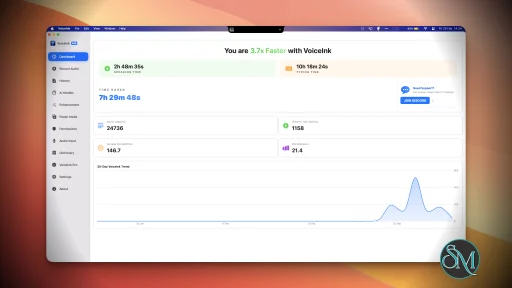
VoiceInk delivers an excellent experience for users who frequently dictate text. Transcriptions appear almost instantly when using local models, and the application integrates smoothly with most macOS applications.
The interface is clean and modern while remaining lightweight during normal operation. Community feedback generally praises its speed, privacy, and ease of use, though some users note that commercial competitors may still produce slightly better formatting in certain scenarios.
Because the project is actively maintained, new transcription models, interface improvements, and AI capabilities are released regularly.
Pros
Free and open source.
Local AI transcription with offline support.
Strong privacy protection.
AI-assisted text enhancement.
Context-aware transcription.
Custom dictionaries and smart text replacement.
Configurable shortcuts and application-specific profiles.
Active development with frequent updates.
Cons
Available only for macOS.
Requires Apple Silicon or a modern Mac for the best performance.
AI enhancement features may require external AI providers or local language models.
Some premium conveniences, such as automatic updates, are tied to the commercial distribution.
Who Should Use VoiceInk?
VoiceInk is an excellent choice for writers, developers, students, journalists, content creators, customer support professionals, and anyone who spends hours typing on a Mac. It is especially appealing to users who value privacy and prefer local AI processing over cloud-based speech recognition.
Users looking for a Windows or Linux version will need to consider alternative projects, as VoiceInk currently focuses exclusively on macOS.
Final Verdict
VoiceInk is one of the best open source voice dictation applications available for macOS. Its combination of fast local transcription, privacy-focused design, AI-powered text enhancement, and customizable workflows makes it a compelling alternative to subscription-based dictation software.
Although some advanced conveniences are reserved for the commercial build, the open source foundation and active development make VoiceInk an outstanding choice for anyone seeking accurate, offline speech-to-text capabilities.
Post a Comment/Report Broken Link: