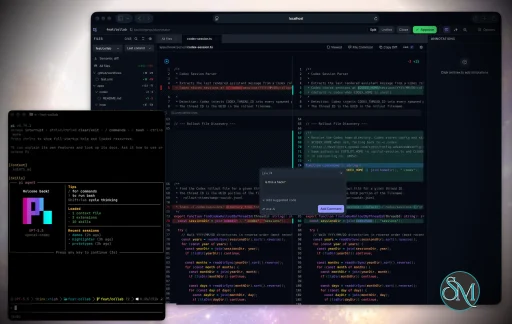
Plannotator is an open-source platform designed to review and validate plans and code generated by AI coding agents.
The platform provides a centralized interface where developers can:
Review AI-generated plans
Annotate proposed actions
Approve or reject tasks
Inspect code changes
Provide structured feedback
Improve agent outputs
Maintain human oversight
Rather than replacing developers, Plannotator aims to keep humans involved in critical decision-making during AI-assisted development.
As AI coding agents become increasingly capable, developers face a growing challenge: ensuring that AI-generated plans and code changes align with project requirements before they are executed. Plannotator addresses this problem by acting as a review layer between developers and AI coding agents.
Instead of generating code itself, Plannotator focuses on making AI-driven development more transparent and controllable. It allows teams to review, annotate, approve, reject, and refine agent-generated plans and code changes before they affect a project.
Download Plannotator v0.23.0 - Software Mirrors |
|---|
Plannotator v0.23.0 for Windowsplannotator-paste-win32-arm64.exe | 106.86 MB plannotator-paste-win32-x64.exe | 110.08 MB plannotator-win32-arm64.exe | 160.14 MB plannotator-win32-x64.exe | 163.36 MB |
Plannotator v0.23.0 for macOSplannotator-darwin-arm64 | 111.94 MB plannotator-darwin-x64 | 116.35 MB plannotator-paste-darwin-arm64 | 58.24 MB plannotator-paste-darwin-x64 | 63.07 MB |
Plannotator v0.23.0 for Linuxplannotator-linux-arm64 | 147.45 MB plannotator-linux-x64 | 147.98 MB plannotator-paste-linux-arm64 | 94.17 MB plannotator-paste-linux-x64 | 94.7 MB |
Plannotator v0.23.0 Release Notes: Follow @plannotator on X for updates
Missed recent releases?
- v0.22.0: Git-status "All changes" default review view, Commits panel with per-commit diffs, Guided Review, Pi + GitHub Copilot CLI review engines
- v0.21.4: Markdown math rendering, PR Overview panel with annotatable description and comments, agent instructions in code review, media parsing fixes
- v0.21.3: File comments in code review, unified click-to-highlight comments, VS Code clipboard/keyboard bridge, Codex Ask AI on app-server transport, CLI subcommand help
- v0.21.2: Custom reviews as Agent Skills, Cursor + OpenCode review engines, whole-file/general findings, deleted-annotation fix, Codex Ask AI outside git repos
- v0.21.1: Annotate-last blank-page fix on multi-message sessions
- v0.21.0: Direct document editing in annotate mode, live git-status file tree, in-app agent terminal, open files in external apps, HTML renders as HTML
- v0.20.3: Annotations no longer lost when clicking away, off-screen indicator for open comments
- v0.20.2: Pierre CodeView all-files review, large-PR pipeline and instant-open checkout, unified agent engine selection, Pi programmatic plan mode
- v0.20.1: Pi extension install hotfix (pinned
@pierre/diffs after a broken upstream release)
- v0.20.0: Multi-repo workspace reviews, semantic diff overview, UI 2.0 themes and plan look chooser, leaner single-source skill install
- v0.19.27: Kiro CLI integration, Glimpse native window, annotate-last message picker
What's New in v0.23.0
This is a community release: 22 PRs, seven of them authored by community contributors, five of whom are contributing for the first time. Plan approval works again on current Claude Code versions, annotate mode gains the version diff that plan mode has always had, the installer learns a binary-only mode, and a wave of Windows, OpenCode, and WebKit fixes lands. The whole changeset went through a multi-day adversarial QA pass — every commit audited, installers exercised end-to-end — before tagging.
Plan approval works again on Claude Code 2.1.199+
Claude Code 2.1.199 added a guard that discards a PermissionRequest allow decision for ExitPlanMode when updatedInput is absent. The result: clicking Approve in the plan review UI closed the page, but the built-in approval dialog reappeared in the terminal as if nothing happened. Deny was unaffected, which made the failure look like a Plannotator bug rather than a protocol change.
The hook now echoes the plan back as updatedInput alongside the allow decision, which satisfies the new guard on 2.1.199+ and is ignored harmlessly by older versions. If plan approval stopped working for you recently, this release fixes it.
PR #1008 by @flex-yj-kim, closing #995 reported by @axelboman277.
Annotate mode: version diff for your files
Plan mode has always shown a +N/-M badge when a plan is resubmitted, with a highlighted diff of what changed between versions. Annotate mode had the same diff UI sitting unused, because the annotate server never tracked history. Now it does: opening a .md or .html file saves a version keyed by file path, and re-opening the same file later shows exactly what changed since you last annotated it — same badge, same rendered diff, same Version Browser in the sidebar.
HTML files annotated with --render-html get the diff as the real rendered page with inline insertion/deletion highlights, not a wall of markup. History is stored under ~/.plannotator/history/; if you'd rather keep annotate sessions stateless, disable it with PLANNOTATOR_ANNOTATE_HISTORY=0 or { "annotateHistory": false } in ~/.plannotator/config.json. A follow-up hardening in this release also makes the history write best-effort: an unwritable data directory degrades to a normal no-diff session instead of failing to open.
PR #961 by @egouilliard-leyton, who also proposed the feature in #960.
Binary-only install with --minimal
The installer writes more than the binary: the sem semantic-diff sidecar, the agent-terminal runtime, and per-agent skills, hooks, and commands for Claude, Codex, OpenCode, Gemini, and Kiro. For users who want none of that, there was no way to opt out. Now there is:
bash
curl -fsSL https://plannotator.ai/install.sh | bash -s -- --minimal
--minimal (alias --binary-only, env var PLANNOTATOR_MINIMAL=1) installs the plannotator binary and stops — no sidecars, no skills, no hooks, no config writes. It works identically across install.sh, install.ps1, and install.cmd, and --no-minimal overrides a persistently exported env var. The mode is non-destructive: running it over an existing full install upgrades the binary and leaves everything else alone.
PR #989 by @Staninna, closing #977 reported by @wauxhall.
Reviews post as you, without attribution
Submitting a PR review to GitHub or GitLab used to append "Review from Plannotator" to the review body. That text is gone. Your general comment and file-scoped feedback post exactly as you wrote them; when GitHub requires a top-level body for an inline-only comment review, a neutral "See inline comments." is used instead; approvals and GitLab inline-only discussions stay bodyless.
PR #1033 by @backnotprop, superseding #1026 by @leoreisdias, who pushed for the change.
Windows: hooks survive spaces in your install path, installers render cleanly
Two classes of Windows breakage are fixed. First, the generated Claude Code hook commands embedded the absolute exe path unquoted — on any machine whose profile path contains a space (C:\Users\John Smith\...), the hook command word-split and plan review silently never intercepted. Both Windows installers now quote the path, and the install test harness pins it.
Second, PR #1021 by @ShiroKSH fixed a broad set of Windows edge cases: the PowerShell installer now parses correctly under stock Windows PowerShell 5.1 (all non-ASCII characters removed, with a regression test), Amp workspace and binary paths normalize across platforms, Ask AI server turns abort cleanly when sessions reset, and Pi archive/config behaviors match Bun's. The same ASCII treatment was then applied to install.cmd, whose status messages rendered as mojibake on default Windows code pages.
Annotate folders: filter the file tree
Annotating a folder now gives you a filter row above the file tree. Type any set of words and they AND-match against file names and paths; matching folders expand automatically while you type, and Escape clears the filter before it closes the browser. Behind it, the folder scan is capped at 5,000 files (configurable via PLANNOTATOR_FILE_BROWSER_MAX_FILES) so a giant monorepo can't hang the browser — and your own modified and untracked files are seeded into the tree first, so the files you just edited always appear no matter how large the folder is.
PRs #1027 and #1022 by @backnotprop.
OpenCode: session URLs you can actually see
Remote OpenCode users (SSH, devcontainers) periodically hit the same wall: the plan or review server starts, but the URL to open it never appears anywhere visible. The root cause turned out to be structural — every URL was routed through client.app.log, which OpenCode writes to its server log file, never the TUI. Session URLs now also surface as TUI toast notifications, delivered through the SDK's visible channel, deduplicated per session, and harmless on older OpenCode hosts that predate the toast endpoint.
Two more OpenCode fixes ride along: model dropdown labels are disambiguated by provider (#1024 by @yusufemreboyraz, closing #988 reported by @ak64th), so deepseek-v4-pro from DeepSeek and OpenRouter are tellable apart — and annotate version history is now scoped per project on OpenCode, matching the other runtimes.
Additional Changes
- Comment editor focuses on open in WebKit hosts — selecting text opens the comment editor with the textarea actually focused; WKWebView hosts (like the Glimpse native window) previously required tabbing into it. PR #1031 by @BrandonNoad.
- Annotate sidebar keyboard shortcuts — toggle the Contents and Files panels from the keyboard, with the bindings listed in Settings while in annotate mode. PR #986 by @leoreisdias.
- GPT-5.6 model family in the Codex job selector —
gpt-5.6 (sol), gpt-5.6-terra, and gpt-5.6-luna are selectable for review jobs, Code Tours, and Guided Reviews. Ask AI discovers Codex models dynamically and needed no change.
- First-time PR reviewers get a destination pointer — a one-time spotlight on the Agent / GitHub switcher explains that feedback can post to the PR or go to your agent session, and that double-tapping Alt toggles it.
- PR comments render tables and inline video — GitHub PR descriptions, comments, and commit messages with markdown tables or video attachments now render properly in the review Overview. PR #1007.
- HTML files render untouched — annotating an
.html file renders the document byte-for-byte in a sandboxed frame instead of normalizing it. PR #1023.
- Resize handles: click to collapse — panel resize handles collapse on click along their full height, with a cursor hint, and the hover highlight can be suppressed by hosts. PR #1028.
- Read-only data directories can't block sessions — an unwritable
~/.plannotator (read-only mount, full disk) now degrades annotate history and session discovery gracefully instead of failing startup.
- Component library migrated to Base UI — the plan and review UIs moved from Radix to Base UI with behavior preserved, part of publishing the document UI as reusable packages. PRs #957, #1013, #1014, #1017.
- plannotator.ai/code-review — a dedicated landing page for the code review side of Plannotator, with an inline Guided Review demo. PRs #1003, #1006, #1012.
Install / Update
macOS / Linux:
bash
curl -fsSL https://plannotator.ai/install.sh | bash
Windows:
powershell
irm https://plannotator.ai/install.ps1 | iex
Extra skills (compound, setup-goal, visual-explainer), opt-in:
bash
npx skills add backnotprop/plannotator/apps/skills/extra
Claude Code Plugin: Run /plugin in Claude Code, find plannotator, and click "Update now".
OpenCode: Clear cache and restart:
bash
rm -rf ~/.bun/install/cache/@plannotator
Then in opencode.json:
json
{
  "plugin": ["@plannotator/opencode@latest"]
}
Pi: Install or update the extension:
bash
pi install npm:@plannotator/pi-extension
Droid: Install via the plugin marketplace:
droid plugin marketplace add backnotprop/plannotator
droid plugin install plannotator@plannotator
Amp: Install the CLI first, then copy the plugin:
bash
mkdir -p ~/.config/amp/plugins
curl -fsSL https://raw.githubusercontent.com/backnotprop/plannotator/main/apps/amp-plugin/plannotator.ts \
  -o ~/.config/amp/plugins/plannotator.ts
Kiro CLI: The installer auto-detects Kiro and installs skills automatically. After installing the CLI, launch with:
bash
kiro-cli chat --agent plannotator
Upgrading from before v0.20.0? Read the v0.20.0 release notes first; that release changed how skills install.
What's Changed
- fix(hook): echo tool_input as updatedInput so plan approval survives Claude Code 2.1.199+ by @flex-yj-kim in #1008
- feat(annotate): per-file version diff for .md and .html by @egouilliard-leyton in #961
- feat(install): add --minimal binary-only install mode by @Staninna in #989
- Fix Windows install and review edge cases by @ShiroKSH in #1021
- Disambiguate OpenCode model dropdown labels by provider by @yusufemreboyraz in #1024
- fix(ui): comment editor textarea not focused on open in WebKit hosts by @BrandonNoad in #1031
- feat(annotate): add sidebar shortcuts by @leoreisdias in #986
- fix(review): remove automatic platform attribution by @backnotprop in #1033
- Make the document UI reusable as published building blocks by @backnotprop in #957
- Migrate @plannotator/ui to Base UI by @backnotprop in #1013
- Migrate packages/review-editor to Base UI by @backnotprop in #1014
- Consumer enablement for @plannotator/ui by @backnotprop in #1017
- fix(review): render tables + inline video in PR comments, descriptions, and commit messages by @backnotprop in #1007
- Render arbitrary HTML in HtmlViewer without altering it by @backnotprop in #1023
- Add file browser filtering by @backnotprop in #1027
- Fix annotate terminal startup in large folders by @backnotprop in #1022
- feat(ui): handle-wide click-to-collapse + suppressible hover on resize handles by @backnotprop in #1028
- chore(ui): move to the plannotator/atomic-editor fork by @backnotprop in #1002
- Code review landing page with demo video by @backnotprop in #1003
- Code review page: copy pass + inline guided-review demo by @backnotprop in #1006
- Dedicated OG/social image for /code-review by @backnotprop in #1012
- fix(opencode): surface session URLs via TUI toasts by @backnotprop
- fix(install): quote exe path in Windows hook commands; ASCII-purge install.cmd by @backnotprop
- fix(server): unwritable data dir degrades annotate/sessions instead of failing startup by @backnotprop
- feat(ui): add GPT-5.6 family to the Codex job model catalog by @backnotprop
- feat(review): one-time spotlight on the PR feedback-destination switcher by @backnotprop
New Contributors
- @Staninna made their first contribution in #989
- @egouilliard-leyton made their first contribution in #961
- @yusufemreboyraz made their first contribution in #1024
- @BrandonNoad made their first contribution in #1031
- @ShiroKSH made their first contribution in #1021
Contributors
@flex-yj-kim tracked the Claude Code 2.1.199 protocol change to its exact guard and shipped the updatedInput echo that makes plan approval work again (#1008), a fix most of the plugin's users will feel immediately.
@egouilliard-leyton proposed the annotate version diff in #960 and then built it (#961), including the rendered-HTML diff with inline highlights. First contribution.
@Staninna built the --minimal install mode across all three installer scripts (#989). First contribution.
@ShiroKSH swept a wide set of Windows edge cases in one PR (#1021) — installer encoding, path normalization, Ask AI abort behavior, and Pi parity details. First contribution.
@yusufemreboyraz fixed the ambiguous OpenCode model labels (#1024). First contribution.
@BrandonNoad root-caused the WebKit focus quirk and moved the comment editor's focus to a ref callback (#1031). First contribution.
@leoreisdias added the annotate sidebar shortcuts (#986) and drove the removal of review attribution — his #1026 shaped the approach that shipped in #1033.
Community members who reported issues that drove changes in this release:
- @axelboman277: #995 (plan approval silently ignored on Claude Code ≥ 2.1.200), with @blimmer adding reproduction detail in the discussion
- @wauxhall: #977 (installer writes state the user didn't ask for)
- @ak64th: #988 (duplicate OpenCode model labels across providers)
Full Changelog: https://github.com/backnotprop/plannotator/compare/v0.22.0...v0.23.0
|
Key Features of Plannotator
Plan Review System
One of Plannotator's core capabilities is reviewing plans generated by AI agents before execution.
Developers can examine:
This visibility helps reduce unintended changes and costly mistakes.
Annotation Tools
The platform allows users to add comments, notes, and guidance directly to AI-generated plans.
These annotations can be used to:
AI Code Review
Plannotator extends the review process beyond planning by supporting inspection of generated code.
Developers can:
This workflow resembles modern pull-request review systems.
Human-in-the-Loop Workflows
A major design goal is ensuring that AI actions remain subject to human approval.
Organizations can establish review processes where important actions require validation before execution.
Open Source Foundation
Plannotator is open source, allowing teams to inspect, modify, and self-host the platform according to their needs.
This transparency is particularly valuable for organizations adopting AI-assisted software development.
User Experience
The interface is designed around review workflows rather than direct code generation.
Instead of interacting with a chatbot, users primarily:
Receive agent-generated plans
Review proposed actions
Add feedback
Approve or reject changes
Monitor execution results
The workflow feels familiar to developers accustomed to pull requests, code reviews, and project planning tools.
Productivity Benefits
As AI coding tools become more autonomous, review processes become increasingly important.
Plannotator helps organizations:
For teams adopting AI-driven development, these safeguards can be as valuable as the coding agents themselves.
Collaboration Features
The platform supports collaborative review workflows where multiple team members can participate in evaluating AI-generated outputs.
This allows:
Such features are especially useful for larger engineering teams.
Performance
Because Plannotator focuses on workflow management and review rather than model inference, performance largely depends on the connected AI agents and integrations.
The platform itself is lightweight and primarily serves as an orchestration and review layer.
Open Source Advantages
Being open source provides several benefits:
Organizations concerned about compliance, security, or proprietary workflows may find these advantages particularly appealing.
Limitations
Plannotator is designed as a companion tool rather than a complete AI development platform.
Common limitations include:
Requires external AI coding agents
Best suited for teams already using AI-assisted development
Smaller ecosystem than mature developer platforms
Additional review steps may slow rapid prototyping
Some users may prefer fully autonomous workflows
The software delivers the most value in environments where oversight and quality control are priorities.
Pros
Improves transparency of AI-generated plans
Supports structured review workflows
Human-in-the-loop design
Useful annotation system
Open source
Self-hosting support
Familiar review experience for developers
Helps reduce AI-generated mistakes
Cons
Not a standalone coding agent
Requires integration with AI development tools
Smaller community than established developer platforms
Adds review overhead to workflows
Best suited for teams rather than casual users
Who Should Use Plannotator?
Plannotator is ideal for:
Software development teams
Engineering managers
AI-assisted development workflows
Organizations adopting coding agents
Open-source projects
Teams prioritizing code quality and governance
It is particularly valuable for environments where AI-generated code requires oversight before reaching production systems.
Plannotator fills an increasingly important role in the AI development ecosystem by providing visibility and control over AI-generated plans and code changes. Its focus on human oversight, structured reviews, and collaborative workflows makes it a useful companion for modern coding agents. While it is not a replacement for AI coding tools themselves, it offers a practical solution for teams seeking greater confidence and accountability in AI-assisted software development.
Post a Comment/Report Broken Link: