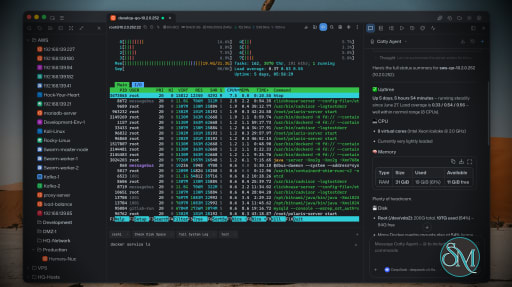
Netcatty is an open source SSH client and remote server management application designed for developers, DevOps engineers, and system administrators. Rather than being a simple terminal emulator, it combines SSH, SFTP, port forwarding, terminal management, and workspace organization into a single desktop application. Available for Windows, macOS, and Linux, Netcatty aims to streamline remote server administration with a modern interface and powerful productivity features.
Managing multiple remote servers often means juggling several terminal windows, file transfer tools, and SSH configurations. Netcatty brings these tasks together into one application with organized workspaces, split terminals, and integrated file management.
Unlike traditional SSH clients that focus solely on terminal access, Netcatty provides a complete remote administration environment with support for SSH, Telnet, Mosh, serial connections, SFTP, jump hosts, proxy servers, and port forwarding.
Key Features of Netcatty
Modern SSH Workspace
Netcatty organizes servers into a built-in Vault, allowing users to manage large numbers of hosts using grid, list, or tree views with fast search capabilities. This makes navigating complex infrastructures much easier than maintaining separate configuration files.
Split Terminal Support
Multiple terminal sessions can be displayed simultaneously using horizontal and vertical split layouts. This is especially useful when monitoring several servers or comparing outputs side by side.
Built-In SFTP Client
The integrated SFTP browser supports drag-and-drop file transfers, remote file editing, and directory management without requiring a separate application.
Multiple Connection Protocols
In addition to SSH, Netcatty supports Telnet, Mosh, and serial connections. It also includes support for jump hosts, proxy servers, and legacy SSH algorithms for compatibility with older systems.
Port Forwarding
The application supports local, remote, and dynamic port forwarding with reusable configurations and automatic startup, making it suitable for development, database access, and secure tunneling.
Secure Authentication
Netcatty supports password authentication, SSH keys, certificates, and SSH agent forwarding, providing flexibility for both personal and enterprise environments.
Cloud Configuration Sync
Users can synchronize their configuration across multiple devices using supported cloud storage providers such as GitHub, Google Drive, OneDrive, or Amazon S3.
AI Assistant
Recent versions include an integrated AI assistant that helps automate terminal workflows and assists with remote administration tasks directly within the application.
Download Netcatty v1.1.73 - Software Mirrors |
|---|
Netcatty v1.1.73 for WindowsNetcatty-1.1.73-portable-win-arm64.exe | 130.51 MB Netcatty-1.1.73-portable-win-x64.exe | 130.5 MB Netcatty-1.1.73-portable-win.exe | 260.65 MB Netcatty-1.1.73-win-arm64.exe | 130.74 MB Netcatty-1.1.73-win-x64.exe | 130.73 MB Netcatty-1.1.73-win-x64.zip | 180.08 MB Netcatty-1.1.73-win.exe | 260.88 MB |
Netcatty v1.1.73 for macOSNetcatty-1.1.73-mac-arm64.dmg | 149.85 MB Netcatty-1.1.73-mac-arm64.zip | 149.94 MB Netcatty-1.1.73-mac-x64.dmg | 155.03 MB Netcatty-1.1.73-mac-x64.zip | 155.14 MB |
Netcatty v1.1.73 for LinuxNetcatty-1.1.73-linux-aarch64.pacman | 104.81 MB Netcatty-1.1.73-linux-aarch64.rpm | 153.4 MB Netcatty-1.1.73-linux-amd64.deb | 156.4 MB Netcatty-1.1.73-linux-arm64.AppImage | 156.87 MB Netcatty-1.1.73-linux-arm64.deb | 153.46 MB Netcatty-1.1.73-linux-x64.pacman | 111.56 MB Netcatty-1.1.73-linux-x86_64.AppImage | 158.93 MB Netcatty-1.1.73-linux-x86_64.rpm | 156.37 MB |
Netcatty v1.1.73 Release Notes: ✨ Release Highlights
Netcatty v1.1.73 adds opt-in inline images and group-based automation targeting, then delivers a broad reliability pass for file transfers and long-running terminal sessions. SFTP and SCP transfers are safer across pause, resume, cancellation, reconnects, and tab changes, while full-screen terminal apps remain responsive when windows are hidden or under sustained output.
🖼️ Inline images in the terminal
- Preview images, charts, and rich terminal output directly over SSH with Kitty, SIXEL, and iTerm inline image support.
- Inline images are opt-in and disabled by default. New settings provide size, memory, and cache safeguards for long-running sessions.
- Images remain available within the current session when the terminal is temporarily hidden.
🎯 Select automation targets by vault group
- Automation scripts can now add or remove every host in a vault group at once, including hosts inside nested groups.
- The selected hosts are saved with the script, so later vault changes cannot silently redirect an existing automation run.
🛡️ Safer, more predictable SFTP and SCP transfers
- Downloads, uploads, resumable transfers, and server-to-server copies now share the same safety checks, protecting files that change while a transfer is running.
- Pause and resume are faster and clearer, with durable progress tracking and stronger checks that the source is still the same file.
- Upload throughput is restored, browsing remains available when switching top-level tabs, and clipboard or folder uploads stay attached to the host where they started.
- Transfer cancellation once again targets the intended task, and interrupted replacements restore the previous destination when possible.
🖥️ More stable terminal sessions
- Full-screen tools such as Herdr no longer freeze during sustained output, and hidden or covered terminal windows continue making bounded progress.
- Windows terminal clearing now works consistently, and Mosh sessions advertise 256-color support correctly.
☁️ Smaller reliability improvements
- Cloud sync can keep local data and overwrite the cloud copy after a reinstall or master-password change without requiring the old cloud password.
- Known-host scans and imports filter public service entries from GitHub, GitLab, Bitbucket, and Azure DevOps.
- Cursor CLI keeps authentication and permission modes isolated between sessions and switches modes more reliably.
Download based on your OS:
- Windows:

- macOS:
 
What's Changed- fix(ci): Cursor triage crash + already_available how-to close by @binaricat in https://github.com/binaricat/Netcatty/pull/2439
- fix(ci): prefer already_available for primary how-to asks by @binaricat in https://github.com/binaricat/Netcatty/pull/2441
- fix(ci): post Cursor triage as netcatty-bot by @binaricat in https://github.com/binaricat/Netcatty/pull/2444
- fix(ci): attribute Cursor automation commits to netcatty-bot by @binaricat in https://github.com/binaricat/Netcatty/pull/2445
- fix(#2436): [Bug] 终端闪现-Terminal Flash / Screen Flicker by @binaricat in https://github.com/binaricat/Netcatty/pull/2440
- fix(ci): plain triage reply tone, no Cursor disclaimer by @binaricat in https://github.com/binaricat/Netcatty/pull/2447
- fix(ci): stop Codex loop failing on draft conversion by @binaricat in https://github.com/binaricat/Netcatty/pull/2448
- fix(#2458): [Bug] 新增的文件传输列表功能的暂停和全部暂定功能不生效 by @netcatty-bot in https://github.com/binaricat/Netcatty/pull/2459
- fix(ci): close Cursor automation handoffs and label state machine by @binaricat in https://github.com/binaricat/Netcatty/pull/2461
- 修复了 Netcatty 终端中 Docker 日志显示 OSC 颜色序列乱码的问题 by @Jinmoli in https://github.com/binaricat/Netcatty/pull/2460
- fix(#2456): [Bug] Codex CLI 提问时流意外断开:error decoding response body by @netcatty-bot in https://github.com/binaricat/Netcatty/pull/2457
- fix(#2453): [Bug] 为什么会出现这种突然出现一大段卡屏的现象 by @netcatty-bot in https://github.com/binaricat/Netcatty/pull/2454
- fix(sftp): raise upload WRITE fanout for higher throughput by @binaricat in https://github.com/binaricat/Netcatty/pull/2452
- fix(terminal): complete Windows ConPTY clear handling by @binaricat in https://github.com/binaricat/Netcatty/pull/2465
- fix(terminal): prevent Herdr rendering freezes by @binaricat in https://github.com/binaricat/Netcatty/pull/2472
- fix(terminal): prevent coalescer wake-up loss stalling TUI output by @netcatty-bot in https://github.com/binaricat/Netcatty/pull/2470
- fix(mosh): pass -c 256 so remote TERM is xterm-256color by @netcatty-bot in https://github.com/binaricat/Netcatty/pull/2481
- fix(ci): reduce flaky failures and PR runtime by @binaricat in https://github.com/binaricat/Netcatty/pull/2474
- feat(snippets): select target hosts by vault group by @netcatty-bot in https://github.com/binaricat/Netcatty/pull/2463
- refactor(sftp): unify transfer safety after #2452 by @binaricat in https://github.com/binaricat/Netcatty/pull/2468
- perf(sftp): upload fanout (64×32KiB) + dead-code cleanup by @binaricat in https://github.com/binaricat/Netcatty/pull/2482
- Revert #2460 OSC color handling test by @binaricat in https://github.com/binaricat/Netcatty/pull/2484
- fix(cloud-sync): keep-local overwrite skips remote decrypt by @netcatty-bot in https://github.com/binaricat/Netcatty/pull/2469
- fix(docs): restore star history chart with static SVGs by @binaricat in https://github.com/binaricat/Netcatty/pull/2490
- fix(ci): bump star-history workflow to actions/checkout@v7 by @binaricat in https://github.com/binaricat/Netcatty/pull/2491
- fix(sftp): close clipboard upload dialog before transfer by @binaricat in https://github.com/binaricat/Netcatty/pull/2493
- fix(sftp): cancel external uploads by task id by @binaricat in https://github.com/binaricat/Netcatty/pull/2495
- fix(sftp): keep browse sessions across top-tab switches by @netcatty-bot in https://github.com/binaricat/Netcatty/pull/2498
- fix(sftp): make transfer pause responsive and visible by @binaricat in https://github.com/binaricat/Netcatty/pull/2486
- fix(known-hosts): filter out public service hosts from scan/import by @CJAY1997 in https://github.com/binaricat/Netcatty/pull/2500
- docs: document issue/PR format gate in agent guides by @binaricat in https://github.com/binaricat/Netcatty/pull/2504
- fix(sftp): unify transfer control under process-level TransferRuntime by @binaricat in https://github.com/binaricat/Netcatty/pull/2509
- feat(terminal): support Kitty/SIXEL/iTerm inline images in terminals by @Lynricsy in https://github.com/binaricat/Netcatty/pull/2508
- feat: continue issue automation after follow-ups by @binaricat in https://github.com/binaricat/Netcatty/pull/2475
- fix(ai): harden Cursor CLI auth and Ask-mode session isolation by @itzhang89 in https://github.com/binaricat/Netcatty/pull/2507
- fix(sftp): restore cancel-by-task, clipboard confirm, and browse stay-alive by @binaricat in https://github.com/binaricat/Netcatty/pull/2510
- fix(sftp): pin clipboard uploads to originating tab by @binaricat in https://github.com/binaricat/Netcatty/pull/2494
- fix(sftp): resolve hook dependency warnings by @binaricat in https://github.com/binaricat/Netcatty/pull/2511
New Contributors- @netcatty-bot made their first contribution in https://github.com/binaricat/Netcatty/pull/2459
- @Jinmoli made their first contribution in https://github.com/binaricat/Netcatty/pull/2460
- @CJAY1997 made their first contribution in https://github.com/binaricat/Netcatty/pull/2500
- @Lynricsy made their first contribution in https://github.com/binaricat/Netcatty/pull/2508
Full Changelog: https://github.com/binaricat/Netcatty/compare/v1.1.72...v1.1.73 |
Performance and User Experience
Netcatty delivers a polished desktop experience with a clean interface and responsive terminal performance. Workspace restoration allows users to resume previous sessions after restarting the application, reducing setup time for daily work.
Although the application is built with Electron, performance is generally smooth on modern hardware. Memory usage is higher than lightweight native SSH clients, but the added functionality justifies the additional resource consumption for most professional users.
The project is actively maintained, with frequent updates introducing new features, performance improvements, and bug fixes.
Pros
Free and open source.
Modern interface with workspace management.
SSH, SFTP, Telnet, Mosh, and serial support.
Split terminal layouts.
Built-in SFTP browser.
Flexible port forwarding.
Secure authentication options.
Cross-platform support.
Active development.
Cons
Electron-based application uses more memory than native SSH clients.
Advanced features may be unnecessary for users who only need basic SSH access.
Some enterprise users may prefer highly specialized commercial SSH management tools.
Who Should Use Netcatty?
Netcatty is an excellent choice for developers, DevOps engineers, cloud engineers, system administrators, security professionals, and IT consultants who regularly manage multiple remote servers.
It is particularly valuable for users looking to replace separate SSH clients, SFTP applications, and terminal windows with a unified workspace.
Final Verdict
Netcatty is far more than a traditional SSH client. By combining terminal management, secure file transfers, workspace organization, port forwarding, and modern productivity features into one application, it offers an impressive environment for remote server administration.
Its clean interface, broad protocol support, and active development make it one of the most compelling open source SSH workspaces currently available. For professionals managing remote infrastructure on a daily basis, Netcatty is well worth considering.








Post a Comment/Report Broken Link: