MuseScore Studio is a free and open source music notation application used by millions of musicians, composers, arrangers, educators, and students worldwide. Available for Windows, macOS, and Linux, it provides professional-quality music engraving, realistic playback, MIDI support, and extensive import and export options without requiring a paid license. Over the years, it has evolved into one of the most capable notation programs available, rivaling many commercial alternatives.
MuseScore Studio is designed to make music composition and score preparation accessible to everyone. Whether you're writing a solo piano piece, an orchestral score, a jazz arrangement, a choir composition, or educational sheet music, the software offers an impressive collection of tools while remaining completely free and open source.
Unlike many commercial notation programs, MuseScore Studio places no limitations on score creation. The software itself is free, while optional online services such as premium score downloads are separate products.
Key Features of MuseScore Studio
Professional Music Engraving
MuseScore Studio produces high-quality sheet music with automatic spacing, intelligent layout, and extensive engraving controls. Users can fine-tune almost every visual element to create publication-ready scores.
Wide Instrument Support
The software supports a broad range of instruments, including:
Piano
Guitar
Orchestra
Choir
Jazz ensembles
Concert bands
Marching bands
Percussion
Traditional instruments
Creating scores for small ensembles or full orchestras is straightforward using the built-in templates.
Realistic Playback
MuseScore Studio includes high-quality playback with MuseSounds, allowing composers to hear realistic orchestral instruments while writing music. Recent releases have also introduced optional AI-powered vocal playback through Online Sounds for supported projects.
MIDI and MusicXML Support
The application supports importing and exporting MIDI, MusicXML, MEI, MuseData, PDF, and various audio formats, making it easy to exchange projects with other music software and digital audio workstations.
MIDI Keyboard Input
Composers can enter notes using a MIDI keyboard for faster composition, while traditional mouse and keyboard input remains available for users without external hardware.
Plugin Support
MuseScore Studio includes a plugin system that allows users to extend functionality with community-developed tools, automation, and workflow improvements.
Active Open Source Development
The project benefits from contributions from developers around the world. Frequent updates continue to improve engraving quality, workflow efficiency, accessibility, and playback features. Recent versions have introduced numerous community-requested enhancements.
Download MuseScore Studio v4.7.4 - Software Mirrors |
|---|
MuseScore Studio v4.7.4 for Windows |
MuseScore Studio v4.7.4 for macOS |
MuseScore Studio v4.7.4 for LinuxMuseScore-Studio-4.7.4.260706075-aarch64.AppImage | 179.55 MB MuseScore-Studio-4.7.4.260706075-aarch64.AppImage.zsync | 314.48 kB MuseScore-Studio-4.7.4.260706075-x86_64.AppImage | 183.33 MB MuseScore-Studio-4.7.4.260706075-x86_64.AppImage.zsync | 321.09 kB |
MuseScore Studio v4.7.4 Release Notes:MuseScore Studio 4.7.4 is now available!This update adds new East-Asian instruments and fixes several minor engraving issues, accessibility bugs, and crashes. To learn more, see the full announcements for 4.7.4 and 4.7. And don't forget to check out the 4.7 release video! |
Performance and User Experience
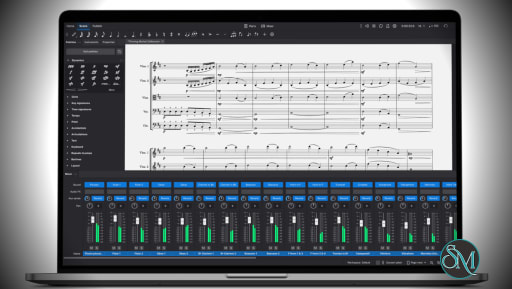
MuseScore Studio offers a clean interface that balances ease of use with professional capabilities. Beginners can quickly create simple scores using templates, while advanced users have access to detailed engraving controls and customization options.
Performance is generally excellent, even when working with moderately large scores. Very large orchestral projects naturally require more system resources, but navigation and editing remain responsive on modern hardware.
The extensive online handbook and active community make learning the software much easier than many competing notation programs.
Pros
Completely free and open source.
Professional-quality music engraving.
Excellent playback with MuseSounds.
Supports MIDI and MusicXML.
Cross-platform compatibility.
Large collection of supported instruments.
Active community and frequent updates.
Extensive documentation and plugin ecosystem.
Cons
Large orchestral scores can require significant system resources.
Advanced engraving features take time to master.
Some optional online services require separate subscriptions, though the notation software itself remains free.
Audio production capabilities are not intended to replace a full digital audio workstation.
Who Should Use MuseScore Studio?
MuseScore Studio is an excellent choice for composers, arrangers, music teachers, students, choir directors, orchestral musicians, educators, and anyone who creates sheet music.
It is particularly attractive for users seeking a professional notation application without paying for expensive commercial software. Even experienced composers often choose MuseScore Studio thanks to its continuous improvements and open source nature.
Final Verdict
MuseScore Studio has matured into one of the finest music notation applications available today. It combines professional engraving, realistic playback, extensive file compatibility, and a thriving open source community into a package that is completely free to use.
While mastering every advanced feature takes time, the software scales exceptionally well from beginners writing their first score to professionals preparing complex orchestral arrangements. For anyone looking for powerful music notation software without licensing costs, MuseScore Studio is one of the strongest options available.
Post a Comment/Report Broken Link: