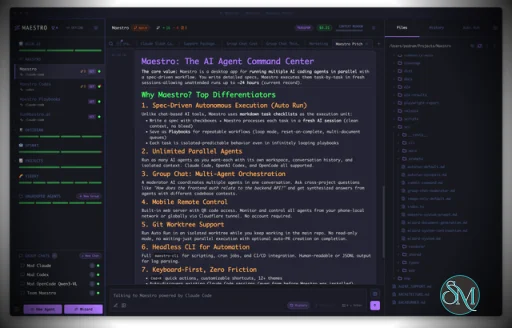
Maestro is a cross platform desktop application built to orchestrate multiple AI agents with isolated contexts. Each agent operates independently while still being managed under a unified command center. This allows users to execute complex workflows, parallel tasks, and long running processes efficiently.
The tool is open source and actively developed, targeting users who work with AI assisted development, research, automation, and experimentation.
Download Maestro v0.17.3 - AI Agent Command Center - Software Mirrors |
|---|
Maestro v0.17.3 - AI Agent Command Center for Windows |
Maestro v0.17.3 - AI Agent Command Center for macOSmaestro-0.17.3-arm64-mac.dmg | 211.78 MB maestro-0.17.3-arm64-mac.zip | 201.59 MB |
Maestro v0.17.3 - AI Agent Command Center for Linuxmaestro-0.17.3-aarch64.rpm | 118.74 MB maestro-0.17.3-amd64.deb | 153.37 MB maestro-0.17.3-arm64.AppImage | 211.93 MB maestro-0.17.3-arm64.deb | 148.04 MB |
Maestro v0.17.3 - AI Agent Command Center Release Notes:Major 0.17.x Additions🔐 Claude Token Source control keeps Claude running on your Max/Pro subscription quota by driving Claude's interactive session instead of the headless API path. A three-way Interactive / API / Dynamic selector is available everywhere agents run (new and existing agents, Cue runs, Group Chat, and background tasks). Dynamic mode uses your subscription quota automatically and only falls back to API billing when that quota is exhausted. 🪄 Maestro Cue is a new trigger-based cross-agent orchestration capability that lets heartbeats, GitHub issues/PRs, file system monitors, and other data sources bring your agents to life and pass work between one another. 💻 Full-featured xterm.js terminal tabs sit alongside your AI and file preview tabs, with support for opening and renaming multiple terminals. 🧑✈️ GitHub Copilot-CLI joins Maestro as a first-class agent with end-to-end integration for both local and remote (over SSH) execution. 🛠️ A vastly expandedmaestro-cli now drives the whole running desktop app, and your agents know how to use it. You can just talk to an agent in plain language to create and run Auto Run playbooks, change settings, set up Maestro Cue pipelines, and manage groups, agents, tabs, and themes, instead of clicking through menus yourself.
0.17.3 Highlights⌨️ Typing in the AI and terminal composer no longer lags, and the transcript no longer reflows on every keystroke, so the app stays smooth under heavy load. 🔁 Maestro now automatically retries a prompt when an agent hits a recoverable error such as an overloaded API, a rate limit, or exhausted quota, showing an inline outage card with a live countdown instead of dropping the run. 🎨 Agent replies now render rich markdown, including GitHub-style[!NOTE]/[!WARNING] callouts, LaTeX math, and sanitized inline SVG diagrams, so answers can be formatted and illustrated instead of landing as plain text.
🖼️ Pasted screenshots now live in a content-addressed store outside the main sessions file, so a workspace full of images no longer bloats that file or freezes the UI.
⭐ Maestro now keeps its own copy of every starred conversation's transcript, so a starred session survives even after the provider rotates or deletes its file and still resumes natively on restore.
Full Changelog: https://github.com/RunMaestro/Maestro/compare/v0.17.2...v0.17.3 |
Key Features
Maestro allows users to run multiple AI agents in parallel while keeping their context, state, and execution separated. This enables large tasks to be broken down and handled simultaneously.
The Auto Run and Playbook system lets users define workflows that execute steps automatically. These workflows can loop, batch tasks, or run unattended, making them suitable for long or repetitive operations.
Maestro supports group chat coordination where multiple agents collaborate within a single task. The tool handles routing and coordination to produce unified results.
Remote monitoring and control features allow users to observe and manage agent activity even when away from the main workstation.
A built in command line interface enables headless execution and scripting, allowing Maestro to integrate into broader automation workflows.
Ease of Use
Maestro is designed for users with technical experience. While it is not a beginner focused tool, its interface is structured for efficiency, especially for users familiar with development tools and multitasking environments.
Once configured, workflows are repeatable and easy to manage.
Performance and Compatibility
Maestro runs on Windows, macOS, and Linux. Performance scales based on system resources and the number of agents running concurrently. The application remains responsive even during complex orchestration tasks when used on modern hardware.
Because Maestro coordinates agents rather than performing heavy computation itself, overall performance largely depends on external AI services and configurations.
Pros and Cons
Advantages include powerful multi agent orchestration, parallel execution, automation through playbooks, command line support, and open source flexibility.
Limitations include a learning curve for new users, reliance on external AI models for functionality, and a focus on advanced workflows rather than simple chat usage.
Final Verdict
Maestro is a capable and thoughtfully designed orchestration tool for managing AI agents at scale. Its focus on parallel workflows, automation, and centralized control makes it a strong choice for advanced users working with AI assisted tasks.
For those who need structured AI agent orchestration rather than simple interaction, Maestro delivers a reliable and efficient solution.
Maestro is an open source agent orchestration tool that provides a centralized desktop environment for managing and running multiple AI agents and workflows simultaneously. It is designed for developers and advanced users who need structured coordination, parallel execution, and automation across AI driven tasks.
Maestro focuses on improving productivity when working with multiple agents by offering orchestration, monitoring, and workflow control from a single interface.
Developer:
Pedram Amini
Operating System:
Windows / macOS / Linux
Date Added:
2026-07-05T04:02:13.011Z
Categories:
Post a Comment/Report Broken Link: