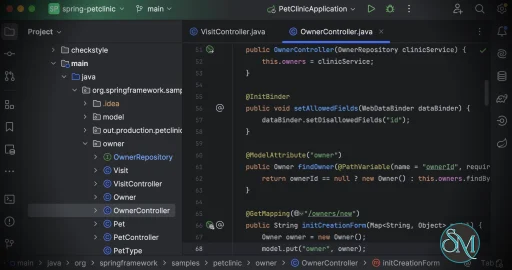
IntelliJ IDEA is JetBrains' flagship integrated development environment (IDE) for JVM development and modern software engineering. It provides intelligent coding assistance, advanced debugging, powerful refactoring tools, and deep integration with popular frameworks, making it one of the most productive IDEs available for professional developers.
With IntelliJ IDEA now offered as a single, unified product, developers no longer need to choose between separate Community and Ultimate editions. Instead, the IDE delivers a unified experience, with advanced capabilities available through licensing while maintaining a streamlined installation and development workflow.
IntelliJ IDEA is designed to help developers write, understand, and maintain code more efficiently. It supports Java, Kotlin, Groovy, Scala, and many other programming languages through plugins, while also providing excellent support for web development, databases, cloud technologies, and modern backend frameworks.
The IDE combines intelligent code analysis with automation tools that reduce repetitive tasks, allowing developers to focus on building software rather than managing their development environment.
Download IntelliJ IDEA 2026.1.4 - Software Mirrors |
|---|
IntelliJ IDEA 2026.1.4 for Windows (Official)IntelliJ IDEA 2026.1.4 for Windows (Community - GitHub)idea-2026.1.4-aarch64.exe | 557.95 MB |
IntelliJ IDEA 2026.1.4 for macOS (Official)IntelliJ IDEA 2026.1.4 for macOS (Community - GitHub) |
IntelliJ IDEA 2026.1.4 for Linux (Official)IntelliJ IDEA 2026.1.4 for Linux (Community - GitHub) |
IntelliJ IDEA 2026.1.4 Release Notes:Release notes are available here |
Key Features of IntelliJ IDEA
Intelligent Code Completion
IntelliJ IDEA analyzes project context to provide accurate code completion suggestions, automatic imports, smart navigation, and real-time error detection. This significantly improves coding speed while reducing mistakes.
Powerful Refactoring
The IDE is widely recognized for its industry-leading refactoring tools. Developers can safely rename symbols, extract methods, move classes, reorganize packages, and perform complex structural changes with confidence.
Advanced Debugging
Comprehensive debugging tools include conditional breakpoints, expression evaluation, variable inspection, call stack analysis, and thread monitoring, making it easier to diagnose issues in applications of any size.
Comprehensive Framework Support
IntelliJ IDEA includes excellent support for popular frameworks and technologies such as Spring, Spring Boot, Jakarta EE, Quarkus, Micronaut, Hibernate, Maven, Gradle, and many others. The IDE automates configuration, navigation, and code generation for these frameworks.
Database and SQL Tools
Built-in database support allows developers to connect to multiple database systems, browse schemas, execute SQL queries, inspect data, and manage database objects without leaving the IDE.
Version Control Integration
Git integration is deeply embedded throughout the IDE. Developers can manage branches, review changes, resolve merge conflicts, inspect commit history, and collaborate with GitHub, GitLab, Bitbucket, and other Git hosting services.
AI-Assisted Development
Modern versions of IntelliJ IDEA integrate with JetBrains AI features, providing assistance with code generation, explanations, documentation, refactoring suggestions, and other productivity tasks.
Extensive Plugin Ecosystem
Thousands of plugins extend IntelliJ IDEA with additional language support, cloud integrations, DevOps tools, testing frameworks, UI development tools, and productivity enhancements.
Performance and User Experience
IntelliJ IDEA delivers an excellent balance between functionality and usability. Navigation is fast, project-wide search is highly efficient, and intelligent indexing enables accurate code analysis across large codebases.
While indexing large enterprise projects can temporarily increase CPU and memory usage, the IDE remains responsive once indexing is complete. The interface is clean, customizable, and designed to support both keyboard-driven workflows and traditional navigation.
The unified product model also simplifies installation and updates, giving developers access to a consistent IDE regardless of their licensing status.
Pros
Outstanding intelligent code completion.
Industry-leading refactoring capabilities.
Excellent debugging and profiling tools.
Comprehensive framework and database support.
Deep Git integration.
AI-assisted development features.
Extensive plugin ecosystem.
Available for Windows, macOS, and Linux.
Unified product simplifies installation and maintenance.
Cons
Large projects can require significant system resources.
Initial indexing may take time for complex codebases.
Some advanced capabilities require a paid subscription.
Beginners may need time to learn the extensive feature set.
Who Should Use IntelliJ IDEA?
IntelliJ IDEA is an excellent choice for Java developers, Kotlin developers, backend engineers, full-stack developers, DevOps professionals, enterprise software teams, and students learning modern software development.
Its combination of intelligent coding tools, framework support, and productivity features makes it suitable for everything from personal projects to large-scale enterprise applications.
Final Verdict
IntelliJ IDEA continues to be one of the most capable and productive IDEs on the market. Its intelligent coding assistance, powerful refactoring tools, comprehensive framework support, and modern development features help developers write better code with greater efficiency.
The move to a unified product further simplifies the user experience, allowing developers to focus on building applications rather than choosing between different editions. Whether you're creating web applications, enterprise systems, cloud services, or desktop software, IntelliJ IDEA remains an outstanding development environment.
Post a Comment/Report Broken Link: