InstallerClean is a small Windows tool that helps detect and remove leftover files, folders, and registry entries created by installed software. It is built for users who want to keep their system clean without manually digging through directories.
InstallerClean is a focused utility designed to clean up files and traces that remain after uninstalling programs. While many uninstallers remove the main application, leftover data often stays behind. InstallerClean aims to fix that with a simple and lightweight approach.
The application is typically portable, meaning it can run without installation and does not add extra load to your system.
Download InstallerClean v2.1.0 - Software Mirrors |
|---|
Download InstallerClean v2.1.0 Download InstallerClean v2.1.0 Download InstallerClean v2.1.0 |
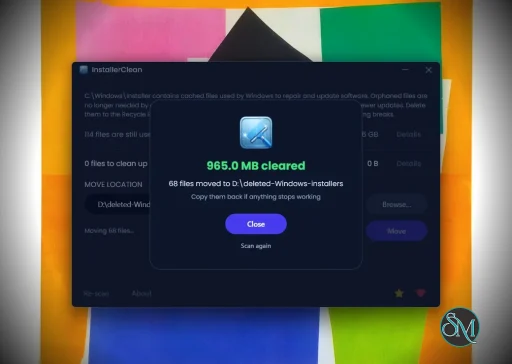
InstallerClean v2.1.0 Release Notes:InstallerClean 2.1.0The Move and Delete buttons have swapped placesDelete is now the emphasised button, and it sits on the right of the pair. Move is the quieter one on the left. Delete is now the default because a great deal of further testing has gone into proving that InstallerClean only ever lists files Windows has finished with. The test suite has grown from 270 tests to 467 this release, and the single largest addition covers exactly the code that decides whether a file is still registered. Move remains an option for anyone who doesn't trust that and would rather keep a backup. The button order just makes it clearer that deleting the unneeded files is safe to do.It's even more careful about what it listsMost of this release went into the situations where Windows can't give a straight answer about a file: records that are damaged, incomplete, or that contradict each other. In every one of them InstallerClean now leaves the file alone rather than putting it on the list. The changelog has each case.Moving
Fewer ways to get stuckThe window no longer freezes while a slow or broken Recycle Bin is checked, or while a move destination on a network share that has gone away times out. It no longer hangs on exit if the Windows shell stops responding. Closing the app mid-move now finishes the file it's on and stops cleanly, rather than cutting off part-way through and leaving a half-written copy behind. A scan that fails at startup now opens the window and tells you why, instead of the app disappearing.Error messagesErrors now appear in InstallerClean's own themed dialog rather than a stock Windows message box. Each message names what actually went wrong. Where Windows won't explain itself, the message says so. And each one ends by confirming that nothing has been removed, which is what you want to know when an error appears over a list of your files.Screen readers and the keyboard
The command lineinstallerclean-cli no longer gives up before it starts when it's launched with no console attached, which is how some remote-management agents and service wrappers run it. It was abandoning the whole run over its output encoding, every time, in a situation where nothing was reading the output anyway.
Unquoted paths with spaces in them are reported properly now, --help explains that a saved move folder is per-user and so no use to a scheduled task running as SYSTEM, and the README has a worked schtasks example.
LanguagesEverything this release adds or rewords is translated into all fourteen non-English languages (plus the extra Arabic README). The existing translations got yet another going-over too: words that had gone missing, wording that didn't sit in the same register as the rest of the app, and punctuation that didn't follow that language's own conventions. Five new automated checks now guard all of this on every push. A new or reworded string can't quietly ship in English, a French narrow space can't be lost to an ordinary one, the installer's language list can't drift from the app's, a translated string can't refer to a number its sentence never provides, and the fourteen public review pages can't fall out of step with the app's own text. Thanks again to @coolvitto and @bovirus, whose Japanese and Italian work this release keeps building on.LicenceInstallerClean is now under Apache 2.0 rather than MIT. It's still free and open source.Everything elseThe changelog lists every change in this release.Downloads
Verify your download (SHA-256).sha256 sidecar files alongside each binary on this release. To verify in PowerShell:
VirusTotal
|
Key Features of InstallerClean
Leftover File Detection
InstallerClean scans your system for files and folders that remain after uninstalling applications. This helps free up disk space and reduce clutter.Registry Cleanup
It can identify unused or orphaned registry entries related to removed programs, helping maintain system organization.Simple Interface
The tool is designed to be straightforward. Users can scan and clean with minimal steps, making it accessible even for non technical users.Portable Usage
InstallerClean often runs as a portable application, so you can use it on multiple systems without installation.Fast Scanning
The scanning process is quick and does not heavily impact system performance.
User Experience
InstallerClean is easy to use, with a minimal interface that focuses on functionality. It does not overwhelm users with advanced settings, which makes it suitable for quick maintenance tasks.
However, advanced users may find it lacks deeper customization compared to more comprehensive system cleanup tools.
Performance and Compatibility
The software performs efficiently and works on most Windows systems. It is lightweight and does not consume significant resources during scanning or cleaning.
Because it targets leftover files specifically, it complements rather than replaces full system maintenance tools.
Pros
Lightweight and fast
Simple and easy to use
Helps remove leftover files and registry entries
Portable and convenient
Cons
Limited advanced features
Not as comprehensive as full system cleaners
Requires careful review before deleting files
InstallerClean is ideal for users who frequently install and uninstall software and want to keep their system tidy. It is also useful for those who prefer simple tools over complex system utilities.
InstallerClean delivers a focused solution for removing leftover files after uninstallations. While it is not a full system optimizer, its simplicity and efficiency make it a valuable addition to basic PC maintenance tools.
Post a Comment/Report Broken Link: