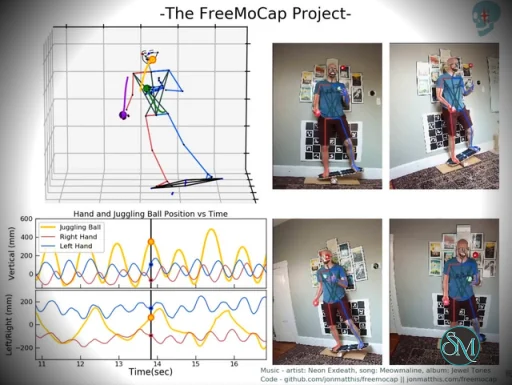
FreeMoCap is a free and open-source markerless motion capture system that allows users to record 3D human movement using standard webcams or video files instead of specialised motion capture suits.
Unlike traditional mocap systems that require body markers and high-end camera arrays, FreeMoCap relies on software-based tracking and computer vision techniques. This makes motion capture more affordable and accessible for students, indie creators, and researchers.
Download FreeMoCap v1.8.2 - Software Mirrors |
|---|
Download FreeMoCap v1.8.2 for Linux Download FreeMoCap v1.8.2 for macOS |
FreeMoCap v1.8.2 Release Notes: ## How to Update **Via Pip:** ``` pip install freemocap==1.8.* ``` Verify the update by checking the version in the FreeMoCap GUI Welcome Screen's bottom right corner. **Via Installer:** Download from the assets section below and review platform-specific instructions. ## ✨ Headline Feature — Reprojection Outlier Rejection https://github.com/user-attachments/assets/e5f45b1c-e054-4ba7-b62b-ef3076178144 v1.8.0 adds an **optional** outlier-rejection step to the 3D triangulation pipeline that should substantially improve reconstruction quality on **4+ camera systems**. Previously, adding more cameras ran into a "poison pill" problem: the more cameras in your rig, the higher the chance that one would pick up a bad track (spooky *ghost skeletons* 💀👻) and contaminate the reconstruction. The new method identifies and rejects those bad views on a per-point basis, making higher-camera-count rigs much more robust. **The option is OFF by default in this release.** We are confident it will improve results in most cases, but because it touches the core reconstruction pipeline we want to roll it out cautiously. Enable it under *Process Data > 3D Triangulation > Use Outlier Rejection Method?* before processing. If you have a 4+ camera setup — or better yet, an old recording that didn't quite reconstruct right — please try it and let us know how it goes on the tracking issue [freemocap#782](https://github.com/freemocap/freemocap/issues/782) or in the [FreeMoCap Discord](https://discord.gg/freemocap). 👉 **For the full write-up** (how it works, the math, recommended settings), see the in-app release notes popup (Help menu → Release Notes) or the [Reprojection Filtering docs page](https://docs.freemocap.org/documentation/reprojection-filtering.html). ## 🆕 Also New — Minimum Cameras for Triangulation A new top-level **"Minimum Cameras for Triangulation"** option was added to the 3D Triangulation Methods panel (default: `3`). It applies to both the simple triangulation path and the new outlier-rejection path. Points with fewer valid 2D detections than this threshold are dropped from the 3D output. If the value exceeds the number of cameras in the recording, FreeMoCap will warn and auto-adjust it down so processing still runs. ## 🎉 Contributor Shout-out The outlier-rejection feature was contributed by [ajc27](https://github.com/ajc27-git), a long-time community member whose previous work includes the Blender output pipeline. This is their first contribution to the core reconstruction pipeline — thank you! 🙌 ## What's Changed * Upgrade GitHub Actions for Node 24 compatibility by @salmanmkc in https://github.com/freemocap/freemocap/pull/767 * Upgrade GitHub Actions to latest versions by @salmanmkc in https://github.com/freemocap/freemocap/pull/768 * Get Actions running and passing Zizmor checks by @philipqueen in https://github.com/freemocap/freemocap/pull/770 * Fix link to calibration guide by @philipqueen in https://github.com/freemocap/freemocap/pull/773 * Ajc/triangulate with outlier rejection by @ajc27-git in https://github.com/freemocap/freemocap/pull/758 * Staging/v1.8 by @jonmatthis in https://github.com/freemocap/freemocap/pull/783 ## New Contributors * @salmanmkc made their first contribution in https://github.com/freemocap/freemocap/pull/767 * @ajc27-git made their first contribution in https://github.com/freemocap/freemocap/pull/758 **Full Changelog**: https://github.com/freemocap/freemocap/compare/v1.7.4...v1.8.0 |
Key Features of FreeMoCap
Markerless Motion Capture
FreeMoCap captures full-body motion without requiring wearable markers or suits. It processes recorded video to reconstruct 3D skeletal movement data.
Multi-Camera and Video Support
Users can connect multiple webcams for better depth accuracy or import pre-recorded video footage. This flexibility allows you to scale your setup based on your budget and technical requirements.
Data Export and Analysis
Captured motion data can be exported in formats such as CSV and NumPy arrays. It also supports workflows compatible with 3D animation tools like Blender. Built-in analysis tools help users inspect skeletal tracking results.
Open-Source Ecosystem
FreeMoCap is fully open source, allowing developers to modify, extend, and integrate it into research or production pipelines. The project benefits from active community contributions and ongoing development.
Performance and Usability
FreeMoCap typically runs in a Python environment and may require installation through package managers. While it provides a graphical interface, initial setup, camera calibration, and environment configuration may require technical familiarity.
Accuracy: Motion tracking can be surprisingly detailed with proper lighting and calibration, though results vary based on camera quality and positioning.
Processing Speed: Most workflows rely on post-processing rather than real-time tracking.
Ease of Use: Setup can be complex for beginners, especially those unfamiliar with Python or camera calibration workflows.
Pros and Cons
Pros
Completely free and open source
No specialised hardware required
Flexible export formats for animation and research
Strong developer and academic community
Cons
Technical setup may be challenging
Limited real-time processing
Accuracy depends heavily on camera setup and lighting
Final Verdict
FreeMoCap stands out as a capable and accessible open-source motion capture platform. While it may not fully replace high-end professional mocap systems for commercial film or AAA game production, it provides impressive performance considering its zero cost.
If you’re interested in motion capture but don’t want to invest in expensive suits or proprietary systems, FreeMoCap offers a compelling alternative.
Sources
Official documentation: https://docs.freemocap.org
GitHub repository: https://github.com/freemocap/freemocap
Developer:
The FreeMoCap Project.
Operating System:
Windows / macOS / Linux
Date Added:
2026-07-13T18:02:15.340Z
Categories:
Post a Comment/Report Broken Link: