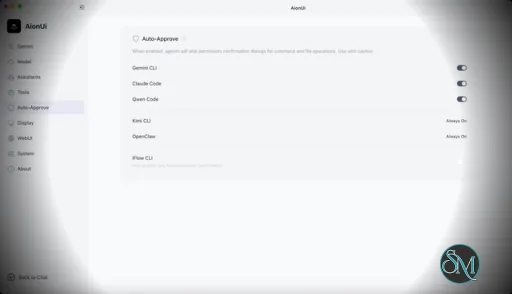
AionUi is a cross platform desktop application that transforms command line AI agents into an intuitive graphical interface. It detects locally installed AI CLI tools and presents them in a structured environment where users can manage conversations, sessions, and files more efficiently.
The software is open source, allowing users to customize and extend its functionality according to their workflow requirements.
Download AionUI v2.1.39 - Software Mirrors |
|---|
Download AionUI v2.1.39
for Windows 64bit (exe) | 290.44 MB Download AionUI v2.1.39
for Windows ARM64 (exe) | 457.97 MB | Download AionUI v2.1.39
for macOS Intel (zip) | 470.88 MB Download AionUI v2.1.39
for macOS Intel (dmg) | 461.4 MB Download AionUI v2.1.39
for macOS ARM64 (zip) | 459.7 MB Download AionUI v2.1.39
for macOS ARM64 (dmg) | 450.36 MB | Download AionUI v2.1.39
for Linux ARM64 (deb) | 401.26 MB Download AionUI v2.1.39
for Linux 64bit (deb) | 428.33 MB |
Highlights
🎁 AionUi × Kimi Partnership — Free Subscription Plans for Contributors
- AionUi has entered a strategic partnership with Kimi (Moonshot AI). To thank our community, Kimi is offering free "Allegretto" subscription plans ($39/mo · ¥199/mo value) to AionUi contributors.
- Campaign runs July 21 – September 21, 2026. Two ways to claim: veteran contributors with 10+ merged PRs in the AionUi repo, or 3 newly merged PRs during the campaign via the claim-an-issue process (see rules). First batch: 30 plans, first come first served.
- Campaign details: https://x.com/AionUi/status/2079493379914961069 · Claim thread: https://github.com/iOfficeAI/AionUi/discussions/3640
Per-Model Capability Settings
- Configure each model's capabilities directly in settings: a per-model Vision indicator with automatic / enabled / disabled modes, and an OpenAI API mode switch (automatic / Chat Completions / Responses). Automatic detection is preserved unless you set an explicit override.
Fixes & Improvements
- Workspace file tree is stabilized — expand state, search, and the preview panel stay consistent.
- Clearer sign-in hint when an auth-gated agent returns an empty turn, so you know to log in instead of seeing nothing.
- No more false "local data repair failed" alarm caused by concurrent startup.
- Agent settings: launch path is hidden for npx-based agents, and the repair panel stays mounted during background revalidation with a correct status banner.
- Markdown preview renders distinct heading texts correctly.
- Send button arrow-up icon restored.
Engine updates (AionCore v0.1.49 → v0.1.50)
- Official Kimi K2.7 Code image input is now enabled — send images to Kimi's coding model.
- Per-model capability settings supported at the engine layer (pairs with the settings UI above); automatic vision detection preserved.
- More reliable ACP: bounded config RPC timeout without tearing down the connection; auth failures from real turns now reflect into agent availability.
- Safer concurrent AionCore startup over one data directory; aionrs sessions rebuilt from persisted runtime permissions.
- Updated Kimi logo to the official brand mark.
What's Changed
- chore: bump version to 2.1.39 and aioncore to v0.1.50 by @piorpua in #3660
- fix(startup): stop false "local data repair failed" alarm from concurrent startup by @piorpua in #3650
- feat(github): post claim invitation when an issue is labeled bonus by @IceyLiu in #3649
- fix(github): never auto-assign bonus-labeled issues in triage workflow by @IceyLiu in #3647
- feat(settings): configure model capabilities by @jiahe0510 in #3639
- fix(conversation): show sign-in hint for empty ACP turns needing auth by @kaizhou-lab in #3644
- fix(workspace): stable file tree — expand state, search, preview panel by @IceyLiu in #3642
- fix(agent-settings): hide launch path for npx agents and fix repair-panel status banner by @kaizhou-lab in #3641
- docs(readme): add AionUi × Kimi contributor campaign section by @IceyLiu in #3643
- fix(github): use English-only module dropdown with exact-match triage parsing by @IceyLiu in #3636
- feat(github): automated issue/PR/discussion triage to module owners by @IceyLiu in #3631
- fix(preview): render distinct heading texts in markdown preview by @IceyLiu in #3630
- feat(settings): promote Kimi/Moonshot placement in platform and agent lists by @IceyLiu in #3629
- feat(feedback): route-aware module preselection and ask-the-butler chip on error surfaces by @IceyLiu in #3626
- fix(chat): restore arrow-up icon on send buttons by @IceyLiu in #3627
- chore(docs): update WeChat group QR code to wx-17 by @IceyLiu in #3623
- fix(settings): keep agent repair panel mounted during background revalidation by @IceyLiu in #3624
Full Changelog: https://github.com/iOfficeAI/AionUi/compare/v2.1.38...v2.1.39
|
Key Features
Multi Agent Support
AionUi allows users to run multiple AI sessions simultaneously. Each session maintains its own context, enabling parallel workflows without cross interference.
Modern Chat Interface
The application provides a clean and organized chat environment. Users can scroll through conversation history, manage session tabs, and interact with AI responses in a visually structured format.
Smart File Management
AionUi includes drag and drop support, file previews, and structured file browsing. This improves productivity when working with code, documents, or AI generated content.
Multi Model Compatibility
The software supports various AI models through local or API based configurations. Users can switch between models depending on task requirements.
Session Control and Workflow Tools
Users can manage sessions independently, review outputs, and maintain organized AI workflows. This structure helps reduce clutter when working on complex tasks.
Cross Platform Availability
AionUi runs on major operating systems, ensuring accessibility for developers working in different environments.
Ease of Use
The interface is designed to simplify complex AI workflows. While some familiarity with AI tools is helpful, the graphical layout significantly reduces the learning curve compared to pure command line usage.
Navigation is intuitive, and core features are accessible without excessive configuration.
Performance and Compatibility
AionUi operates efficiently as a desktop application. Performance depends partly on the underlying AI services or APIs being used, but the interface itself remains responsive during normal use.
Compatibility with standard AI command line tools ensures flexibility for technical users.
Final Verdict
AionUi is a powerful desktop interface for managing AI command line tools in a structured and visual way. Its ability to handle multiple sessions, integrate different models, and organize workflows makes it a valuable productivity solution for advanced users.
For professionals seeking greater control and efficiency in AI driven projects, AionUi delivers a practical and modern solution.
AionUi is a free and open source desktop application that provides a modern graphical interface for command line AI tools. It is designed to simplify AI workflows by replacing terminal based interaction with a visual environment that supports multiple AI models, parallel sessions, and productivity focused features. AionUi is suitable for developers, researchers, and advanced users who want a unified way to manage AI driven tasks.
Post a Comment/Report Broken Link: