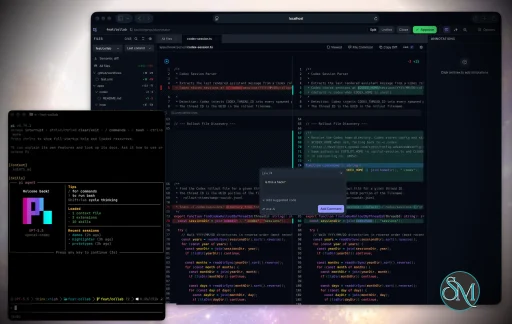
Plannotator is an open-source platform designed to review and validate plans and code generated by AI coding agents.
The platform provides a centralized interface where developers can:
Review AI-generated plans
Annotate proposed actions
Approve or reject tasks
Inspect code changes
Provide structured feedback
Improve agent outputs
Maintain human oversight
Rather than replacing developers, Plannotator aims to keep humans involved in critical decision-making during AI-assisted development.
As AI coding agents become increasingly capable, developers face a growing challenge: ensuring that AI-generated plans and code changes align with project requirements before they are executed. Plannotator addresses this problem by acting as a review layer between developers and AI coding agents.
Instead of generating code itself, Plannotator focuses on making AI-driven development more transparent and controllable. It allows teams to review, annotate, approve, reject, and refine agent-generated plans and code changes before they affect a project.
Download Plannotator v0.20.3 - Software Mirrors |
|---|
Plannotator v0.20.3 for Windowsplannotator-paste-win32-arm64.exe | 106.86 MB plannotator-paste-win32-x64.exe | 110.08 MB |
Plannotator v0.20.3 for macOSplannotator-darwin-arm64 | 103.72 MB plannotator-darwin-x64 | 108.19 MB |
Plannotator v0.20.3 for Linuxplannotator-linux-arm64 | 139.29 MB plannotator-linux-x64 | 139.82 MB |
Plannotator v0.20.3 Release Notes:Follow @plannotator on X for updatesMissed recent releases?
What's New in v0.20.3v0.20.3 is a small patch of two PRs, both focused on the comment popover used in plan review and annotate mode. The first stops in-progress annotation text from being thrown away, and stops the annotation panel from forcing itself open. The second adds a way to find a comment box again after it scrolls out of view. Both came out of community feature requests.Annotations No Longer Lost When You Click AwayThe comment popover used to close on any click outside it, which discarded whatever you had typed but not yet saved. A misplaced click meant retyping the annotation. Now a popover that holds text or an attached image stays open when you click elsewhere, so your in-progress work survives a stray click. Empty popovers still close on an outside click, and Escape and the X button still cancel explicitly, so nothing changes about how you dismiss a box you actually want to discard. The same release stops annotations from forcing the right annotation panel open. If you had closed the panel, adding a plan annotation or a code-file popout annotation used to reopen it and pull focus away from what you were reading. The panel now stays in whatever state you left it, and you can open it from the header toggle when you want it. The annotation itself is still selected and still shows its highlight, so it is never lost or hidden.Off-Screen Indicator for an Open CommentBecause an open comment box now persists when you click or scroll away, it became possible to leave one open above or below the visible area and lose track of it. When that happens, a small pill appears pinned to the top or bottom of the viewport with a chevron pointing toward the box and an "Open comment" label. Clicking it scrolls back to the comment. The indicator only appears for a box that has actually left the viewport and disappears as soon as it returns, so it stays out of the way the rest of the time.
Install / UpdatemacOS / Linux:/plugin in Claude Code, find plannotator, and click "Update now".
OpenCode: Clear cache and restart:
opencode.json:
What's Changed
CommunityBoth changes in this release answer feature requests from the community. @8bitjoey asked for the annotation input to keep its text instead of closing on an outside click (#821), and @jj-valentine asked for annotations to be saved rather than lost (#888). @SyahrulBhudiF and @gwynnnplaine joined the discussion on #821 that shaped the behavior. Full Changelog: https://github.com/backnotprop/plannotator/compare/v0.20.2...v0.20.3 |
Key Features of Plannotator
Plan Review System
One of Plannotator's core capabilities is reviewing plans generated by AI agents before execution.
Developers can examine:
Proposed tasks
Implementation strategies
Agent reasoning
Planned file modifications
Workflow sequences
This visibility helps reduce unintended changes and costly mistakes.
Annotation Tools
The platform allows users to add comments, notes, and guidance directly to AI-generated plans.
These annotations can be used to:
Clarify requirements
Correct misunderstandings
Provide context
Guide future agent actions
AI Code Review
Plannotator extends the review process beyond planning by supporting inspection of generated code.
Developers can:
Review modifications
Analyze diffs
Leave comments
Request revisions
Validate implementation details
This workflow resembles modern pull-request review systems.
Human-in-the-Loop Workflows
A major design goal is ensuring that AI actions remain subject to human approval.
Organizations can establish review processes where important actions require validation before execution.
Open Source Foundation
Plannotator is open source, allowing teams to inspect, modify, and self-host the platform according to their needs.
This transparency is particularly valuable for organizations adopting AI-assisted software development.
User Experience
The interface is designed around review workflows rather than direct code generation.
Instead of interacting with a chatbot, users primarily:
Receive agent-generated plans
Review proposed actions
Add feedback
Approve or reject changes
Monitor execution results
The workflow feels familiar to developers accustomed to pull requests, code reviews, and project planning tools.
Productivity Benefits
As AI coding tools become more autonomous, review processes become increasingly important.
Plannotator helps organizations:
Reduce risky AI actions
Improve code quality
Increase accountability
Preserve architectural consistency
Encourage collaboration between developers and AI agents
For teams adopting AI-driven development, these safeguards can be as valuable as the coding agents themselves.
Collaboration Features
The platform supports collaborative review workflows where multiple team members can participate in evaluating AI-generated outputs.
This allows:
Peer review
Team approval processes
Shared annotations
Collective decision-making
Such features are especially useful for larger engineering teams.
Performance
Because Plannotator focuses on workflow management and review rather than model inference, performance largely depends on the connected AI agents and integrations.
The platform itself is lightweight and primarily serves as an orchestration and review layer.
Open Source Advantages
Being open source provides several benefits:
Transparent development
Self-hosting capabilities
Custom integrations
Community contributions
Vendor independence
Organizations concerned about compliance, security, or proprietary workflows may find these advantages particularly appealing.
Limitations
Plannotator is designed as a companion tool rather than a complete AI development platform.
Common limitations include:
Requires external AI coding agents
Best suited for teams already using AI-assisted development
Smaller ecosystem than mature developer platforms
Additional review steps may slow rapid prototyping
Some users may prefer fully autonomous workflows
The software delivers the most value in environments where oversight and quality control are priorities.
Pros
Improves transparency of AI-generated plans
Supports structured review workflows
Human-in-the-loop design
Useful annotation system
Open source
Self-hosting support
Familiar review experience for developers
Helps reduce AI-generated mistakes
Cons
Not a standalone coding agent
Requires integration with AI development tools
Smaller community than established developer platforms
Adds review overhead to workflows
Best suited for teams rather than casual users
Who Should Use Plannotator?
Plannotator is ideal for:
Software development teams
Engineering managers
AI-assisted development workflows
Organizations adopting coding agents
Open-source projects
Teams prioritizing code quality and governance
It is particularly valuable for environments where AI-generated code requires oversight before reaching production systems.
Plannotator fills an increasingly important role in the AI development ecosystem by providing visibility and control over AI-generated plans and code changes. Its focus on human oversight, structured reviews, and collaborative workflows makes it a useful companion for modern coding agents. While it is not a replacement for AI coding tools themselves, it offers a practical solution for teams seeking greater confidence and accountability in AI-assisted software development.
Developer:
backnotprop
Operating System:
Windows / macOS / Linux
Date Added:
2026-06-16T18:10:54.212Z
Categories:
Post a Comment/Report Broken Link: