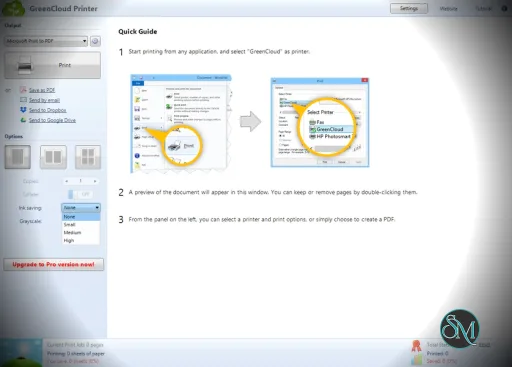
GreenCloud Printer is software that installs as a virtual printer on your computer. Instead of sending a document directly to your physical printer, you “print” to GreenCloud Printer first, where you can preview the document and apply eco-friendly adjustments. After optimizing, you can send the final job to a real printer or save it as PDF.
The tool is used by home users, small offices, and businesses looking to reduce printing costs and environmental impact.
Buy Product From ObviousIdea with limited Discount!!! | |
|---|---|
Key Features
Print Preview with Optimization
Before printing, GreenCloud shows a preview of your document. You can adjust settings that reduce paper and ink usage, such as:
Removing images
Adjusting margins
Converting to grayscale
Reducing font size
These adjustments help you print only what you need.
Eco Mode Templates
GreenCloud Printer includes preset modes that help you save resources, such as:
Eco Mode – Reduces ink and paper usage automatically
Draft Mode – Uses less ink for less critical prints
Office Mode – Balanced output quality with resource savings
These templates make it easy to apply common optimizations quickly.
Save as PDF
In addition to printing, you can save optimized documents as PDF files. This is useful when you want to archive documents without printing a hard copy.
Duplex and Multiple Pages per Sheet
GreenCloud Printer supports duplex (double-sided) printing as well as printing multiple pages per sheet. This significantly cuts paper usage for documents with many pages.
Performance and Usability
GreenCloud Printer integrates as a virtual printer driver on Windows systems. It opens a preview window whenever you print from any application. The preview interface is straightforward and provides clear options for adjustments.
Users can learn how to apply eco-friendly settings without needing technical skills.
Pros and Cons
Pros
Helps reduce printing costs
Easy to preview and optimize print jobs
Supports saving to PDF
Templates simplify eco adjustments
Works with any application that supports printing
Cons
Limited advanced editing tools
Best features require paid version
Printer driver integration can feel unfamiliar at first
Who Should Use GreenCloud Printer
GreenCloud Printer is ideal for:
Home users looking to reduce printing waste
Small offices with frequent print jobs
Students and researchers saving paper
Anyone who prints regularly and wants lower costs
If you print often and care about lowering paper and ink usage, this tool can help streamline that process.
Final Verdict
GreenCloud Printer is a practical utility that combines ease of use with real savings on printing costs. Its optimization tools and eco mode presets make it effective for users who want to trim waste without complex workflows.
GreenCloud Printer is a print management application designed to help users save paper, ink, and printing costs by optimizing print jobs before they are sent to your printer. It acts as a virtual printer driver that lets you preview, edit, and adjust print jobs, focusing on reducing waste and environmental impact.
GreenCloud Printer scores well as an eco-conscious printing utility that delivers clear savings and flexibility.
Developer:
ObviousIdea
Operating System:
Windows
Date Added:
2026-06-16T18:12:40.905Z
Categories:
Post a Comment/Report Broken Link: