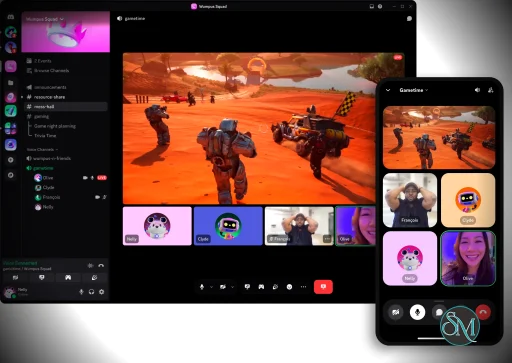
Discord is a cross-platform communication application that combines messaging, voice chat, video conferencing, and community management features into a single platform.
Users can create or join servers that contain:
Text channels
Voice channels
Video rooms
Community forums
Events
Announcements
Automated bots
Available on Windows, macOS, Linux, Android, iOS, and web browsers, Discord enables users to stay connected across multiple devices.
Discord has evolved from a gaming-focused voice chat application into one of the world's most popular communication platforms. Today, it serves millions of users across gaming communities, open-source projects, educational groups, businesses, creators, and online communities of every size.
Its combination of text chat, voice communication, video calls, screen sharing, and community management tools has made Discord a central hub for online collaboration and social interaction.
Download Discord for Windows | |
|---|---|
Key Features
Servers and Communities
Discord's server-based structure allows communities to organize discussions into dedicated channels.
A single server can contain:
General chat rooms
Support channels
Project discussions
Media sharing sections
Community announcements
Voice meeting rooms
This flexibility makes Discord suitable for both small groups and large communities.
Voice and Video Communication
Discord became popular because of its low-latency voice communication.
Users can:
Join voice channels instantly
Start video calls
Share screens
Stream games
Host community events
Voice quality is generally excellent, particularly on stable internet connections.
Screen Sharing and Streaming
The platform includes built-in screen sharing tools that allow users to:
Present applications
Stream gameplay
Conduct tutorials
Host remote meetings
Collaborate on projects
This functionality has become increasingly valuable for remote teams and online communities.
Community Management Tools
Discord offers powerful moderation capabilities including:
Permission systems
Role management
Channel restrictions
Automated moderation
Verification systems
Audit logs
These tools help administrators manage communities ranging from a few members to hundreds of thousands of users.
Bot Ecosystem
One of Discord's greatest strengths is its extensive bot ecosystem.
Bots can provide:
Moderation automation
Music playback
AI integrations
Custom commands
Community analytics
Support ticket systems
Event management
The availability of bots significantly expands the platform's functionality.
Cross-Platform Availability
Discord maintains a consistent experience across:
Windows
macOS
Linux
Android
iPhone
Web browsers
Messages and voice sessions synchronize seamlessly across devices.
User Experience
Discord strikes an excellent balance between simplicity and flexibility.
New users can quickly join conversations, while advanced users can take advantage of sophisticated community management features.
The interface is generally intuitive, although users joining large servers may initially find the channel structure overwhelming.
Recent updates have improved navigation, onboarding, and mobile usability.
Performance
Discord performs well across most modern devices.
The desktop application is built using Electron, which can consume more memory than native applications, but performance remains acceptable for the majority of users.
Voice calls, video communication, and messaging are generally reliable even in large communities.
Security and Privacy
Discord provides several security features, including:
Two-factor authentication
Account protection tools
Moderation systems
User blocking
Privacy controls
Community verification options
However, users should still exercise caution when joining public servers, interacting with unknown users, or installing third-party bots.
As with any large social platform, moderation quality varies significantly between communities.
Discord Nitro
Discord offers a premium subscription called Nitro that adds:
Higher upload limits
Enhanced streaming quality
Custom emojis across servers
Profile customization
Additional personalization features
The core platform remains fully functional without a subscription.
Use Cases
Discord works exceptionally well for:
Gaming communities
Open-source projects
Developer communities
Online education
Content creator communities
Fan groups
Study groups
Small business collaboration
Remote communities
Its flexibility is one of the primary reasons for its widespread adoption.
Limitations
Despite its strengths, Discord has some drawbacks.
Large servers can become difficult to navigate, and notification management may require careful customization.
The Electron-based desktop application also consumes more system resources than some competing messaging platforms.
Additionally, while Discord supports team collaboration, it is not a complete replacement for enterprise-focused workplace platforms in highly regulated business environments.
Pros
Excellent voice communication quality
Powerful community management tools
Extensive bot ecosystem
Cross-platform support
Reliable screen sharing and streaming
Free core functionality
Strong developer and gaming communities
Flexible server organization
Cons
Can be resource-intensive on older systems
Large servers may feel overwhelming
Notification management requires configuration
Not designed specifically for enterprise compliance
Some advanced features require Nitro
Who Should Use Discord?
Discord is ideal for:
Gamers
Developers
Open-source communities
Students
Content creators
Online communities
Remote groups
Hobbyist organizations
It is particularly valuable for groups that need a combination of messaging, voice communication, and community management within a single platform.
Discord has successfully transformed from a gaming chat application into one of the most versatile communication platforms available today. Its combination of voice communication, community management, streaming capabilities, and extensibility makes it suitable for an enormous range of use cases. While it may not replace specialized enterprise collaboration tools, it remains one of the best platforms for building and managing online communities.
Developer:
Discord Inc.
Operating System:
Windows
Date Added:
2026-06-12T10:36:47.000Z
Categories:
Post a Comment/Report Broken Link: