Spybot Technician’s Edition is a professional security suite developed by Safer Networking Ltd. It is designed specifically for technicians who provide malware removal, system repair, and security maintenance services on Windows computers.
Unlike personal editions, the Technician’s Edition allows professionals to use the software across multiple systems, including temporary installations on client computers or portable usage from external devices.
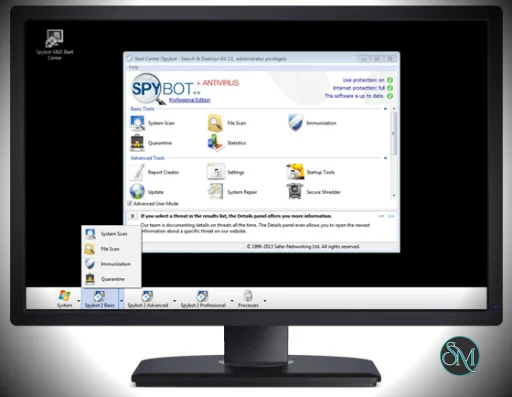
The toolkit combines anti virus scanning, anti malware detection, system repair tools, and advanced diagnostic utilities.
Get Discount 20% OFF using "SWMR" Coupon code for the Safer-Networking Ltd Products below:
Key Features of Spybot Technician’s Edition
Anti Virus and Anti Malware Protection
Spybot Technician’s Edition includes both anti malware and anti virus engines for detecting threats such as:
Spyware
Adware
Trojans
Keyloggers
Rootkits
Potentially unwanted programs
The software uses an award winning antivirus engine together with Spybot’s own anti spyware detection technology to identify threats across different categories.
Live Protection
Live Protection provides real time monitoring of system processes and newly created files. Suspicious or malicious activity can be blocked before it starts, helping prevent infections from spreading across the system.
Protected Repair Environment
One of the most advanced features is the Protected Repair Environment. This feature launches a secure Windows desktop environment where malware cannot interfere with the repair process.
The environment isolates the Spybot tools from other processes, preventing keyloggers or malicious programs from interfering with system cleanup.
Rootkit Detection
Rootkits are particularly difficult to detect because they hide deep within system processes.
Spybot Technician’s Edition includes a dedicated rootkit scanning tool that checks:
File systems
Registry entries
Hidden processes
This specialized scan helps uncover threats that traditional scanners may miss.
System Immunization
The Immunization feature blocks access to known malicious websites and prevents tracking cookies from being installed.
It supports multiple browsers and proactively prevents malware infections by modifying system settings and hosts file entries.
Startup Management Tools
Spybot includes advanced startup analysis tools that allow technicians to inspect and control programs that run when Windows starts.
This is useful when diagnosing slow startup performance or identifying suspicious background processes.
Command Line Tools for Automation
Technicians often automate maintenance tasks. Spybot Technician’s Edition includes command line tools that allow administrators to run:
File scans
Full system scans
Malware cleanup
Immunization tasks
Update operations
These commands can be integrated into scripts, batch files, or scheduled tasks.
Secure File Shredding
The built in Secure Shredder allows technicians to permanently delete files using multiple overwrite passes.
This prevents deleted files from being recovered using data recovery tools.
Script Editor for Custom Detection
Advanced users can create custom malware detection scripts using Spybot’s scripting language.
These scripts allow technicians to define detection patterns and remove specific unwanted files or threats.
Performance and Usability
Spybot Technician’s Edition is designed primarily for IT professionals rather than casual users. The interface provides detailed system information, scanning tools, and advanced repair options.
Technicians can run the software directly on a client computer or use it from portable media such as a USB device. This flexibility allows quick malware removal without permanent installation.
Signature databases are updated regularly to ensure the detection engine can identify the latest threats.
Pros and Cons
Advantages
Designed specifically for IT technicians and repair professionals
Combines antivirus and anti malware detection
Portable usage for servicing multiple computers
Includes rootkit detection and advanced system repair tools
Command line automation support
Secure repair environment for safe malware removal
Limitations
Interface may be complex for beginners
Some scans may consume significant system resources
Primarily focused on Windows systems
Who Should Use Spybot Technician’s Edition
This edition is best suited for:
IT technicians repairing infected computers
Managed service providers
Computer repair shops
Security professionals performing malware cleanup
System administrators maintaining multiple Windows systems
The toolkit is particularly useful in technical support environments where multiple systems require diagnosis and repair.
Final Verdict
Spybot Technician’s Edition is a professional security toolkit designed for technicians who need advanced malware detection and system repair capabilities. With features such as rootkit scanning, secure repair environments, and command line automation, the software provides powerful tools for diagnosing and cleaning infected systems.
For computer repair professionals and IT support teams, Spybot Technician’s Edition offers a practical and flexible solution for handling security threats and maintaining system integrity.
Cybersecurity professionals often need advanced tools to diagnose, repair, and remove malware from multiple computers. Spybot Technician’s Edition is a specialized security toolkit designed for IT technicians and support professionals who work on different client systems.
Developer:
Safer-Networking Ltd
Operating System:
Windows
Date Added:
2026-05-02T06:01:58.184Z
Categories:
Post a Comment/Report Broken Link: