Shotcut 26.4.30

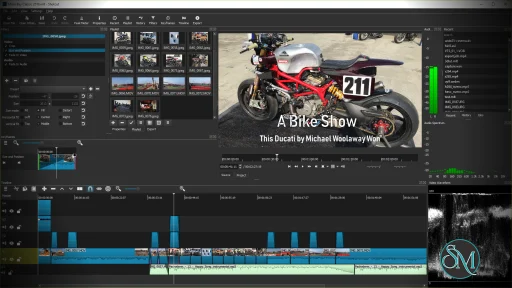
Shotcut is a cross platform video editor that allows users to edit videos without converting files beforehand. It is built on the FFmpeg framework, which gives it strong format compatibility and reliable performance.

Because it is open source, Shotcut is continuously improved by the community.

Download Shotcut 26.4.30 - Software Mirrors

Download Shotcut 26.4.30
Windows x64 Installer

Download Shotcut 26.4.30
Windows x64 Portable

Download Shotcut 26.4.30
Windows x64 Installer

Download Shotcut 26.4.30
Windows x64 Portable

Download Shotcut 26.4.30
macOS Universal dmg

Download Shotcut 26.4.30
macOS Unsigned dmg

Download Shotcut 26.4.30
Linux AppImage

Download Shotcut 26.4.30
Linux Portable

Shotcut 26.4.30 Release Notes:

What's Changed


Timeline Improvements

  • Added symmetric resize of a timeline transition using its trim handles.
  • Added drag-n-drop from Recent to Timeline.
  • Improved Timeline and Keyframes zoom to be less erratic and more focused.
  • Reduced memory usage for timeline waveforms.
  • Changed Timeline > Set Current Track Above and Set Current Track Below to use the bare Up and Down keys.

Speech to Text

  • Added Vulkan GPU support to Speech to Text on Windows and Linux.
  • Added a Use GPU checkbox to the Speech to Text dialog.

Other New Features

  • Added Export > Metadata including Cover art.
  • Added a Typewriter group of options to the Burn In Subtitle filter.
  • Added job progress and status on the taskbar or dock icon where supported.
  • Added Properties > LUT file for video clips, primarily for the Linear 10-bit processing mode.
  • Added aspect ratio grid options to the player grid button:
  • 1:1 Frame
  • 16:9 Frame
  • 4:3 Frame
  • 9:16 Frame
  • Added 10-bit VP9 MP4 (E-AC-3) and 10-bit VP9 WebM (Opus) export presets.
  • Added launching Glaxnimate from the Microsoft Store on Windows if available.

Changes

  • Stopped bundling Glaxnimate except in the Linux Flatpak.
  • Changed audio transition to a constant power crossfade.
  • Changed multi-select for Subtitles to use the Shift key.
  • Changed Properties timeline duration to be editable.
  • Changed opening an image to not start playback.
  • Changed Export to default to 10-bit HEVC export in the 10-bit processing modes.
  • Changed Timeline > Record Audio to use FLAC instead of Opus for improved quality and tool compatibility.
  • Reorganized the Video Mode menu with new categories:
  • Social Media
  • Other
  • Legacy
  • Reduced the thickness of the panel splitters and made them brighter.

Fixes

  • Fixed intermittent audio waveform sync or blank waveforms (broke in v26.2).
  • Fixed incorrect last frame in Glaxnimate animations.
  • Fixed Font style other than weight and italics/oblique in the font dialog.
  • Fixed accepting file names with special characters in Playlist > Add Files.
  • Fixed markers disappearing after undo moving clips.
  • Fixed hourly backup not working when saving frequently.
  • Fixed opening a project starts the player at the second frame.
  • Fixed seeking with keyboard in Timeline sometimes not working.
  • Fixed Settings > Time Format not immediately updating the Timeline and Keyframes rulers.
  • Fixed Timeline > Copy, Cut, Paste, and Overwrite breaking grouped clips.
  • Fixed keyframes after undoing a trim in.
  • Fixed changing Properties > Duration dropping time filters.
  • Fixed Edit Marker duration and Ripple Markers off by one frame.
  • Fixed the Nervous video filter doing a 2 frame fade-in from black.
  • Fixed undo history for lock, mute, and hide track.
  • Fixed button menus not opening reliably on Wayland on Linux.
  • Fixed a possible crash during voice preview in the Text to Speech dialog.

Upgrades

  • Upgraded FFmpeg to version 8.1.
  • Upgraded x265 to version 4.1.
  • Upgraded whisper.cpp to version 1.8.3.
  • Upgraded MLT to version 7.38.0.
  • Upgraded Qt to version 6.10.3 on Linux.

New Contributors

  • @qwe854896 made their first contribution in https://github.com/mltframework/shotcut/pull/1818

Full Changelog: https://github.com/mltframework/shotcut/compare/v26.2.26...v26.4.30

Key Features of Shotcut

Shotcut provides essential and advanced editing tools in a simple package.

Main features include:

  • Native timeline editing without import conversion

  • Support for 4K and high resolution video

  • Wide format support for video and audio files

  • Advanced video and audio filters

  • Keyframe animation support

  • Audio waveform and scopes

  • Multi track timeline

  • Hardware encoding support

These features make Shotcut suitable for many types of video projects.

Supported Platforms and Formats

Shotcut is available on:

  • Windows

  • macOS

  • Linux

It supports common and professional formats such as MP4, MKV, MOV, AVI, WebM, MP3, AAC, FLAC, and more.

Performance and Editing Experience

Shotcut performs well on modern systems and can handle high resolution footage, including 4K. Proxy editing and preview scaling help improve performance on lower end hardware.

The interface is clean but may feel different from traditional editors, which can require some adjustment for new users.

Ease of Use

Shotcut is beginner friendly once the basics are understood, but it has a learning curve. Some workflows are less guided compared to commercial editors, which may confuse first time users.

However, the software offers strong control for users who take time to learn it.

Is Shotcut Safe to Use

Yes, Shotcut is safe to use when downloaded from the official website. It contains no ads, no watermarks, and no hidden restrictions.

As open source software, it is transparent and trusted by the community.

Pros and Cons of Shotcut

Pros:

  • Completely free and open source

  • No watermark or time limits

  • Cross platform support

  • Strong format compatibility

  • Suitable for 4K editing

Cons:

  • Interface may feel unconventional

  • Limited built in effects compared to premium editors

  • Occasional performance drops on very large projects

Despite these limitations, Shotcut remains a strong free option.

Common Use Cases

Shotcut is commonly used for:

  • YouTube and social media videos

  • Basic to intermediate video editing

  • Educational and personal projects

  • Simple color correction and effects

  • Cross platform editing workflows

It is ideal for users who want control without cost.

Final Verdict

Shotcut is a solid free video editor that delivers reliable performance and useful features without forcing users into subscriptions or watermarks. While it may not replace high end professional editors, it is more than capable for most everyday video editing needs.

For users looking for a free, open source, and cross platform video editor, Shotcut is a smart choice. Shotcut is a free and open source video editing software designed for users who want powerful editing tools without paying for a subscription. It is suitable for beginners, content creators, and hobbyists who need a reliable editor for everyday video projects.

Shotcut supports a wide range of formats and runs smoothly on multiple operating systems.
Shotcut 26.4.30
Free
Software Informations:
Developer:

Operating System:
Windows / macOS / Linux
Date Added:
2026-05-01T08:29:41.029Z
Categories:

Post a Comment/Report Broken Link: