OpenScreen is a free, open-source screen recording application designed for creating tutorials, demos, and presentations. It combines recording and editing features into a single lightweight tool, eliminating the need for multiple apps.
Unlike many competitors, it does not require subscriptions, accounts, or licenses. It is distributed under an open-source license, allowing users to modify and use it freely.
If you are looking for a clean, no-cost alternative to premium screen recording tools, OpenScreen is quickly becoming a popular choice. It focuses on simplicity, visual quality, and zero subscription, making it especially appealing for developers, educators, and content creators.
Download OpenScreen v1.4.0 - Software Mirrors |
|---|
Download OpenScreen v1.4.0 Download OpenScreen v1.4.0 Download OpenScreen v1.4.0 Download OpenScreen v1.4.0 |
OpenScreen v1.4.0 Release Notes:fixed stuff, potentially broke stuff, shipped new stuffWhat's Changed
|
Key Features of OpenScreen
1. Screen Recording and Editing in One
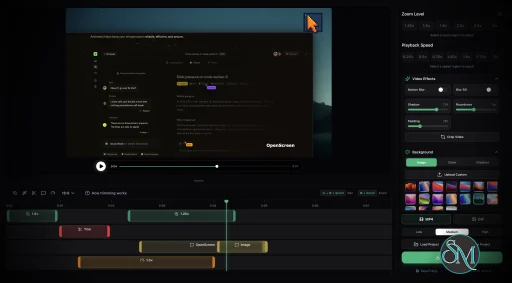
OpenScreen allows you to record your full screen or specific windows and edit the result directly in the same interface.
This makes it efficient for quick tutorials or product demos without switching tools.
2. Intelligent Zoom Effects
One standout feature is automatic zoom based on clicks and actions. It creates smooth, professional-looking animations without manual keyframing.
You can also add manual zoom for more control.
3. Built-In Timeline Editor
OpenScreen includes a simple timeline editor where you can:
Trim clips
Split recordings
Adjust playback speed
Add transitions
This helps create polished videos without external software.
4. Visual Customization
You can enhance recordings with:
Custom backgrounds and gradients
Padding, shadows, and rounded corners
Logos and branding elements
These features are useful for professional presentations and branded content.
5. Export Options
OpenScreen supports exporting to:
MP4 video (up to high resolution)
GIF for quick sharing
Editing formats like Final Cut
This flexibility makes it suitable for both quick sharing and advanced editing workflows.
6. Privacy and Open Source
There is no tracking, no ads, and no forced cloud integration. Everything runs locally, which is ideal for users concerned about privacy.
Performance and Real-World Use
OpenScreen is lightweight and optimized for speed. It launches quickly and handles recording and editing smoothly on most systems.
It is commonly used for:
Software tutorials
Product demos
Developer walkthroughs
Educational content
Because it combines recording and editing, it reduces workflow complexity compared to using multiple tools.
User Experience
The interface is modern and minimal, designed to keep focus on recording and editing rather than complex settings.
Beginners can start quickly, while advanced users still get enough control for professional-looking output.
Pros and Cons
Pros
Completely free and open source
No subscription or watermark
Built-in editing tools
Smooth zoom and animation effects
Privacy-friendly with no tracking
Cons
Still relatively new and evolving
Fewer advanced features than premium tools
macOS support is more mature than other platforms
Limited ecosystem compared to established software
Who Should Use OpenScreen
OpenScreen is ideal for:
Developers creating demos or walkthroughs
Content creators making tutorials
Teams needing quick screen recordings
Users who want a free alternative to tools like OBS Studio or Loom
It may not fully replace advanced video production tools, but it covers most everyday needs very well.
Final Verdict
OpenScreen is a refreshing addition to the screen recording space. It offers a balance between simplicity and professional output, without the cost or complexity of premium software.
OpenScreen is an excellent choice for anyone who wants clean, high-quality screen recordings with minimal setup and zero cost.
Developer:
siddharthvaddem
Operating System:
Windows / macOS / Linux
Date Added:
2026-05-06T12:01:37.025Z
Categories:
Post a Comment/Report Broken Link: