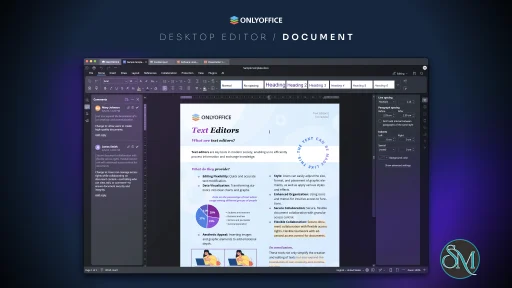
ONLYOFFICE Desktop Editors is a standalone office suite that provides tools for editing text documents, creating spreadsheets, crafting presentations, and working with forms or templates. It supports formats used by other major office applications, such as Microsoft Office and OpenDocument formats.
This suite is designed for users who want a full office toolkit without subscription or cloud limitations, though optional cloud integration is available.
Key Features
Word Processor
The document editor in ONLYOFFICE Desktop Editors offers a robust word processing experience with tools for:
Rich text formatting
Styles and templates
Track changes and comments
Headers, footers, and page layout controls
It rivals other mainstream document editors for both basic and advanced tasks.
Spreadsheet Editor
The spreadsheet module lets you manage data with functions including:
Formulas and functions
Charts and pivot tables
Cell styling and formatting
Data validation and filters
It supports large data sets and many common spreadsheet tasks.
Presentation Creator
The presentation tool enables users to:
Build slide decks
Insert media and charts
Apply transitions and animations
Customize layouts and themes
It matches essential presentation features found in other suites.
Format Compatibility
OnlyOffice Desktop Editors works with formats such as:
DOCX, XLSX, PPTX
ODT, ODS, ODP
PDF viewing and basic editing
Export to formats like HTML and TXT
This high compatibility makes it easy to share files with collaborators using different software.
Collaboration Tools (Optional Cloud Sync)
While the desktop editors themselves work offline, ONLYOFFICE provides cloud-based collaboration modules that can be integrated separately. This includes real-time co-editing and document sharing, though these features are not required for offline use.
Performance and Usability
ONLYOFFICE Desktop Editors load quickly and perform smoothly on most systems. The interface is modern and intuitive, with ribbon menus and clear icons. Users familiar with traditional office suites will feel comfortable navigating its tools.
Overall performance remains responsive even with larger documents and complex spreadsheets.
Pros and Cons
Pros
Excellent compatibility with Microsoft Office formats
Clean, modern interface
Powerful editing tools across document types
Works offline without subscription
Free version available
Cons
Collaboration features require additional setup
Some advanced tools lag behind highest-end suites
Templates library could be richer
Who Should Use ONLYOFFICE Desktop Editors
ONLYOFFICE Desktop Editors is ideal for:
Students and educators
Small business professionals
Users needing strong format compatibility
People who prefer a desktop suite without subscription
If you want a capable office application set with broad format support and robust editing tools, this suite offers good balance and versatility.
Final Verdict
ONLYOFFICE Desktop Editors is a strong office suite that supports a wide range of document types and provides powerful editing tools. Its modern interface and offline capabilities make it a compelling choice for productivity work.
ONLYOFFICE Desktop Editors is a comprehensive desktop office suite that combines word processing, spreadsheets, presentations, and more in a single application. It offers compatibility with major document formats and delivers a clean, modern interface for productivity work. ONLYOFFICE Desktop Editors earns high marks for feature depth and compatibility with popular file formats.
Developer:
Ascensio System SIA
Operating System:
Windows / macOS / Linux
Date Added:
2026-05-05T18:02:22.153Z
Categories:
Post a Comment/Report Broken Link: