ManyCam is a webcam and live video software that allows you to add effects, overlays, backgrounds, and multiple video sources to your camera output. It works with popular platforms like Zoom, Microsoft Teams, YouTube, Twitch, and other video conferencing or streaming services.
ManyCam brings professional-level features to everyday video calls and live streams, making your camera feed more dynamic and engaging.
Download Manycam Free | |
|---|---|
Get Discount 20% OFF using "SWMR" Coupon code for the ManyCam Products below:
ManyCam Enterprise (3 users) Annual (Discount 45% OFF)
ManyCam Enterprise (5 users) Annual (Discount 45% OFF)
ManyCam Enterprise (10 users) Annual (Discount 45% OFF)
Key Features of ManyCam
Multiple Video Sources
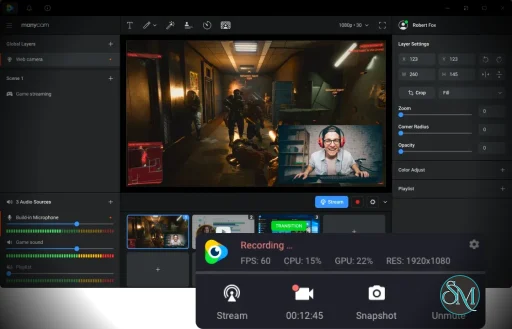
ManyCam lets you combine multiple cameras, screens, and media sources. You can switch between sources in real time, which is ideal for live presentations and multi-camera setups.
Virtual Backgrounds and Effects
Enhance your video with virtual backgrounds, filters, and live effects. You can blur or replace backgrounds without a green screen, apply fun filters, or add branded overlays for professional look-and-feel.
Picture-in-Picture and Split Screens
Create picture-in-picture layouts and split screens for tutorials, interviews, or interactive streams. This allows you to show your face while presenting slides, gameplay, or other content.
Chroma Key (Green Screen)
ManyCam supports chroma keying, so if you have a green screen setup, you can replace the backdrop with custom images or videos.
Text, Graphics, and Lower Thirds
Add text labels, countdown timers, logos, and lower-third graphics to customize your broadcast. This is particularly useful for live events, training sessions, and branded streams.
Video Recording and Streaming
Record video directly from ManyCam or stream to your chosen platform. It integrates with popular streaming software and services for flexible workflow.
Audio Enhancements
ManyCam includes basic audio tools like noise suppression and audio source mixing, which help improve sound quality during broadcasts.
Performance and Usability
ManyCam has an intuitive interface that balances ease of use with advanced video controls. It runs on both Windows and macOS. Performance is generally smooth, though effects and multiple source compositing may require a reasonably powerful CPU/GPU.
Setting up many features is straightforward, and there are tutorials and community resources to help with advanced configurations.
Pros and Cons
Pros
Creative effects and virtual backgrounds
Multi-camera support and source switching
Good integration with conferencing and streaming apps
Picture-in-picture and layout tools
Useful for both casual and professional use
Cons
Some advanced features require paid plans
Resource usage can increase with effects
Interface may feel busy for beginners
Who Should Use ManyCam?
ManyCam is suited for:
Live streamers on platforms like Twitch and YouTube
Teachers and online presenters
Remote workers on video conferencing calls
Content creators improving webcam production
Anyone who wants more creative control over webcam output
If you regularly use a webcam for work or content creation and want tools to enhance your video quality and presentation, ManyCam is a versatile option.
Final Verdict
ManyCam remains a strong choice for webcam enhancement and live video production. Its creative features, multiple source support, and flexible tools make it useful for both beginners and more advanced users.
ManyCam is a flexible and creative webcam tool that’s ideal for streamers, educators, remote workers, and anyone who wants more from their webcam than basic video.
For enhanced webcam control, effects, and professional-looking streams or calls, ManyCam delivers excellent value.
Developer:
ManyCam ULC
Operating System:
Windows / macOS
Date Added:
2026-05-02T16:26:25.000Z
Categories:
Post a Comment/Report Broken Link: