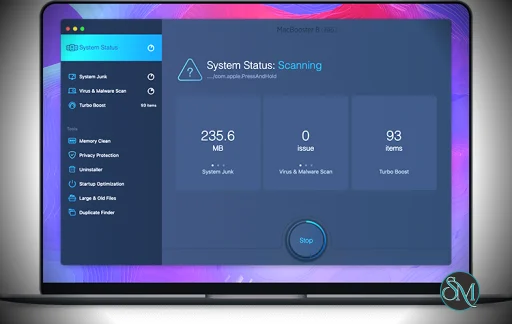
MacBooster 8 PRO is a Mac optimization and security utility developed by IObit. The software combines system cleanup, malware scanning, privacy protection, and performance optimization tools in a single application.
The program scans macOS systems for junk files, duplicates, and unnecessary applications while also checking for potential malware and privacy risks.
MacBooster is designed for users who want to maintain system performance and free up disk space without manually locating and deleting unnecessary files.
Key Features of MacBooster 8 PRO
System Junk Cleaner
One of the core features of MacBooster 8 PRO is its system junk cleaner. It scans the Mac for unnecessary files that accumulate over time.
Examples include:
System cache files
Application logs
Temporary files
Installer leftovers
Language files
Removing these files can free up significant disk space and help maintain system performance.
Duplicate and Large File Finder
MacBooster includes tools that identify files taking up large amounts of storage or duplicated across the system.
Users can locate:
Duplicate photos
Duplicate documents
Old or unused large files
This helps reclaim disk space quickly, especially on systems with limited storage.
Malware and Virus Scan
The software includes a malware scanning engine that checks for:
Mac malware
Adware
Potentially unwanted applications
The scanning feature helps identify suspicious files and remove threats that could affect system security.
Privacy Protection
MacBooster can remove browsing traces and privacy related data such as:
Browser cookies
Browsing history
Cached website data
This helps protect personal information and prevent websites from tracking user activity.
Startup Optimization
Startup items can slow down system boot time if too many applications launch automatically.
MacBooster allows users to:
View startup applications
Disable unnecessary startup items
Improve boot performance
Managing startup programs can significantly reduce system startup time.
Memory Optimization
The memory optimization feature releases RAM used by inactive processes. This can help improve performance when multiple applications are running simultaneously.
Although macOS manages memory automatically, some users find manual optimization tools helpful in certain scenarios.
Application Uninstaller
MacBooster includes an advanced uninstaller that removes applications together with leftover files that standard uninstall methods may leave behind.
This helps prevent leftover files from consuming unnecessary disk space.
Performance and Usability
MacBooster 8 PRO provides a modern interface with clearly organized modules for different system tasks. Users can perform quick system scans or run specific tools depending on their needs.
The software is designed to be beginner friendly, allowing users to run system cleanup tasks with minimal technical knowledge.
However, users should always review scan results before deleting files to avoid removing important system data.
Pros and Cons
Advantages
Comprehensive Mac system cleanup tools
Detects duplicate and large files
Includes malware scanning features
Startup and memory optimization tools
Easy to use interface
Limitations
Some scans may produce false positives
Antivirus capabilities are limited compared to dedicated security software
Some features overlap with built in macOS tools
Certain reviewers have also criticized the software for aggressive warnings that may push users toward purchasing a subscription.
Who Should Use MacBooster 8 PRO
MacBooster 8 PRO is suitable for:
Mac users who want automated system cleanup
Users dealing with limited storage space
Beginners who prefer one click optimization tools
Users wanting additional malware scanning features
It can be particularly helpful for maintaining older Mac systems that have accumulated unnecessary files.
Final Verdict
MacBooster 8 PRO is a feature rich Mac optimization tool that combines system cleanup, malware scanning, and privacy protection in one package. With tools for removing junk files, managing startup items, and identifying large or duplicate files, it can help improve system performance and reclaim storage space.
For users looking for an easy way to maintain and optimize their Mac, MacBooster 8 PRO offers a convenient all in one solution.
Mac systems are known for stability and performance, but over time they can accumulate junk files, duplicate data, and startup items that slow down the system. MacBooster 8 PRO is a system optimization and security tool designed to clean, protect, and improve the performance of macOS computers.
Post a Comment/Report Broken Link: