KRyLack Volume Serial Number Editor is a Windows application developed by KRyLack Software that changes the volume serial number assigned to disk partitions.
The software works with NTFS, FAT, FAT32, and exFAT file systems and can modify the logical volume serial number without requiring a drive reformat.
KRyLack Volume Serial Number Editor is a lightweight Windows utility designed to modify disk volume serial numbers without reformatting drives. While this type of tool serves a relatively niche audience today, it still attracts attention among advanced Windows users, system administrators, virtualization enthusiasts, and legacy software users who need to manage or alter volume identifiers
Importantly, the tool only changes the operating system’s volume serial number, not the physical hardware serial number of the storage device itself.
Key Features of KRyLack Volume Serial Number Editor
Modify Volume Serial Numbers Instantly
The software can change disk volume IDs immediately without reformatting the partition.Supports Multiple File Systems
The utility supports NTFS, FAT, FAT32, and exFAT partitions. exFAT support was added in later versions.Backup Existing Serial Numbers
Users can save the current volume serial number before making modifications.Removable Drive Support
USB drives and removable media are supported alongside internal storage devices.Command Line Edition Available
KRyLack also offers a console version called “volsn” for scripting and automation workflows.
More From KRyLack - Software Mirrors | ||
|---|---|---|
Asterisk Password Decryptor | ||
KRyLack Archive Password Recovery | ||
Volume Serial Number Editor | ||
Volume Serial Number Editor UNLIMITED License | ||
KRyLack RAR Password Recovery | ||
KRyLack ZIP Password Recovery | ||
User Experience
The application reflects classic Windows utility design philosophy.
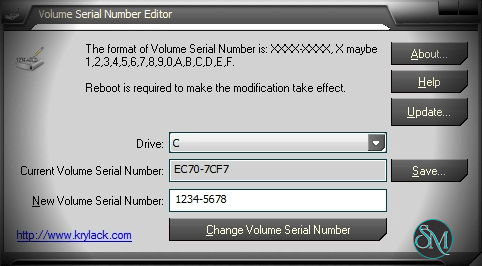
The interface is extremely simple and focused entirely on one task:
Select drive
View current serial number
Enter new serial number
Apply changes
There are very few advanced menus or modern UI elements, which can actually be beneficial for users who want a fast and lightweight workflow.
Community reviews consistently describe the tool as straightforward and easy to understand.
Real World Use Cases
Today, changing volume serial numbers is a fairly specialized task.
Common use cases include:
Legacy software compatibility
Virtual machine cloning
Testing disk identification systems
Certain backup and imaging workflows
Portable application environments
Recovery of broken license bindings tied to volume IDs
However, modern Windows environments rarely require manual volume ID modification for everyday users.
Performance and Compatibility
The tool is extremely lightweight and runs well even on older systems. Official compatibility includes Windows XP through Windows 11 on both x86 and x64 editions.
Changes generally require a reboot before the new serial number becomes fully recognized by the operating system.
The software consumes almost no system resources and remains highly responsive even on low powered hardware.
Security and Practical Concerns
Although changing a volume serial number is not inherently malicious, these tools sometimes appear in discussions around licensing systems, software activation bypasses, or anti tracking workflows.
Users should avoid using such utilities to violate software licensing agreements or bypass copy protection systems.
Additionally, modifying disk identifiers can occasionally confuse backup software, disk management systems, or applications tied to existing drive identities.
Creating backups before modification is strongly recommended.
Pros
Extremely lightweight and simple
Supports NTFS, FAT, FAT32, and exFAT
Works without reformatting drives
Removable drive support
Command line edition available
Broad Windows compatibility
Cons
Very niche modern use case
Interface feels outdated
Changes may require reboot
Can interfere with software tied to disk identifiers
Limited usefulness for average users
This tool is best suited for advanced Windows users, virtualization enthusiasts, IT technicians, legacy software users, and administrators dealing with storage identification workflows.
Most everyday users will rarely need to modify a disk volume serial number manually.
KRyLack Volume Serial Number Editor remains a reliable and lightweight utility for changing Windows drive volume serial numbers without reformatting. While its audience is highly specialized in modern computing environments, it continues to perform its intended function efficiently with minimal complexity and broad compatibility.
Post a Comment/Report Broken Link: