KRyLack Archive Password Recovery is a Windows password recovery application developed by KRyLack Software.
The tool supports recovery attempts for ZIP, ZIPX, RAR, and ACE archives using brute force attacks, dictionary attacks, and mask based password generation systems.
KRyLack Archive Password Recovery is one of the older password recovery utilities still circulating in Windows recovery and archive management communities. Designed for recovering forgotten passwords from ZIP, RAR, and ACE archives, the software focuses primarily on brute force, dictionary, and mask based recovery methods rather than exploiting vulnerabilities or bypassing encryption directly.
While modern archive encryption standards remain extremely difficult to crack without password hints, KRyLack still maintains some relevance for users recovering older archives with weak or partially remembered passwords.
The software specifically targets lost or forgotten archive passwords rather than bypassing encryption itself.
Key Features of KRyLack Archive Password Recovery
ZIP and RAR Archive Support
The software supports standard ZIP archives alongside RAR archives including encrypted filenames, SFX archives, and multi volume archives.AES Encrypted ZIP Support
Modern AES encrypted ZIP and ZIPX archives are supported, though actual recovery difficulty depends entirely on password complexity.Brute Force Recovery
Users can attempt exhaustive password generation attacks using customizable character sets and password lengths.Dictionary and Mask Attacks
One of the more practical features is mask based recovery, which helps users narrow attempts if part of the password is remembered.Autosave and Resume Support
The software can save recovery progress and continue after interruptions or crashes, which is important because password recovery can take days or weeks.Portable Style Lightweight Design
The application is relatively lightweight compared to modern GPU accelerated password recovery suites.
More From KRyLack - Software Mirrors | ||
|---|---|---|
Asterisk Password Decryptor | ||
KRyLack Archive Password Recovery | ||
Volume Serial Number Editor | ||
Volume Serial Number Editor UNLIMITED License | ||
KRyLack RAR Password Recovery | ||
KRyLack ZIP Password Recovery | ||
User Experience
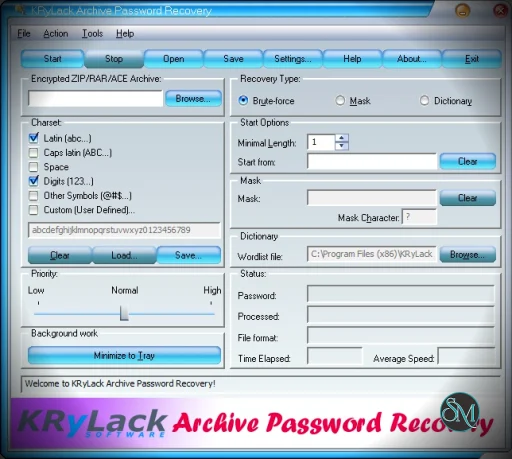
The interface feels heavily rooted in older Windows desktop utility design. Menus, controls, and layouts resemble early 2000s Windows software more than modern recovery applications.
That said, the workflow is straightforward:
Load the archive
Choose attack method
Configure password rules
Start recovery attempt
For users familiar with password recovery terminology, the tool is easy to understand.
Beginners, however, may misunderstand what these tools can realistically accomplish. Strong modern passwords using long random strings remain practically impossible to brute force within reasonable timeframes using standard CPUs.
Real World Effectiveness
This is the most important part of the discussion.
KRyLack Archive Password Recovery does not “break” archive encryption. Instead, it automates password guessing techniques against encrypted archives.
Its effectiveness depends almost entirely on:
Password complexity
Password length
Whether users remember partial password patterns
Available computing power
Community discussions around RAR and ZIP recovery consistently note that weak or partially remembered passwords are realistically recoverable, while strong random passwords are often infeasible without specialized GPU cracking tools like Hashcat.
Compared to modern GPU accelerated cracking frameworks, KRyLack feels slower and more limited today, especially for advanced recovery scenarios.
Performance and Compatibility
The software works well on Windows systems and supports many legacy archive formats that older recovery tools still target.
However, it lacks many modern optimizations found in advanced password recovery frameworks:
Limited GPU acceleration support
Older interface architecture
Less active ecosystem compared to Hashcat or John the Ripper
Reduced focus on modern 7z workflows
For legacy ZIP and RAR recovery, though, it remains functional.
Security and Ethical Considerations
Password recovery tools should only be used on archives users legally own or are authorized to access.
Attempting unauthorized password recovery against third party data may violate laws, company policies, or privacy regulations.
Users should also be cautious when downloading older utilities from unofficial mirror sites due to the risk of bundled malware or tampered installers.
Pros
Supports ZIP, ZIPX, RAR, and ACE archives
Easy to use interface
Useful mask based recovery options
Resume and autosave functionality
Lightweight application design
Still works for many legacy archive scenarios
Cons
Outdated interface and architecture
Far slower than modern GPU based recovery tools
Limited usefulness against strong modern passwords
Less effective for advanced modern encryption workflows
Narrower ecosystem compared to Hashcat or John the Ripper
KRyLack Archive Password Recovery is best suited for users attempting recovery of older ZIP or RAR archives where partial password information is known.
It is especially useful for casual recovery attempts where users want a simpler graphical interface rather than command line cracking frameworks.
Advanced users dealing with modern high entropy passwords will likely prefer more modern GPU accelerated tools.
KRyLack Archive Password Recovery remains a functional archive recovery utility for legacy and moderate difficulty password recovery scenarios. While modern encryption standards and GPU accelerated cracking tools have reduced its competitive edge, the software still offers a straightforward and accessible solution for recovering forgotten ZIP and RAR archive passwords in realistic everyday situations.
Post a Comment/Report Broken Link: