Krita is a free and open-source raster graphics editor designed primarily for digital painting and 2D animation. It is developed by the Krita Foundation and runs on Windows, macOS, Linux, and even Android devices.
Unlike tools focused on photo editing, Krita is optimized for drawing, painting, and creative workflows using tablets and styluses.
Key Features of Krita
1. Advanced Brush Engine
Krita offers over 100 preloaded brushes and multiple brush engines that simulate real painting styles like watercolor, ink, and airbrush.
You can fully customize brush behavior, making it ideal for artists who want precise control.
2. Professional Layer System
Krita includes:
Raster layers
Vector layers
Filter layers
Group layers
This allows complex compositions and non-destructive editing similar to high-end software.
3. Built for Drawing Tablets
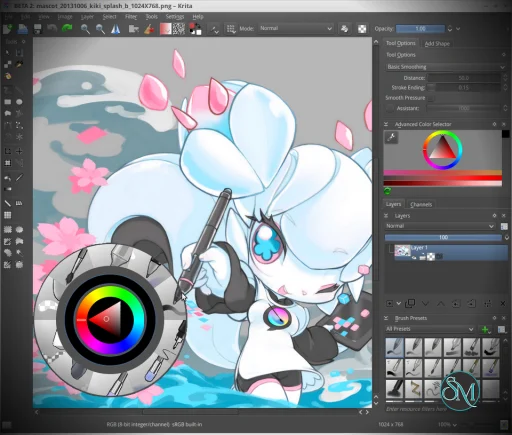
Krita is optimized for pen pressure, tilt, and smooth stroke stabilization. It even includes brush stabilizers to help reduce shaky lines.
4. 2D Animation Tools
Krita also works as a lightweight animation studio with:
Timeline and frame control
Onion skinning
Audio support
Frame-by-frame animation
While not as advanced as dedicated animation software, it is strong enough for short animations.
5. PSD and File Compatibility
You can open and save PSD files, making it easier to collaborate with users of Adobe Photoshop.
6. Customizable Interface
The UI is highly flexible:
Dockers and panels can be rearranged
Custom workspaces can be saved
Keyboard shortcuts can be fully customized
Performance and Real-World Use
Krita performs well for most digital painting tasks and is optimized with GPU acceleration for smoother canvas interaction.
It is widely used for:
Concept art
Comic creation
Texture painting
Illustration
Recent updates have improved tools for comic creators and added features like better text handling and HDR support.
User Experience
Krita offers a professional-level interface, but it comes with a learning curve. Beginners may feel overwhelmed at first due to the number of tools and customization options.
However, once mastered, it provides a very efficient and flexible workflow tailored for artists.
Pros and Cons
Pros
Completely free and open source
Powerful brush engine and customization
Excellent for digital painting and illustration
Supports animation features
Cross-platform availability
Cons
Not focused on photo editing
Learning curve for beginners
Occasional bugs or performance issues with large projects
Animation tools are limited compared to professional software
Who Should Use Krita
Krita is ideal for:
Digital artists and illustrators
Comic creators and concept artists
Students and beginners who want free professional tools
Artists using drawing tablets
It is less suitable for users who need advanced photo editing or AI-powered workflows.
Final Verdict
Krita is one of the most powerful free creative tools available today. It rivals paid software in many areas, especially for painting and illustration, while remaining completely accessible.
Krita is a top-tier choice for digital artists who want full creative control without paying for expensive software.
If you are into digital art, illustration, or concept design, Krita is one of the best free tools available today. Unlike general image editors,
is built specifically for artists, offering advanced brushes, animation tools, and a highly customizable workflow.
Developer:
Krita Foundation
Operating System:
Windows / Linux / macOS / Android
Date Added:
2026-05-28T10:01:28.530Z
Categories:
Post a Comment/Report Broken Link: