calibre is a free and open-source eBook management program that helps users build and maintain digital libraries. It supports a wide range of eBook formats and provides tools for organizing metadata, converting file types, editing content, and transferring books to reading devices.
It runs on Windows, macOS, and Linux, making it highly accessible.
Download calibre 9.9.0 - Software Mirrors |
|---|
Download calibre 9.9.0 for Windows 64bit Download calibre 9.9.0 for macOS Download calibre 9.9.0 for Windows 64bit (Portable) |
Key Features
Comprehensive Library Management
calibre allows you to:
Organize books by title, author, tags, series, and custom columns
Edit metadata individually or in bulk
Download metadata and covers automatically
Search and filter large collections instantly
For users with thousands of eBooks, its database structure is extremely efficient.
Powerful Format Conversion
One of calibre’s strongest features is its format conversion engine. It supports conversion between formats such as:
EPUB
MOBI
AZW
PDF
DOCX
Conversion settings allow fine control over layout, fonts, structure, and metadata.
Device Synchronization
calibre detects many eReaders automatically when connected. It can transfer books directly to devices and convert them to compatible formats during transfer.
This simplifies managing books across multiple reading platforms.
Built-In eBook Editor
calibre includes a full-featured editor that allows you to modify EPUB and other supported formats. You can edit HTML, CSS, structure, and metadata directly.
This is useful for fixing formatting issues or customizing book layouts.
Content Server
calibre includes a built-in content server that lets you access your library through a web browser on your local network. This makes it possible to read or download books wirelessly from other devices.
Plugin Ecosystem
The plugin system expands functionality with additional tools, including metadata sources, interface enhancements, and advanced management utilities.
Performance and Usability
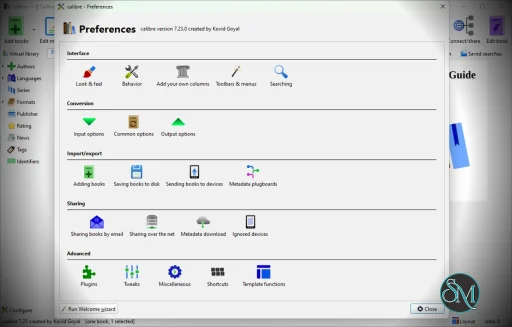
calibre is stable and performs well even with large libraries. Initial learning may take time due to the number of features available. The interface is functional rather than modern, but highly customizable.
Advanced users appreciate the depth of configuration options, while beginners may need short tutorials to unlock its full potential.
Pros and Cons
Pros
Free and open source
Extensive format support
Advanced metadata editing
Strong conversion engine
Device compatibility
Large plugin ecosystem
Cons
Interface can feel dated
Learning curve for advanced features
Conversion from complex PDFs may require adjustments
Who Should Use calibre
calibre is ideal for:
Avid readers managing large eBook collections
Researchers organizing digital documents
Users converting formats between devices
Anyone who wants full control over their digital library
If you regularly manage, convert, or edit eBooks, calibre is one of the best tools available.
Final Verdict
calibre is a comprehensive and powerful eBook management solution that combines organization, conversion, editing, and synchronization in one application. Its open-source nature and feature depth make it unmatched in flexibility.
calibre is a powerful open-source eBook management application that allows users to organize, convert, edit, and transfer digital books across devices. It is widely used by readers, researchers, and digital librarians who need full control over their eBook collections.
Developer:
Kovid Goyal
Operating System:
Windows / macOS / Linux
Date Added:
2026-05-28T08:01:25.797Z
Categories:
Post a Comment/Report Broken Link: